






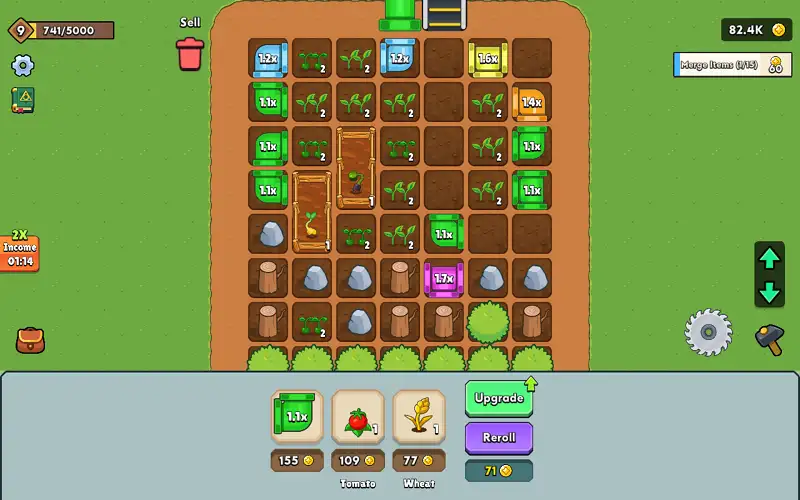


Play Loop Farm free. Merge plants, grow stronger crops, and build a thriving farm. Loop Farm hands you a small grid of land, a handful of seeds, and one simple rule: two of the same thing, merged together, become something better. Plant crops, watch them grow through three stages to ripeness, harvest with a sickle, and merge matching items to climb through six tiers of value – all while running a flour mill, managing power through a rotating gear grid, and expanding your zone one purchase at a time. No downloads, no account required to start. Works in Chrome, Firefox, Edge, and on mobile.
What Is Loop Farm?
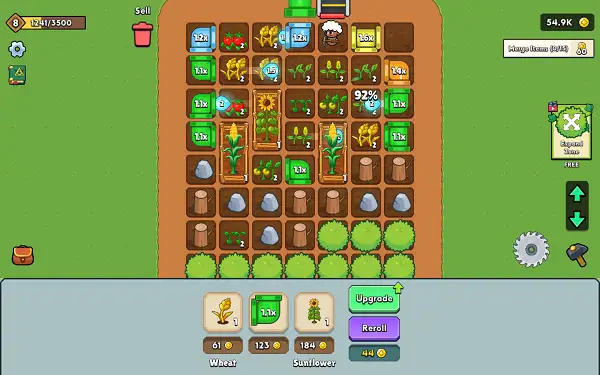
Loop Farm is a free, browser-based 2D farming and merge game built in Unity. The core loop combines two mechanics that work naturally together: planting and harvesting crops the traditional way, and merging matching items on your board to upgrade them into rarer, more valuable versions. Beyond the farm itself, you’ll manage a Mill that turns wheat into flour, gather wood and stone from resource nodes, direct automated workers, and expand your usable land as you progress.
It’s built with genuine long-term structure in mind – missions to guide your progress, a four-stage unlock system that gradually opens up new content, and both local and cloud saves so your farm carries over between sessions.
How to Play Loop Farm
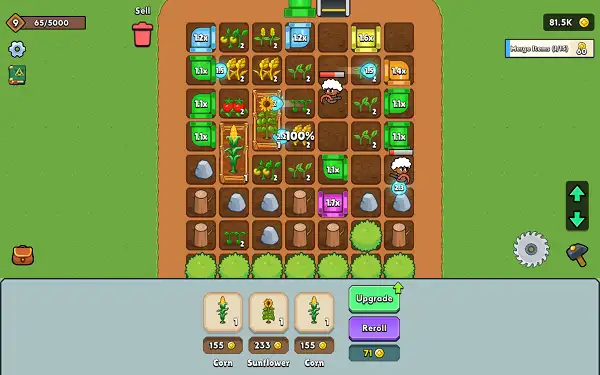
- Plant your crops. Choose from seven crop types and place them on your farm board.
- Watch them grow through three stages. Every crop moves from seedling, to growing, to fully ripe before it’s ready to harvest.
- Harvest with the sickle. Once a crop is ripe, harvest it to collect your reward and clear the space for something new.
- Merge matching items to upgrade them. Drag two identical crops or items together to combine them into a higher tier – each crop type has six merge tiers to work through.
- Keep the Mill running. Feed wheat into the Mill to process it into flour, completing a full processing cycle for extra rewards.
- Gather wood and stone. Clear resource nodes scattered on your board to stock up on materials needed for upgrades and expansion.
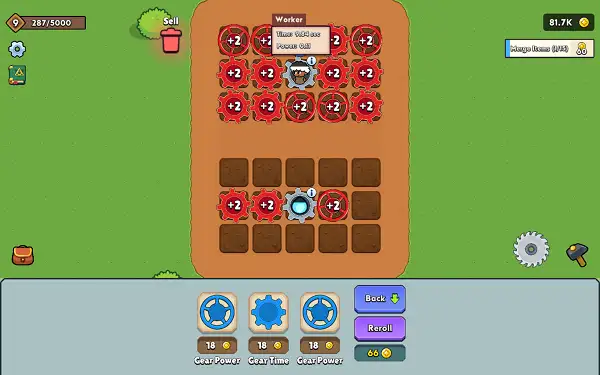
- Manage your gears. Upgrade your Gear (time) and Gear Power tracks through the rotating gear-grid to speed up your board’s tempo and boost watering strength.
- Complete missions and expand your zone to unlock more farming space and progress through the game’s four stages.
Controls
| Action | Input |
|---|---|
| Place or Move an Item | Drag with Mouse |
| Merge Items | Drag one item onto a matching item |
| Harvest / Interact | Tap or click |
| Pan Camera | Drag empty space |
| Zoom Camera | Scroll wheel / pinch (mobile) |
Everything in Loop Farm is drag-and-tap based, which is exactly why it works equally well on desktop with a mouse and on mobile with touch. Placing items, merging matching pairs, and interacting with crops or resource nodes all use the same simple, direct input.
Crops
There are seven crop types to grow and merge, each with six merge tiers and three growth stages from seedling to ripe:
- Corn
- Beet
- Tomato
- Pumpkin
- Sunflower
- Watermelon
- Wheat – the only crop with a special purpose beyond harvesting: it feeds directly into the Mill, where it’s processed into flour.
Merging two matching crops (or other matching board items) combines them into the next tier up, working through all six tiers for genuinely upgraded value each step of the way.
Board Items
Beyond crops, your board can hold several other placeable items:
- Mill – Processes wheat into flour, completing a full cycle for a reward each time.
- Watering Can – Boosts plant growth for any crop within a one-cell radius, speeding up how quickly nearby plants reach ripeness.
- Expand Zone tiles – Placeable items that grow your total usable farm area once activated.
- Pipe pieces – A connection-routing layer with multiple piece shapes (straight runs, corners, and multi-way junctions) that you’ll need to arrange correctly to link parts of your farm together.
Gears and Power
Loop Farm includes two upgrade tracks tied to a rotating gear-grid mechanic:
- Gear (Time) – Eleven levels affecting the overall timing and speed of your board.
- Gear Power – Ten levels affecting power and watering strength.
Investing in both tracks over time noticeably speeds up your farm’s rhythm – faster growth, faster processing, and a generally snappier pace to your merging and harvesting loop.
Missions
Loop Farm includes 19 missions that guide your progress and reward you for engaging with every system in the game, including:
- Placing each of the seven crop types
- Collecting wood and stone from resource nodes
- Earning coins
- Expanding your zone (across two separate tiers)
- Upgrading Gear Power and Gear Time
- Harvesting ripe crops (across multiple mission variants)
- Merging matching items on the board
- Completing a full Mill processing cycle
Working through these missions is a reliable way to make steady progress even if you’re not sure what to prioritize next on your own.
Progression and Stages
Content unlocks across four progression stages, gradually opening up more of the game as you advance. Your overall progress is tracked with a visible progress bar, giving you a clear sense of how far you are from your next major unlock.
Economy
Coins are the main currency, earned through harvesting, completing missions, and running your Mill. If you’re not happy with what’s currently available to merge or place, a reroll option lets you refresh your board items for a price that rises the more you use it, so it’s worth using thoughtfully rather than constantly. Unwanted items can also be discarded through a trash and refund system rather than left cluttering your board.
Tips and Tricks
- Prioritize Wheat early on. Since it’s the only crop that feeds the Mill, keeping a steady supply flowing gives you consistent flour production alongside your regular harvest income.
- Place Watering Cans strategically. Since their boost only covers a one-cell radius, positioning them where they can speed up several crops at once gets you more value than placing them randomly.
- Don’t reroll too casually. Since the reroll price increases with each use, save it for moments when your board genuinely has nothing useful to work with rather than using it out of impatience.
- Work toward Expand Zone tiles deliberately. More farm space means more room to grow crops and stage merges simultaneously, which compounds your overall progress significantly.
- Keep an eye on your Gear tracks. Investing in Gear Time and Gear Power evenly tends to pay off more than maxing one while ignoring the other, since faster growth and stronger watering complement each other.
- Use missions as a progress checklist. If you’re unsure what to focus on next, working through the current mission list is a reliable way to touch every system in the game and keep steadily unlocking new content.
- Clear resource nodes when you see them. Wood and stone feed into upgrades and expansion, so letting nodes sit unharvested just delays your own progress.
Other Similar Games
Frequently Asked Questions
What is Loop Farm?
Loop Farm is a free, browser-based 2D farming and merge game where you plant and harvest crops, merge matching items to upgrade them through six tiers, run a flour mill, and expand your farm using a mission-driven progression system.
What are the controls?
Drag to place or move items on your board, drag one item onto a matching one to merge them, and tap or click to harvest ripe crops and interact with resource nodes and buttons.
How many crops are in the game?
Seven crop types – Corn, Beet, Tomato, Pumpkin, Sunflower, Watermelon, and Wheat – each with six merge tiers and three growth stages from seedling to ripe.
What does the Mill do?
The Mill processes Wheat into flour. Completing a full processing cycle rewards you, making Wheat a crop worth keeping a steady supply of.
What are Gear and Gear Power?
Two separate upgrade tracks tied to a rotating gear-grid mechanic. Gear affects your board’s overall timing and speed, while Gear Power affects power and watering strength.
How does merging work?
Dragging two matching items together combines them into the next tier up. Each crop and eligible board item has six tiers to progress through.
What are missions in Loop Farm?
19 objectives that reward you for engaging with the game’s core systems – planting specific crops, gathering resources, merging items, running the Mill, expanding your zone, and upgrading your gears.
Does my progress save?
Yes. Loop Farm saves locally and can also sync through cloud saves when connected to an account, so your farm’s progress carries over between sessions.
Which browser works best for Loop Farm?
Loop Farm runs well on Chrome, Firefox, and Edge.
Can I play Loop Farm on a phone or Chromebook?
Yes. Loop Farm works in any modern browser, including on Chromebooks, and its drag-and-tap controls are built to work naturally with touch on mobile devices.
Why isn’t Loop Farm loading?
Check your internet connection, make sure this site isn’t blocked on your network, and try disabling any ad blockers – these are the most common causes of loading issues.
Simulation