





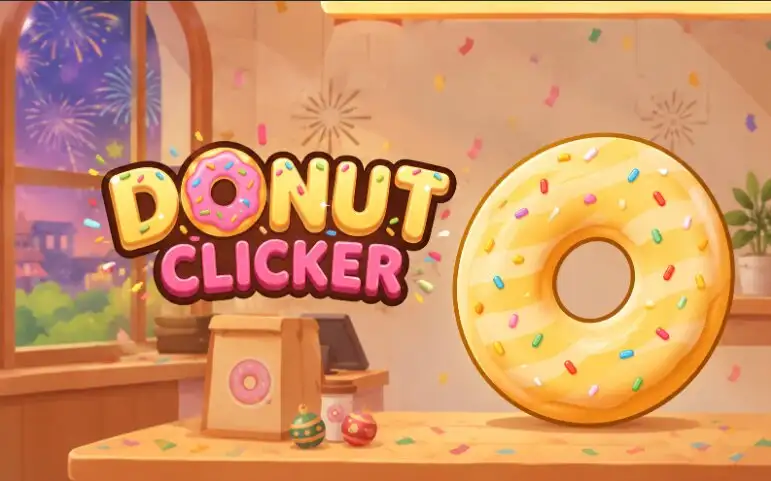








Donut Clicker starts with one giant donut and a simple idea: click it, make donuts, and spend what you earn to produce even more. That basic loop quickly grows into a surprisingly deep incremental game where automated buildings, hundreds of upgrades, random bonuses, achievements, customization, and a permanent prestige system keep pushing the numbers higher.
At the beginning, your own clicks do most of the work. Before long, Dipping Fingers, Fry Cooks, farms, mines, factories, magical producers, and increasingly strange late-game technology begin generating donuts automatically. The challenge changes from clicking as fast as possible to deciding where your next investment will create the biggest improvement.
About Donut Clicker
Donut Clicker is developed by AZGames and was released for browsers in October 2026. It is designed for desktop, tablet, and mobile play, with simple click-and-tap controls that fit the idle and incremental gameplay.
Although the game is easy to begin, its large building tree, hundreds of upgrades, prestige progression, achievements, seasonal customization, Golden Donut bonuses, and idle earnings give it considerably more depth than a basic one-button clicker.
How to Play Donut Clicker
Click or tap the large donut to produce your first donuts. Each donut also works as currency, so your early goal is to save enough to purchase automatic producers. A Dipping Finger is the cheapest starting option, followed by the Fry Cook, Wheat Farm, Sugar Mine, Fryer Plant, Sugar Bank, and progressively more powerful buildings.
Once automatic production starts, watch your donuts-per-second rate and reinvest your earnings. Buying additional buildings increases passive production, while upgrades can multiply the effectiveness of buildings, improve clicking power, or add bonuses that affect several parts of your bakery at once.
You can switch between purchase amounts such as x1, x10, and x100 when buying buildings. This becomes especially useful later, when your production is high enough that purchasing one building at a time would be unnecessarily slow. A sell option also lets you adjust your setup when needed.
Donut Clicker Controls
| Action | Desktop | Mobile / Tablet |
|---|---|---|
| Make Donuts / Interact | Left Mouse Click | Tap |
| Buy Buildings and Upgrades | Left Mouse Click | Tap |
| Collect a Golden Donut | Click or Spacebar | Tap |
| View Item Information | Mouse Hover | Use the on-screen interface |
Build an Automated Donut Production Line
Donut Clicker has 20 producer types that take your bakery from simple manual production into absurdly large numbers. The early lineup includes Dipping Finger, Fry Cook, Wheat Farm, Sugar Mine, Fryer Plant, and Sugar Bank. After that, production becomes much more imaginative.
You can eventually invest in Glaze Temples, Sprinkle Sorcerers, Delivery Fleets, Flavor Labs, Portals, Time Fryers, Antimatter Fryers, Prisms, Chancemakers, Fractal Fryers, Javascript Consoles, Idleverses, Cortex Fryers, and even a producer simply called You.
Each tier is more expensive but capable of supporting much larger production. Buildings also become stronger through their own upgrade chains, so unlocking a new producer is only the beginning of its progression.
Hundreds of Upgrades Change How Fast You Grow
The upgrade system is one of the biggest parts of Donut Clicker. There are more than 700 usable named upgrades covering building efficiency, click strength, overall production multipliers, special synergies, prestige improvements, and other bonuses.
Early upgrades include improvements such as Farmer’s Almanac for Wheat Farms and Sturdy Pickaxes for Sugar Mines. Many building upgrades can double the effectiveness of a producer, while later bonuses connect multiple producer types together or improve your entire bakery at once.
There are also upgrades that strengthen manual clicking based on your current donuts-per-second output. That means clicking does not necessarily become useless just because your automated production reaches enormous numbers.
Golden Donuts and Temporary Production Bonuses
Keep an eye on the main game area while managing your bakery because Golden Donuts can appear as special lucky drops. Catching one can trigger useful rewards and temporary effects, including Frenzy-style bonuses that multiply donut production for a limited period.
These events make active play more valuable. Even when your buildings are generating most of your income automatically, checking the screen and grabbing a Golden Donut at the right time can give your production a major temporary boost.
What Do the UFO Visitors Do?
UFO Visitors occasionally add another interactive event to the bakery. When one appears, click it three times to pop it and receive a small bonus.
Unlike a traditional enemy attack, ignoring a UFO does not punish your bakery or remove your progress. It is an optional bonus event rather than something you must defeat to protect your production, so you can continue focusing on upgrades if you do not want to chase every visitor.
Glaze Over and Start Stronger With Prestige
Your first major long-term milestone is reaching 1 trillion donuts. At that point, the game introduces Glaze Over, its prestige system.
Glazing Over begins a fresh production run, but your previous progress contributes toward Golden Glaze and prestige levels. Golden Glaze can then be spent on upgrades in the prestige tree, including permanent improvements that continue helping across future runs.
This changes the late-game strategy. Instead of trying to stay in a single run forever, there comes a point where restarting can make your next bakery develop much faster. Repeated prestige runs gradually turn early-game milestones that once took a long time into goals you can reach much more quickly.
Achievements, Goals, and Long-Term Progress
Donut Clicker has more than 600 achievements covering almost every part of progression. They include total donuts produced, production speed, number of buildings owned, upgrades purchased, Golden Donuts collected, prestige milestones, individual producer totals, clicking achievements, and unusual challenge conditions.
The game also includes Goals, Awards, statistics, progression milestones, and a rank system. These give you objectives beyond simply watching the donut counter increase and make it easier to see what part of the bakery you should work on next.
Customize Your Donut and Bakery
Production is only part of the progression. Donut Clicker also lets you customize the appearance of your main donut using four visual layers: Dough, Glaze, Drizzle, and Sprinkles.
Cosmetic options unlock through different accomplishments. Some require a certain amount of currency, while others are tied to achievements, building ownership, purchased upgrades, or repeated prestige runs. Examples include Chocolate Frosted, Vanilla Drizzle, Berry Confetti, Cocoa Cake Base, Fudge Drizzle, Coconut Flakes, Golden Sheen, and Midnight Base.
You can also give your bakery a custom shop name and change its seasonal atmosphere.
Eight Seasonal Themes
There are eight themed seasons that change the mood and presentation of the bakery: Sprinkle Countdown, Sweetheart Glaze, Bloom & Batter, Sunshine Glaze, Back to School Bash, Spooky Sprinkles, Gobble Glaze, and Frosty Flurries.
The themes cover different times of the year, from Valentine’s-style pink frosting and spring flowers to Halloween candy, autumn flavors, and winter snow. They are mainly presentation features, so choosing a favorite theme does not force you into a different production strategy.
Offline Progress and Saving
Donut Clicker supports idle progression, so the bakery can calculate earnings from time spent away and show a welcome-back summary when you return. Once your automatic production is established, this makes the game suitable for both active clicking sessions and shorter visits where you collect earnings, buy upgrades, and leave the bakery running again.
The game also includes progress-saving features along with statistics and settings, letting a long-running bakery build up over many sessions instead of requiring you to start from the beginning every time you play.
Tips for Faster Progress in Donut Clicker
- Automate early: Buy your first producers as soon as practical instead of relying entirely on manual clicks.
- Compare upgrades with new buildings: A multiplier for producers you already own can sometimes provide more value than purchasing another expensive building.
- Watch your production rate: Donuts per second becomes more important than raw clicking once your bakery is established.
- Use bulk purchasing: Switch to x10 or x100 when your income becomes large enough to expand buildings quickly.
- Catch Golden Donuts: Temporary bonuses such as Frenzy can dramatically accelerate a strong production setup.
- Do not worry about every UFO: Popping one gives a bonus, but ignoring it does not cost you anything.
- Check Goals and Awards: They can point you toward useful milestones you might otherwise overlook.
- Glaze Over when the permanent gain is worthwhile: Prestige is designed to sacrifice one run in exchange for stronger future progression.
Other Similar Games
- Brainrot Clicker 2
- Planet Clicker 2
- Spacebar Clicker
- Pizza Clicker
- 67 Clicker
- Cookie Clicker
- Goo Goo Gaga Clicker
Donut Clicker FAQ
What is Donut Clicker?
Donut Clicker is an idle incremental game where you click a large donut to produce currency, buy automatic producers, unlock upgrades, complete achievements, and eventually use prestige to increase future production.
How do you make donuts?
Click the main donut with the left mouse button on desktop or tap it on a touchscreen. Your buildings will also produce donuts automatically once you begin purchasing them.
How many buildings are in Donut Clicker?
There are 20 producer types, beginning with Dipping Finger and Fry Cook and eventually reaching much more powerful producers such as Portals, Time Fryers, Idleverses, Cortex Fryers, and You.
How many upgrades does Donut Clicker have?
The game contains more than 700 named production and progression upgrades, including building upgrades, click improvements, global multipliers, synergies, and prestige bonuses.
What are Golden Donuts?
Golden Donuts are lucky drops that occasionally appear during play. Collecting one can activate special rewards or temporary production bonuses such as Frenzy.
What happens if I ignore a UFO?
Nothing bad happens. UFO Visitors are optional bonus events. You can click a UFO three times to pop it and receive a small reward, but ignoring it does not penalize your bakery.
What is Glaze Over?
Glaze Over is Donut Clicker’s prestige mechanic. It lets you restart your current production run in exchange for Golden Glaze and prestige progression that can strengthen future runs.
When can I Glaze Over?
The first major prestige target shown by the game is 1 trillion donuts. Once prestige progression becomes available, you can decide when the permanent benefits justify beginning another run.
Does Donut Clicker have achievements?
Yes. There are more than 600 achievements covering production totals, clicking, buildings, upgrades, lucky events, prestige, and many other milestones.
Can you play Donut Clicker on mobile?
Yes. Donut Clicker supports browser play on desktop, tablets, and mobile devices. Desktop players primarily use the mouse, while touchscreen players can use taps for the main donut and interface controls.
Clicker