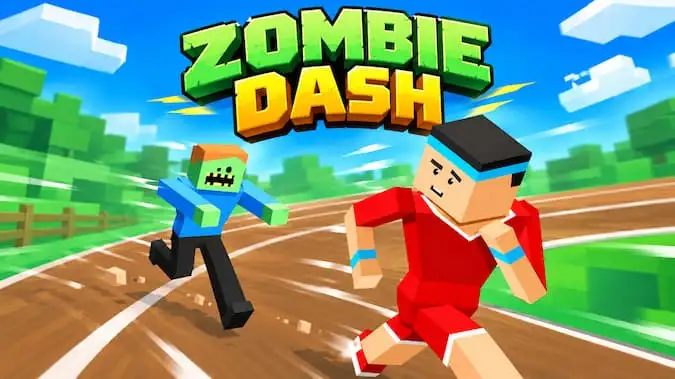


Zombie Dash throws you into a frantic 3D escape where a hungry zombie horde is never far behind. Your runner moves forward automatically while the road twists through obstacle-filled environments, leaving you responsible for the decisions that matter most: when to change lanes, which route is safest, and whether a nearby coin or star is worth the risk.
The controls are simple, but surviving a complete stage takes concentration. Barricades, crates, logs, roadside objects, narrow sections, and other hazards can interrupt your run and give the zombies a chance to catch you. Reach the finish safely and you can move deeper into the game’s 16-stage progression, collect more rewards, improve your star results, and unlock additional customization.
How to Play Zombie Dash
Once a stage begins, your character automatically moves forward. You do not need to hold an acceleration button or constantly press a run key. Instead, focus entirely on positioning.
Watch the road ahead and move left or right when an obstacle blocks your current lane. Try to make each lane change early enough that you are already lined up before reaching the hazard. Waiting until the last second makes it much easier to crash or move directly into the next obstacle.
The zombie pack follows your progress throughout the stage. Smooth movement keeps you ahead, while collisions can quickly turn a comfortable run into a dangerous situation. Your goal is to survive the complete route and reach the finish before the horde gets you.
Zombie Dash Controls
| Action | Desktop | Mobile / Tablet |
|---|---|---|
| Move / Turn Left | A / ← | Left Touch Control |
| Move / Turn Right | D / → | Right Touch Control |
| Run Forward | Automatic | Automatic |
Zombie Dash is built around left-right movement rather than a large control scheme. There is no normal jump action for getting over obstacles, so choosing the correct side of the track is the heart of the gameplay.
Stay Ahead of the Zombies
The zombie horde provides constant pressure instead of acting as background decoration. Enemies track your progress along the route and can close the distance when your run goes badly.
Crashes are particularly dangerous because they disrupt your momentum. The zombies can then rush toward your position, turning one mistake into a possible game over.
The safest strategy is therefore not to make as many movements as possible. Stay in a clear lane until there is a reason to leave it, then make one deliberate change and immediately start reading the next section of track.
16 Stages to Complete
Zombie Dash is a level-based runner with 16 gameplay stages, not a single endless course. Each level gives you a defined track to survive and a finish point to reach.
New stages unlock as you progress, and the courses become more demanding as obstacle layouts become harder to read. The game keeps individual level information such as completion status, score, and stars, so your progress is tied to each stage rather than disappearing after one run.
This structure gives you a reason to return to earlier levels as well. You may have completed a track once, but there can still be stars to collect, coins to grab, or a stronger score to chase.
Different Environments Keep the Escape Changing
The 16 stages are spread across several visual environments instead of repeating exactly the same road. The game includes forest, city or village-style, desert, and snowy/winter scenery, with different road pieces, turns, surroundings, and obstacle arrangements appearing as you progress.
These environmental changes are more than simple background swaps. Each area uses its own road layouts and obstacle placement, so moving into another group of levels can change how far ahead you need to read the course.
Later snowy and more complex road sections are especially useful for testing whether you have learned to react calmly instead of making random lane changes.
Collect Coins During Each Run
Coins appear along the road and can be collected by moving through their lane. They provide an extra progression goal, but they can also tempt you into unsafe movement.
A coin positioned directly on a safe route is easy value. A coin that forces you across the track immediately before a barricade may be better ignored. Survival should always come before one collectible.
Your money is saved between runs and can be used for progression features such as character customization. Coins can also be involved in continuing after a failed attempt, making them useful for more than cosmetic purchases.
Collect Stars for Better Level Progress
Stars are actual collectibles within the level system. Star pickups can appear along the course alongside coins and other gameplay objects, and the game records how many stars you collect during a stage.
Completed levels save their star progress as well as score, giving completion-focused players another reason to replay a course after first reaching the finish.
Going after every star can be riskier than simply finishing, so it often makes sense to learn the level first. Once you know the dangerous obstacle patterns, replay the stage and take more aggressive routes to improve your star result.
Obstacles, Barricades, and Narrow Roads
Zombie Dash uses more than isolated boxes placed in straight lanes. Courses can contain barricades, destructible objects, barrels, narrowing sections, turns, and lane-specific obstacle placements.
Some barricades have their own opening and closing behavior, while other track objects can be positioned directly inside particular lanes. The road itself can also narrow, reducing the amount of space available for a safe reaction.
Because the tracks can curve and transition between different road pieces, it is better to watch the route itself instead of staring only at your runner.
Recover After a Crash
A failed dodge does not always have to send you straight back to the beginning. Zombie Dash includes a continue and rewind system that can offer another chance after a crash.
The game records recent track progress and can restore your position so you can continue from an earlier safe point rather than repeating the entire stage. Depending on the option presented, continuing can involve coins or another available recovery choice.
This is especially useful near the end of a difficult level, but spending coins on repeated mistakes can quickly become expensive. If you keep crashing at the same obstacle sequence, restarting and learning that section may be smarter than paying to continue every time.
Customize Your Runner
Collected currency can also be used in the customization shop. Rather than offering only one-piece character skins, Zombie Dash includes separate customization categories for your runner’s head, body, and legs.
You can browse available pieces, unlock new items, equip the ones you prefer, and change character colors. This lets you create different combinations instead of being restricted to a small set of fixed outfits.
Cosmetics do not replace the core survival challenge, but they provide another long-term goal for coins earned while replaying stages.
Power-Ups and Track Collectibles
Zombie Dash also includes a broader power-up system alongside coins and stars. Special pickups can be positioned at predefined places on the track, with the game managing their availability separately from normal obstacles.
Nitro-related placement and a shield component are also part of the game’s gameplay systems. Their best use is to support survival and movement rather than changing Zombie Dash into a combat game—the central challenge is still staying on the road and ahead of the zombies.
No Weapons – Movement Is Your Defense
There is no normal gun or melee combat system in this version of Zombie Dash. You do not stop to fight the horde or clear levels by killing zombies.
Your real weapon is clean movement. Read the track, stay away from obstacles, keep your momentum, and reach the finish before the zombies close the gap.
This is important because several completely different games online also use the name Zombie Dash. Some of those include shooting or platforming, but this browser version is a 3D lane-based escape game.
Scores, Stars, and Level Completion
Each stage tracks more than whether you simply reached the end. Zombie Dash saves level score and star progress, while the game also contains high-score functionality.
This means a completed level does not necessarily represent your best possible run. You can return to improve your result, pick up stars you missed, collect more coins, or try to survive the course with fewer mistakes.
Players who enjoy full completion can therefore treat the 16 levels as more than a one-time sequence.
Zombie Dash Achievements
The game also includes achievement goals connected to long-term progress. These cover objectives such as completing environment groups, achieving stronger results across those groups, reaching large numbers of lane-change inputs, and even surviving far enough to fail in the final stage.
The major environment-completion achievement groups include Forest, Desert, Village, and Winter. Achievement availability can depend on the platform services used by the current browser version, but the underlying progression gives experienced players additional goals beyond simply clearing every level once.
Best Zombie Dash Tips
- Look farther down the road. Your next obstacle matters more than the one you have already avoided.
- Move deliberately. Unnecessary left-right switching makes your position harder to control.
- Do not chase every coin. A safe finish is worth more than one risky pickup.
- Learn a stage before chasing all its stars. Completion first, collectibles second is often the easiest strategy.
- Watch for narrowing roads. Some sections give you less room to recover from a late movement.
- Use continues wisely. A rewind near the finish can save a strong run, but repeatedly paying after the same mistake wastes coins.
- Remember difficult obstacle sequences. The game is easier when you know what follows your first lane change.
- Replay completed stages. Better scores, missed stars, and extra coins give older levels continued value.
Other Similar Games
Zombie Dash FAQ
What is Zombie Dash?
Zombie Dash is a 3D arcade runner where you automatically move forward while zombies chase from behind. You switch lanes, avoid hazards, collect rewards, and try to reach the end of each stage safely.
How many levels are in Zombie Dash?
Zombie Dash contains 16 gameplay stages. The courses progress through different environments and become more difficult as you move farther into the game.
What are the Zombie Dash controls?
Use A or the Left Arrow to move left and D or the Right Arrow to move right. Mobile players use the left and right touchscreen controls. Forward movement is automatic.
Can you jump in Zombie Dash?
No. The core controls are based on changing lanes rather than jumping. You must move around hazards instead of leaping over them.
What environments are in Zombie Dash?
The 16-stage progression uses several environment styles, including forest, city or village-style roads, desert scenery, and snowy or winter sections.
What do stars do in Zombie Dash?
Stars are collectible level rewards. Your star progress is saved for individual stages, so you can replay completed levels to improve your result.
What are coins used for?
Coins support progression features including character customization and can also be involved in continuing after a failed run.
Can you continue after crashing?
Yes. Zombie Dash includes continue and rewind functionality that can let you resume from an earlier point instead of always restarting the entire stage.
Can you customize your character?
Yes. The shop supports separate head, body, and leg customization, along with character color options and unlockable items.
Are there weapons in Zombie Dash?
No. This version focuses on running and obstacle avoidance rather than normal weapon combat. Your goal is to stay ahead of the zombies and reach the finish.
Arcade