







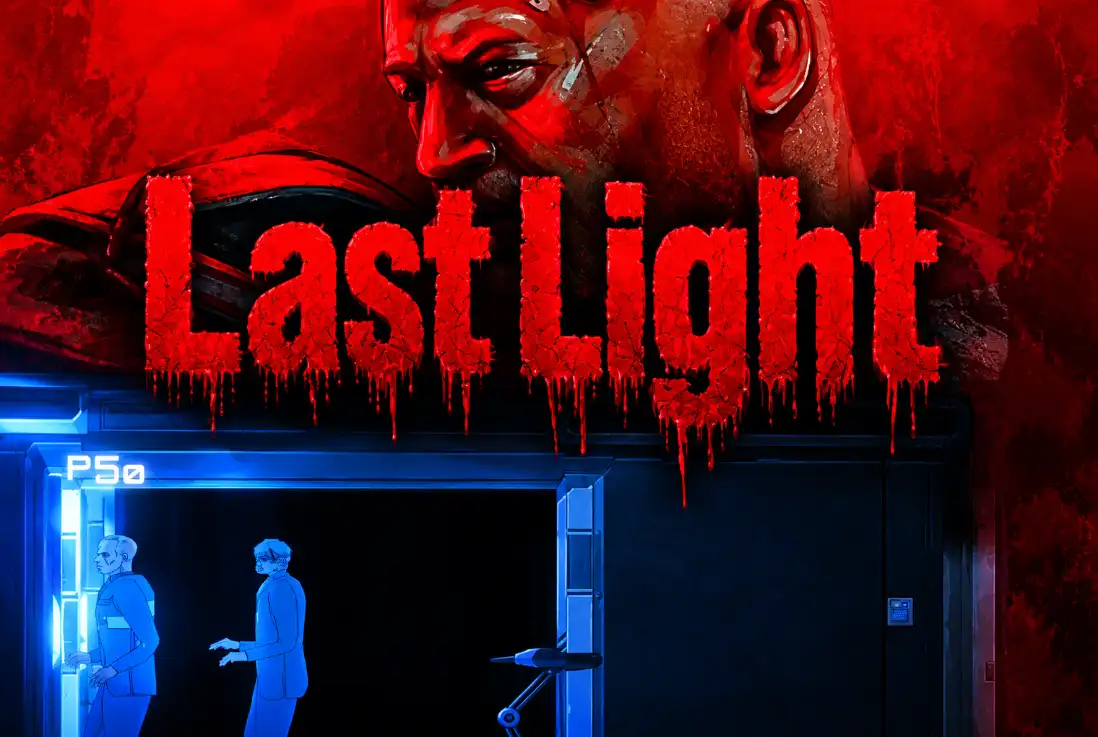









The alarm is still ringing. The corridors are almost empty, the laboratory lights are flickering, and nobody seems to be coming to help. Somewhere beyond the locked doors, infected test subjects are roaming the building. You have a gun, a little time to prepare, and one serious problem: the same limited electricity must power your lights, security doors, and escape elevator.
Last Light is a 2D side-scrolling zombie survival horror game that mixes shooting, exploration, resource management, and base defense. Trapped inside an underground research facility, you must search abandoned rooms, collect coins and keycards, repair broken electrical systems, and fight your way toward the surface.
But this isn’t a game where shooting every zombie guarantees victory. Daytime gives you a chance to prepare, while midnight brings more aggressive mutant attacks. Every upgrade costs money, every bullet matters, and using too much electricity can trigger a blackout at the worst possible moment.
Your goal is to survive long enough to escape the laboratory. To do that, you’ll need to think like both a soldier and an engineer.
Your First Objective: Grab the Gun and Find Out What Happened
The adventure begins with a survivor waking inside an unfamiliar facility. The alarm has been activated, the other people appear to have disappeared, and the situation outside the room is unknown.
The opening instructions give you a simple first task: grab the gun. Once you’re armed, follow the tutorial prompts to learn how to move, aim, shoot, reload, and interact with laboratory equipment.
Rather than rushing toward the first staircase, take a moment to inspect your surroundings. Look for containers, research desks, lockers, and objects marked by question-mark icons. These can lead you to important supplies, coins, or items needed to access other rooms.
The game’s main objective involves killing infected subjects and repairing the fuse box at the end of each floor. That means defeating zombies is only part of the job. Even after clearing a dangerous section, you may need to restore its electrical equipment before you can continue.
As you progress, you’ll travel between different parts of the facility using stairs and elevators, investigate restricted areas, and gradually restore the systems needed for escape.
Last Light Controls
Last Light uses keyboard movement and mouse-based shooting. The controls are straightforward, but aiming accurately while moving through narrow laboratory corridors takes practice.
| Action | PC Controls |
|---|---|
| Move Left / Right | A / D |
| Move Up / Down Stairs | W / S |
| Aim Weapon | Right Mouse Button |
| Shoot | Left Mouse Button |
| Reload / Take Items | R |
| Interact / Use Pills | E |
| Kick / Cancel Action | Middle Mouse Button |
| Run | Left Shift |
| Open / Close Menu | Esc |
The game also includes a controls menu, so check the in-game key bindings if an action behaves differently in your browser version. Although some gaming websites list mobile and tablet compatibility, a desktop computer with a mouse is recommended for precise aiming and managing the game’s more detailed interfaces.
Why the Day-Night Cycle Changes Everything
Last Light revolves around two very different situations: preparing while the laboratory is relatively quiet and defending yourself when the infected become more aggressive.
During the Day: Explore, Loot, and Prepare
Daytime is your opportunity to investigate new rooms, search for keycards, and gather enough coins to strengthen your equipment.
You should also check the facility’s power supply, repair accessible systems, and decide where you want to defend yourself when the next attack begins. If a generator needs attention or a corridor has no protection, the earlier you deal with it, the better.
Exploration is valuable, but don’t spend the entire day wandering. Keep an eye on the clock and leave yourself enough time to return to a defensible position.
At Midnight: Survive the Mutant Waves
When midnight arrives, the laboratory becomes much more dangerous. Infected enemies attack in greater numbers, placing pressure on your ammunition, defenses, and electrical systems.
This is when preparation pays off. A reinforced corridor, a working turret, and a properly supplied gun can help you handle enemies that would otherwise surround you.
If you ignored your defenses and spent every coin on unnecessary purchases, the night will expose those decisions very quickly.
The Three Power Systems: Light, Security, and Elevator
Electricity is arguably the most important resource in Last Light. You can’t simply turn on every system and forget about it. The laboratory has a limited power supply, and you need to distribute that energy according to your immediate needs.
| Power System | What It Does | When to Prioritize It |
|---|---|---|
| Light | Illuminates rooms, helps reveal items, and improves headshot accuracy. | While exploring dark areas or aiming at difficult targets. |
| Security | Allows security doors to function and helps reduce nighttime zombie pressure. | When defending your position or preparing for a wave. |
| Elevator | Powers the lift needed to travel between laboratory floors. | When you’re ready to advance or need access to another floor. |
These systems compete for the same limited energy. Lighting every room may make exploration easier, but it can leave less electricity for your defenses or the elevator. Likewise, putting too much power into security can limit your ability to travel.
A useful strategy is to adjust your priorities as the situation changes. Give lighting more attention when searching unfamiliar rooms, keep security available before dangerous waves, and reserve sufficient energy for the elevator when you are ready to move upward.
The key is to think about what you need right now, rather than trying to maximize everything simultaneously.
How to Fix a Power Blackout in Last Light
Overloading the electrical system can trigger a blackout. This is particularly dangerous because power failures may activate alarms and cause additional zombies to breach the facility.
If the grid fails, don’t continue using electricity as if nothing happened. Look for the source of the problem and prepare to restore power through the basement breaker switches.
The laboratory contains generators, batteries, power-routing equipment, and breaker boxes. These systems work together, so fixing a single room’s lighting may not solve a larger power shortage.
When you encounter a blackout:
- Check the power demand. Look at how much energy is being allocated to Light, Security, and Elevator.
- Reduce unnecessary consumption. Avoid running systems you don’t currently need.
- Reach the relevant breaker box. Basement switches are important for recovering from overloaded power conditions.
- Restore power and check your defenses. Zombies may have appeared while the alarm was active.
- Rebalance your electricity. Prevent the same overload from happening again immediately.
Always remember where the basement is relative to your current position. Being unable to find the breaker while zombies are attacking is one of the easiest ways to turn a manageable problem into a disaster.
Explore Laboratory Floors, Find Keycards, and Repair Fuse Boxes
Last Light isn’t just about surviving in one room. The facility contains interconnected corridors, locked areas, laboratories, ammunition rooms, basement sections, and an elevator network.
The 1Games listing describes an escape through seven dangerous floors. The game’s internal numbering also references higher-numbered floors, so use the floor indicators and objective prompts in your current version rather than assuming a fixed sequence of seven identical stages.
As you explore, some doors will remain locked until you obtain the appropriate keycard. The game’s item system includes White, Green, Purple, and Black keycards, connected to access restrictions in the facility.
Search research desks and nearby containers when you encounter a locked area. If a door won’t open, it doesn’t necessarily mean you’ve missed a hidden switch; you may need an access card from another part of the building.
You will also encounter fuse boxes associated with different floors. The objective is to eliminate infected threats and repair the required electrical equipment, then use the elevator or stairs to continue progressing.
Useful exploration tip: Keep track of locked doors, nearby staircases, and the nearest elevator. Returning to an earlier room becomes much easier when you remember which areas required a keycard or power restoration.
The Zombies: Ordinary Infected, Fast Mutants, and Tank Types
The laboratory’s enemies are not all equally dangerous. While ordinary infected subjects provide the most familiar threat, the game’s enemy systems also include fast zombie variants and tougher tank-type zombies.
Regular Zombies
Standard infected enemies are the basic threat throughout the laboratory. They can become dangerous when several approach at once, especially if you are trapped against a locked door or need to reload.
Try to keep enough distance to aim properly. A controlled shot is more useful than firing repeatedly while an enemy is still outside your effective range.
Fast Zombies
Faster infected enemies leave you less time to react. When they appear, avoid standing still and attempting a lengthy reload. Create some distance, use your available space, and prioritize enemies that are closing in most quickly.
Tank Zombies
Tank-type enemies are built around a more durable threat. Their presence makes ammunition management especially important, since a tougher opponent can absorb the attention you would otherwise use to handle the rest of a wave.
Use your environment and any available defensive equipment to support your attacks. Fighting a strong enemy in a narrow corridor can be easier when a turret is already covering its approach.
The game files also contain identifiers for invisible and unusual mutant creatures, but their exact appearances and availability depend on the active version. The important lesson is that not every enemy should be approached in the same way.
Weapons in Last Light – From the Beretta to the Winchester
Your starting firearm is associated with a Beretta 9mm, and the broader weapon collection includes several recognizable rifles, submachine guns, and a shotgun.
Named weapons found in the game include:
- Beretta: A pistol associated with the introductory equipment.
- MP40, MP5, and Uzi: Submachine guns represented in the weapon collection.
- Karabiner and StG44: Rifles available through the game’s equipment systems.
- BAR Mark 2: Another rifle option identified in the weapon assets.
- Winchester Shotgun: A close-range firearm with its own ammunition system.
Availability depends on your progress, purchases, and the version being played. You don’t begin with every gun unlocked.
Weapon upgrades and combat statistics cover more than basic damage. The game includes systems for reload time, magazine capacity, firing speed, headshot chance, stumbling, and piercing damage.
This means choosing a weapon isn’t only about selecting the one that looks strongest. A firearm that reloads reliably and uses ammunition you can obtain may be more helpful during a long wave than a powerful gun you cannot keep supplied.
How to Conserve Ammunition
Ammo is valuable, especially before midnight. Aim with the right mouse button and fire carefully with the left button. Avoid emptying an entire magazine into a distant enemy if you aren’t landing effective hits.
Pay attention to headshots. The game’s lighting system explicitly improves headshot accuracy, so adequate visibility can help you fight more efficiently.
Try to reload during quiet moments rather than when an infected enemy is already within striking distance. The kick action can provide a close-range response when an enemy gets too near, but it shouldn’t replace careful positioning.
Build Turrets and Barricades Before the Horde Arrives
Last Light combines shooting with base defense. You can strengthen the laboratory by placing protective structures in useful locations, making it harder for zombies to reach you during nighttime attacks.
The building systems include turrets, ordinary walls, and steel walls. Turrets can automatically attack nearby enemies, while barriers help slow incoming threats and create safer positions.
The underlying equipment collection identifies turret types labeled 18, 24, and 32, with corresponding plans and upgrades. The names distinguish equipment types; they should not be confused with verified damage or ammunition values.
Some turrets also connect to the game’s battery and electricity systems, making power management important even when you have enough money to construct defenses.
Where Should You Place a Turret?
The best location is usually a narrow corridor or doorway where enemies must approach from a predictable direction.
Place a barrier where it can slow the infected, then position a turret where it has a clear view of the approaching zombies. This gives your defenses time to deal damage before the enemies reach you.
Vending machines can also serve as improvised barricades in suitable areas, helping block important routes during nighttime attacks.
Avoid spending every coin on turrets and walls without checking the power supply. A strong defensive position becomes much less useful if an overloaded generator triggers another emergency.
Coins, Upgrades, and Why Your First Investment Matters
Defeated zombies and laboratory containers provide coins that you can invest in equipment and improvements.
The game’s own instructions offer an important warning: don’t immediately spend your coins in the first available slot. Instead, think about which investment will help you survive longer. The tutorial specifically highlights weapons and a good power supply as sensible early priorities.
That advice reflects how Last Light works. Spending everything on a gun may leave your generator underpowered, while investing only in electricity may leave you unable to stop the next attack.
Early on, focus on three things:
- Reliable offense: Keep a usable firearm and enough ammunition to handle nearby enemies.
- Stable electricity: Make sure critical systems can run without constantly overloading the grid.
- Basic protection: Strengthen vulnerable approaches before nighttime waves begin.
Later, you can invest more heavily in additional defenses, weapon improvements, and character statistics. The game also contains a Workbench system and upgrade plans for weapons and defensive equipment.
Don’t overlook useful supplies such as batteries, flashlights, tools, and other items found during exploration. The exact use of an item may become clear when you reach the relevant machine or locked section.
Easy, Normal, and Hard – Which Difficulty Should You Choose?
Last Light offers Easy, Normal, and Hard difficulty settings. If you’re unfamiliar with the facility, begin on Easy.
That recommendation comes from the game itself. Its ranking instructions tell players to complete Easy at least once before attempting Hard, and the leaderboard system identifies Hard as the difficulty required for ranked runs.
Easy is a good choice for learning where to find supplies, understanding how power distribution works, and discovering how the nightly zombie waves behave.
Normal provides another level of challenge once you’re familiar with the mechanics. Hard is better suited to players who can manage electricity, defenses, ammunition, and floor objectives efficiently.
The menu also includes achievement goals such as Repair Everything, Beat Lab in 7 Days, No Hit Run, and milestones for killing 1,000, 2,000, and 5,000 zombies.
One unusual detail is worth knowing before a serious challenge run: the game’s hat menu warns that wearing a cosmetic hat prevents the run from counting toward leaderboards and the Beat Lab in 7 Days goal. If you want competitive progress, choose your cosmetics carefully.
Last Light Survival Tips That Help You Reach the Surface
- Start on Easy. Use the first run to learn the laboratory layout, find useful equipment, and understand the power system.
- Prioritize your first weapon. Follow the opening instruction to grab the gun before exploring dangerous corridors.
- Search during daylight. Collect coins, keycards, and supplies while the facility is less dangerous.
- Repair the fuse boxes. Clearing zombies isn’t enough if the electrical equipment required for progression remains broken.
- Don’t overload the grid. Balance Light, Security, and Elevator power instead of maximizing them all.
- Remember the basement route. You may need to return to breaker switches after a power failure.
- Prepare for midnight. Reload, check your power supply, and position defenses before waves begin.
- Build around chokepoints. Turrets and barriers become more useful when enemies must pass through narrow corridors.
- Keep some ammunition in reserve. Don’t spend every bullet on harmless distant targets when more dangerous enemies may appear later.
- Read item and door prompts. Some areas require specific keycards or tools, not simply more shooting.
What Makes Last Light Different From Other Zombie Games?
Most zombie shooters focus on weapons and enemy numbers. Last Light makes the laboratory itself part of the survival challenge.
The electricity system forces difficult choices. Do you power the lights to improve visibility and accuracy, strengthen security before midnight, or save electricity for the elevator that moves you closer to freedom?
Every system connects to something important. Coins earned in combat can fund better weapons or generators. Power supports defensive equipment and access to other floors. Keycards open new rooms, and fuse-box repairs help restore the route ahead.
The game also rewards players who enjoy longer-term challenges through difficulty modes, achievements, weapon upgrades, and survival statistics. That combination gives Last Light more depth than a conventional browser zombie shooter.
Other Similar Games
Last Light FAQ
What is Last Light?
Last Light is a 2D zombie survival horror game where you explore an underground laboratory, fight infected enemies, repair electrical systems, build defenses, and try to reach the surface.
How do you play Last Light?
Use WASD to move, the right mouse button to aim, and the left mouse button to shoot. Search rooms, collect coins and keycards, maintain the power supply, and repair fuse boxes as you progress through the laboratory.
What is the main objective in Last Light?
Your goal is to escape the laboratory. The game instructs you to defeat infected subjects, repair fuse boxes, and use the elevator to reach upper floors.
How many floors are in Last Light?
The 1Games description refers to seven dangerous floors, although the game interface and internal floor system include additional numbered references. Follow the floor indicators and objectives shown in your version.
How does electricity work in Last Light?
The laboratory shares a limited supply of power between Light, Security, and Elevator. You must distribute energy carefully to avoid blackouts and keep essential systems operational.
How do you restore power after a blackout?
Check the electrical demand, reduce unnecessary consumption, and find the relevant basement breaker switches to restore the system. Be prepared for zombies that may appear while alarms are active.
What happens at midnight?
Midnight brings more aggressive zombie waves. Use the quieter daytime period to collect resources, improve weapons, and prepare turrets and barricades.
How do you unlock locked laboratory doors?
Search for the required keycards and investigate nearby rooms and containers. The game’s item system includes White, Green, Purple, and Black access cards.
What weapons are in Last Light?
The weapon collection includes the Beretta pistol, MP40, MP5, Uzi, Karabiner, StG44, BAR Mark 2, and Winchester Shotgun. Availability depends on the game’s equipment and progression systems.
What are the best early upgrades?
Prioritize a reliable weapon, adequate ammunition, and a stable electricity supply. The game’s tutorial specifically recommends investing in weapons and power rather than spending coins without a plan.
Does Last Light have a multiplayer mode?
The game files include a Multiplayer (alpha) menu and related lobby options, but online multiplayer availability is not confirmed for every browser-hosted version. The single-player laboratory escape is the main verified experience.
How do you unlock rankings in Last Light?
The in-game instructions state that rankings apply to Hard difficulty and recommend completing Easy first. Cosmetic hats can also prevent a run from counting toward leaderboard and seven-day challenge progress.
Can you play Last Light on mobile?
1Games lists browser compatibility for desktop, tablet, and mobile devices. However, the keyboard-and-mouse controls make a desktop computer the more practical choice, particularly for aiming and managing defenses.
Is Last Light free to play?
Yes. Last Light is available to play for free online through 1Games, without downloading a separate game application.
SurvivalActionShootingStrategy