

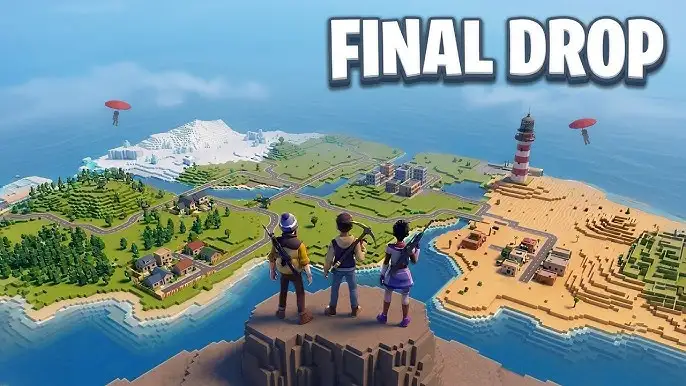








Play Final Drop free. Drop into a 100-player battle royale, loot gear, build for cover, and be the last one standing. Final Drop throws up to 100 players onto a single vibrant island with nothing but their wits, then lets loot, gunfights, and real-time building decide who’s still standing at the end. Loot gear, throw up walls and ramps mid-firefight, and outlast everyone else in a nonstop scramble for survival. No downloads, no account required to start. Works in Chrome, Firefox, and Edge on desktop.
What Is Final Drop?
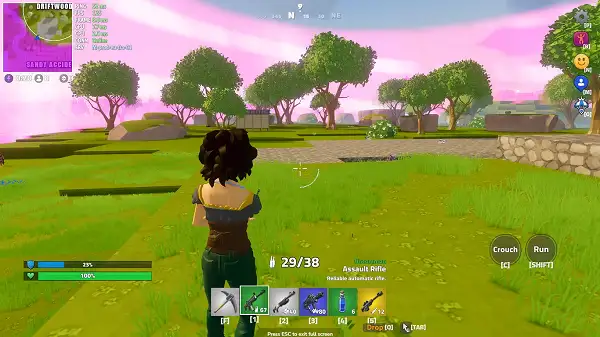
Final Drop is a free, browser-based battle royale shooter that pits up to 100 players against each other across a single, vibrant island map. It combines fast third-person gunplay with real-time building – throwing up walls, floors, and ramps for cover or a height advantage – giving it the same core DNA as the genre’s biggest console and PC hits, but built to load instantly in a browser tab with no installation required.
The loop is exactly what battle royale fans expect: drop in, scramble for weapons and resources before anyone else finds you unarmed, and fight to be the last player standing as the map shrinks around you. What sets Final Drop apart from a lot of browser-based battle royale clones is how seriously it takes the building mechanic – it’s not a bolted-on afterthought, but a genuine part of how fights are won and lost.
How to Play Final Drop
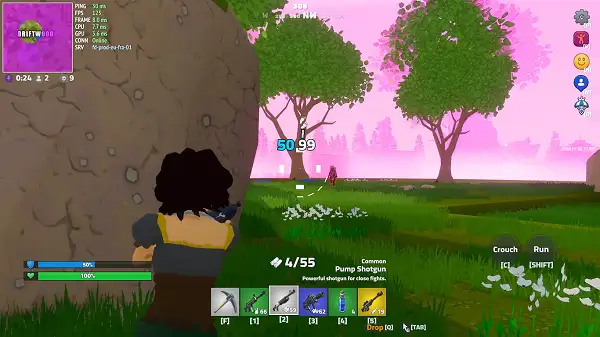
- Drop onto the island. Every match starts with all remaining players landing across the same map at once.
- Loot immediately. Find weapons and resources before running into another player empty-handed.
- Gather building materials. Resources scattered around the island let you construct walls, floors, and ramps on demand.
- Build for cover or height. Throwing up a wall mid-firefight can block incoming shots, while a ramp lets you quickly gain elevation on an opponent.
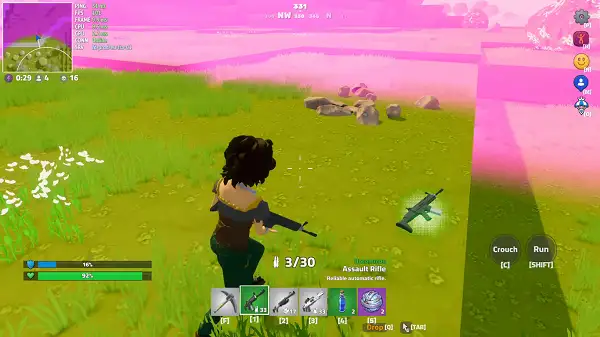
- Manage your stamina and movement. Toggle between running and walking depending on whether you need speed or a quieter approach.
- Track the shrinking play area. Check the map regularly to make sure you’re rotating toward safety rather than getting caught outside the zone.
- Eliminate opponents and be the last one standing to win the match.
Controls
| Action | Input |
|---|---|
| Move | W, A, S, D |
| Jump | Spacebar |
| Crouch | C |
| Toggle Run / Walk | Shift |
| Open Map | M |
| Select Item Slot | 1 – 6 |
| Shoot | Left Mouse Button |
| Aim | Right Mouse Button |
| Reload | R |
| Use Item / Interact | E (hold) |
| Build Wall | Z |
| Build Floor | X |
| Build Ramp | V |
| Dance Menu | B |
| Emoji Menu | N |
| Mode Selection Menu | L |
| Pause Menu | P |
Note that Final Drop is currently a desktop browser experience, with keyboard and mouse as the primary way to play rather than touchscreen controls. Building has its own dedicated keys separate from item selection, so getting comfortable with Z, X, and V for walls, floors, and ramps is worth practicing before jumping into a competitive match.
Building and Combat
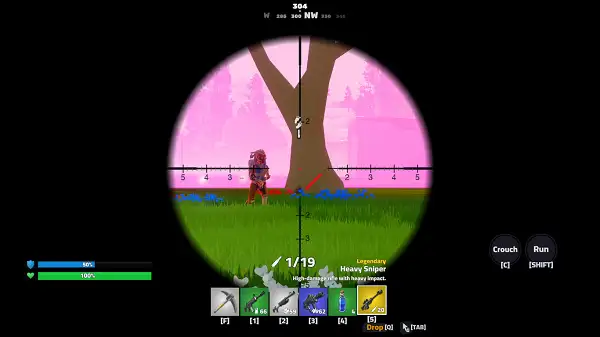
Building is genuinely central to how fights play out in Final Drop rather than being a minor extra feature. Walls thrown up quickly can block incoming fire mid-gunfight, floors let you bridge gaps or create a stable platform, and ramps give you a fast way to climb for a height advantage over an opponent. Since materials for building are gathered from around the island alongside standard loot, managing your resources – and knowing when it’s worth spending them on defensive structures versus pushing forward aggressively – is a core part of playing well.
Social Features
Beyond straight combat, Final Drop includes dedicated dance and emoji menus, letting you express yourself or taunt opponents between fights – a small but genuine nod to the social side of the genre that’s become just as much a part of battle royale culture as the combat itself.
Tips and Tricks
- Don’t land in the most obvious hotspots as a beginner. Busy landing zones mean early fights against players who may already be geared up – a quieter drop point buys you time to loot properly first.
- Practice your build keys before a real match. Since Z, X, and V control walls, floors, and ramps respectively, building muscle memory for these separately from your weapon slots (1-6) will make you noticeably faster in a real firefight.
- Use walls reactively, not constantly. Throwing up a wall the instant you take fire is more valuable than building preemptively everywhere you walk – save your materials for when you actually need them.
- Use ramps to contest high ground. Since elevation gives you a clear sightline advantage, building a quick ramp when an opponent has the high ground is often better than trying to fight uphill.
- Toggle walk mode when sneaking through contested areas. Running is faster but louder and more visible – switching to a walk with Shift when you suspect enemies are nearby can help you avoid unwanted attention.
- Check the map regularly, not just when you remember to. Since the play area shrinks over the course of a match, getting caught outside the safe zone costs you health for no benefit – build map-checking into your routine.
- Loot efficiently, then move. Spending too long in one area gives other players time to find and engage you – grab what you need and reposition rather than fully clearing every building you land near.
Other Similar Games
Frequently Asked Questions
What is Final Drop?
Final Drop is a free, browser-based battle royale shooter for up to 100 players, combining third-person gunplay with real-time building across a single island map.
What are the controls?
WASD to move, Spacebar to jump, C to crouch, Shift to toggle between running and walking, Left Mouse Button to shoot, Right Mouse Button to aim, R to reload, and Z, X, and V to build walls, floors, and ramps respectively.
How many players are in a match?
Up to 100 players can compete in the same match on the same island.
Can I build structures during a fight?
Yes. Building walls, floors, and ramps is a core part of the game, useful for blocking incoming fire, bridging gaps, or gaining a height advantage over opponents.
Is Final Drop playable on mobile?
No. Final Drop is currently a desktop-only browser experience built around keyboard and mouse controls.
Can I customize how my character expresses themselves?
Yes. Dedicated dance and emoji menus let you use social gestures and reactions during a match.
Which browser works best for Final Drop?
Final Drop runs well on Chrome, Firefox, and Edge on desktop.
Why isn’t Final Drop loading?
Check your internet connection, make sure this site isn’t blocked on your network, and try disabling any ad blockers – these are the most common causes of loading issues.
ActionMultiplayer GamesShooting