


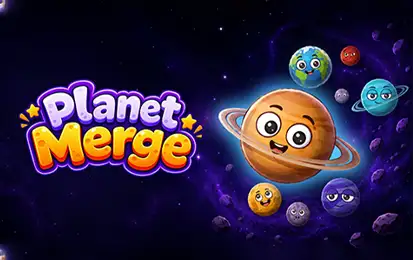


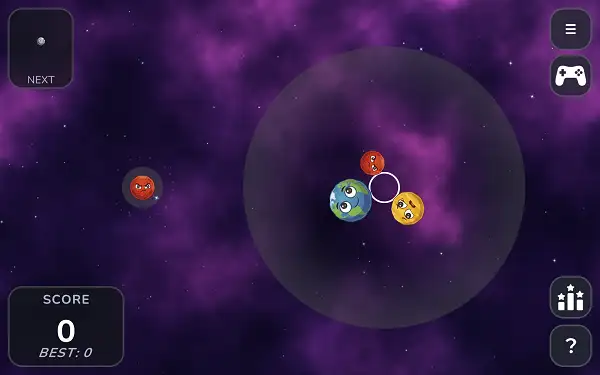
Play Planet Merge free. Slingshot planets into a gravity bubble, merge matching worlds, and work your way up to the Sun. Planet Merge takes the addictive “merge two of the same thing into something bigger” formula and launches it into orbit – literally. Instead of dropping fruit into a box, you’re slingshotting planets into a circular gravity well, watching them drift and settle toward the center until two matching worlds touch and merge into something bigger. Get too aggressive with a big merge, though, and you might just knock a smaller planet clean out of the bubble – which is exactly how you lose. No downloads, no account required to start. Works in Chrome, Firefox, Edge, and on mobile.
What Is Planet Merge?
Planet Merge is a free, browser-based merge puzzle game and a space-themed twist on the “Watermelon Game” (Suika Game) formula that’s become hugely popular in recent years. It’s actually a rebrand of an existing indie title called Sputnika Game, originally developed by Lee Geonhan and also available on Steam and mobile app stores – the core game here is the same one, republished under a new name for browser play.
What sets it apart from typical merge games isn’t just the space theme – it’s the physics. Rather than planets falling straight down under normal gravity into a box, they exist inside a circular gravity field, or “bubble,” that pulls everything toward the center. Planets drift, orbit, and settle into the cluster naturally, and two identical planets that touch merge into the next tier up – all the way from a small Sputnik satellite up to a fully formed Sun.
How to Play Planet Merge
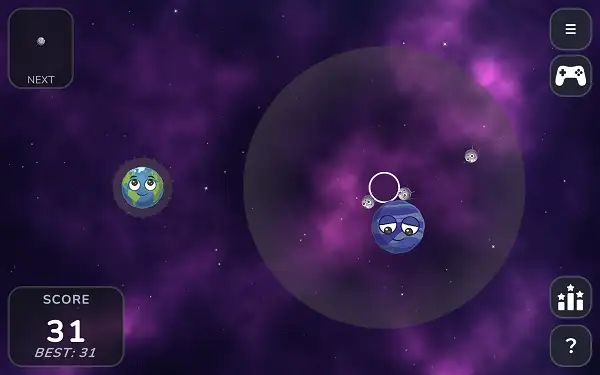
- Drag to aim. Click and drag anywhere on the screen to set your launch direction – the game shows a dotted trajectory line predicting exactly where your planet will go.
- Release to launch. Your planet fires along that slingshot vector, entering the circular gravity bubble.
- Let gravity do the rest. Once inside the bubble, your planet gets pulled toward the center, gradually settling into the growing cluster.
- Merge matching planets. When two planets of the same tier touch, they combine into the next planet up the chain, awarding points in the process.
- Watch for planets near the edge. A planet that drifts too close to the boundary starts fading – a visible warning that it’s in danger of being knocked out entirely.
- Avoid ejecting planets from the bubble. The game ends the moment a planet ends up outside the circular boundary after a collision, so aggressive merges near the edge carry real risk.
- Keep merging toward the Sun. The ultimate goal is working your way up the full 10-tier chain to create a Sun, all while keeping your score climbing and your planets safely inside the bubble.
Controls
| Action | Input |
|---|---|
| Aim | Click and drag with the Mouse |
| Launch | Release Mouse button |
That’s the entire control scheme – drag back to aim like a slingshot, and let go to fire. On mobile and tablets, the same drag-and-release gesture works with touch.
The Planet Chain
Planet Merge has 10 tiers in total, and the progression isn’t strictly based on real-world planetary size – it’s tuned for gameplay feel instead. The full chain, from smallest to largest:
- Sputnik – The starting tier, a small satellite rather than a planet, and a nice nod to the game’s space theme right from the beginning.
- Mercury
- Mars
- Venus
- Earth
- Neptune
- Uranus
- Saturn
- Jupiter
- Sun – The final, largest tier and the ultimate goal of every run.
Each planet also has its own eyes that look around and react to nearby planets, giving even the mid-tier worlds a surprising amount of personality – and the Sun in particular has its own distinct, more elaborate eye animation as the game’s trophy tier.
How You Lose
Unlike most merge games, where losing means your stack grew too tall, Planet Merge’s lose condition is tied directly to its gravity-bubble design: the game ends when a planet ends up outside the circular boundary after a collision. This usually happens when a big merge knocks a smaller planet with enough force to send it flying past the edge. There’s a brief grace period before it’s counted as a loss – a planet that drifts out of bounds fades gradually, giving you a visual warning and a small window to see it coming, rather than ending your run the instant it happens.
Tips and Tricks
- Be careful with merges between large planets. When two big planets combine, any smaller planet caught in between can easily get bounced clean out of the bubble – the bigger the merge, the more force gets thrown around.
- Clear out small planets before they become a liability. Merging small planets into larger ones proactively, rather than letting them pile up loose in the cluster, reduces the risk of one getting launched out by a later collision.
- Look for nesting opportunities. Certain planet sizes can tuck neatly into the gaps around a much larger one – Earth can fit over Saturn, Venus can fit over Jupiter, and Mars can fit over the Sun. Using these size relationships to your advantage helps keep your cluster compact and stable.
- Watch the trajectory line closely before every launch. Since the predicted path is shown before you release, take the extra moment to line up a precise shot rather than launching on instinct.
- React quickly to fading planets. Since a fading planet near the edge is a visible warning sign, treat it as an urgent problem rather than something to deal with later.
- Aim for the center of the cluster on later, riskier shots. Launching directly into the middle of an established cluster tends to be more stable than clipping the edge, where a bad bounce is more likely to sail out of the bubble entirely.
Other Similar Games
Frequently Asked Questions
What is Planet Merge?
Planet Merge is a free, browser-based merge puzzle game where you slingshot planets into a circular gravity bubble, merging identical planets into bigger ones along a 10-tier chain from Sputnik up to the Sun.
Who made Planet Merge?
Planet Merge is a rebranded version of Sputnika Game, originally developed by Lee Geonhan and also available on Steam and mobile app stores.
What are the controls?
Click and drag to aim like a slingshot, then release to launch your planet. The game shows a predicted trajectory line before you let go.
How do I merge planets?
When two planets of the same tier touch, they automatically combine into the next planet up the chain, earning you points in the process.
How do I lose the game?
The game ends when a planet ends up outside the circular gravity bubble’s boundary after a collision – usually caused by a large merge knocking a smaller planet out with too much force.
What is the highest tier planet?
The Sun is the final and largest tier, representing the ultimate goal of the full 10-planet merge chain.
Is the planet order astronomically accurate?
No. The merge chain is tuned for gameplay feel rather than real planetary size, which is why the order doesn’t perfectly match the actual solar system.
Is there a way to see danger coming before I lose?
Yes. A planet drifting near the boundary fades out gradually as a warning before it’s counted as having left the bubble, giving you a brief window to notice the danger.
Is there a leaderboard?
Yes. Planet Merge includes an online leaderboard where you can submit your score and see how it compares to other players.
Which browser works best for Planet Merge?
Planet Merge runs well on Chrome, Firefox, and Edge.
Can I play Planet Merge on a phone or Chromebook?
Yes. It works in any modern browser, including on Chromebooks, and uses the same drag-and-release touch controls on mobile devices.
Why isn’t Planet Merge loading?
Check your internet connection, make sure this site isn’t blocked on your network, and try disabling any ad blockers – these are the most common causes of loading issues.
PuzzleCasual