













Play Text Twist free. Unscramble letters, find the bingo word, and race the clock in this classic word puzzle. Text Twist hands you six random letters and two minutes to find every word hiding inside them – three letters, four, five, all the way up to the one word that uses every single letter you’ve been given. Find that word, and you move on. Miss it, and you’re stuck at this level no matter how many other words you found. No downloads, no account required to start. Works in Chrome, Firefox, Edge, and on mobile.
What Is Text Twist?
Text Twist is a classic word game developed by GameHouse, a Seattle-based studio (now part of RealNetworks) that’s been making casual games since 1998. First released in 2001, it became one of the defining word games of the early internet era, and its simple, addictive formula – unscramble letters, beat the clock, find every word you can – has kept it popular ever since.
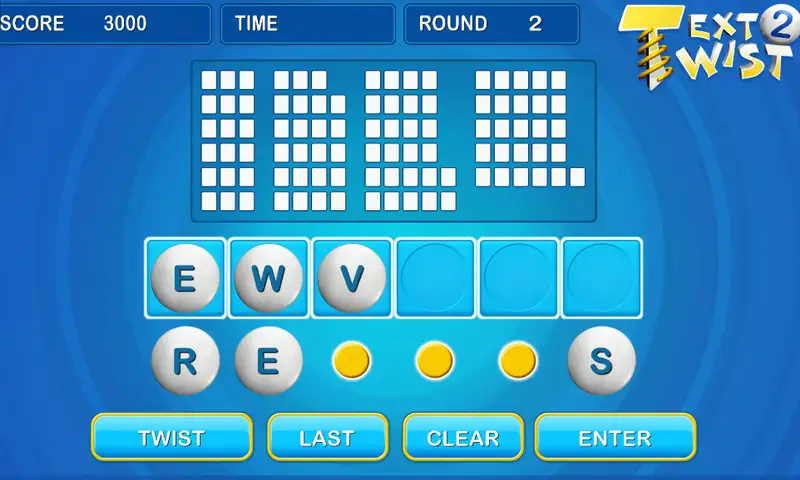
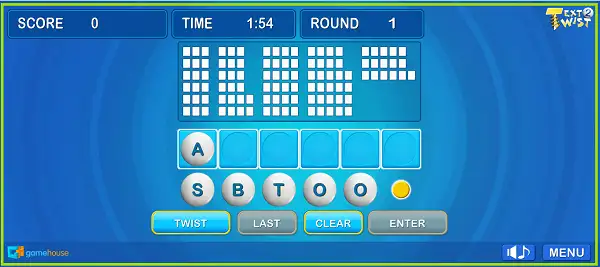
Each round gives you a set of six letters arranged in a circle, and your job is to type out as many valid words as you can before time runs out. Short words are easy to spot, but the real challenge – and the real reward – comes from finding longer words, especially the single word that uses every letter you’ve been given.
How to Play Text Twist
- Look at your six letters. Each round starts with a random set of letters arranged in a circle.
- Click letters to build a word. Select letters in order to spell out a word, which appears in a box above the letter wheel.
- Submit your word. Press Enter to lock in your word – if it’s valid, it fills the matching space in the grid above, sorted by word length.
- Keep going until time runs out. You have two minutes per round to find as many words as you can, three letters or longer.
- Use Twist when you’re stuck. Shuffling the letters into a new arrangement can help you spot a word you were missing simply by looking at the letters from a different angle.
- Find the word that uses every letter. You don’t need to find every single word to advance, but you do need to find this one specific word – the longest possible word using all six letters – to move on to the next round.
- Advance through increasingly tricky rounds. Later levels lean on less common, more obscure words, testing your vocabulary more seriously than the early rounds do.
Controls
| Action | Input |
|---|---|
| Select a Letter | Click the letter, or press the matching key on your Keyboard |
| Submit Word | Enter |
| Clear Current Word | Backspace |
| Shuffle Letters (Twist) | Click the Twist button |
On mobile and tablets, tapping the letters and using the on-screen submit button works the same way as clicking and pressing Enter on desktop.
Why the “Twist” Matters
The Twist button – the feature the game is named after – shuffles your six letters into a new arrangement without changing what letters you actually have. It sounds like a small thing, but it genuinely helps: staring at the same fixed order of letters for too long can make certain words harder to spot, and a fresh shuffle often reveals a word your eyes had simply skipped over. It’s worth using liberally whenever you feel stuck rather than saving it for a last resort.
Tips and Tricks
- Start with the shortest words first. Three and four-letter words are usually the fastest to spot, and banking a handful of quick, easy finds early builds momentum before you slow down to hunt for longer words.
- Look for common letter pairs and endings. Combinations like “-ING,” “-ED,” “-ER,” and “-LY” show up constantly in English and are a fast way to spot longer words hiding in your letter set.
- Don’t neglect the bingo word. Since you can’t advance without finding the word that uses all six letters, it’s worth spending real time specifically hunting for it rather than only picking off shorter, easier finds.
- Use Twist early and often when you’re stuck. Since it costs you nothing and can reveal words a static letter arrangement was hiding from you, there’s little reason to hold back on shuffling.
- Say the letters out loud or sound them out. Sometimes a word is easier to notice phonetically than visually, especially with six letters jumbled together in an unfamiliar order.
- Expect the vocabulary to get harder as you progress. Later rounds lean on less common words, so building your general vocabulary over time – not just your unscrambling speed – pays off the deeper you get.
- Play multiple rounds in a row to build pattern recognition. Like most word games, your speed at spotting valid words improves noticeably the more consecutive rounds you play in a single session.
Other Similar Games
Frequently Asked Questions
What is Text Twist?
Text Twist is a free, browser-based word game where you’re given six random letters and two minutes to spell out as many valid words as possible, including the one word that uses all six letters to advance to the next round.
Who made Text Twist?
Text Twist was developed by GameHouse, a casual game studio based in Seattle and now part of RealNetworks. It was first released in 2001.
What are the controls?
Click letters (or type them on your keyboard) to build a word, then press Enter to submit it. Press Backspace to clear your current word, and click the Twist button to shuffle the letters.
Do I need to find every word to advance?
No. You only need to find the single longest word that uses all six of your given letters to move on to the next round – though finding more words along the way adds to your score.
What does the Twist button actually do?
It shuffles the order of your six letters without changing which letters you have. This is often enough to help you spot a word you were missing when they were arranged differently.
How long is each round?
The standard timed mode gives you two minutes per round.
What is the minimum word length?
Words must be at least three letters long to count.
Is there a sequel to Text Twist?
Yes. Text Twist 2, also developed by GameHouse, followed the original and added additional modes beyond the classic timed format, including Untimed, Word of the Day, Lightning, and Crossword modes.
Which browser works best for Text Twist?
Text Twist runs well on Chrome, Firefox, Safari, and Edge.
Can I play Text Twist on a phone or Chromebook?
Yes. It works in any modern browser, including on Chromebooks, and uses simple tap controls on mobile devices.
Why isn’t Text Twist loading?
Check your internet connection, make sure this site isn’t blocked on your network, and try disabling any ad blockers – these are the most common causes of loading issues.
Puzzle