





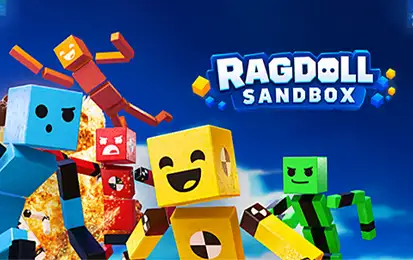








Ragdoll Sandbox is a 3D physics playground where you can build your own ridiculous experiments and then jump directly into them as a ragdoll. Drop in cannons, mines, cars, lasers, black holes, fans, jump pads, destructible structures, AI ragdolls, and other interactive objects, then see what happens when everything starts moving at once.
There is no single correct way to play. You can construct a stunt course, create a trap-filled maze, set up a chain reaction, launch ragdolls across the map, build a vehicle challenge, or simply combine objects until the physics turns your careful design into complete chaos. Adjustable objects, different ragdoll behaviors, world settings, customization, and reusable worlds give the sandbox much more depth than simply throwing a dummy down the stairs.
How to Play Ragdoll Sandbox
Start by moving around the world and getting comfortable with your ragdoll. You can walk, jump, interact with objects, and instantly switch into full ragdoll mode whenever you want to let physics control your character.
The real experimentation begins when you enter Build Mode. Open the item menu, choose an object, position it in the world, and place it with the mouse. You can combine basic building pieces with mechanical devices, vehicles, hazards, AI characters, checkpoints, and other interactive elements.
Once your setup is ready, leave Build Mode and test it yourself. If something does not work, return to editing, move or remove objects, adjust their properties, and try again. The game is designed around this cycle of building, testing, crashing, and rebuilding.
Ragdoll Sandbox Controls
| Action | Desktop | Mobile / Tablet |
|---|---|---|
| Move | WASD | Virtual Joystick |
| Look Around | Mouse | Swipe / Drag |
| Jump | Space | Jump Button |
| Interact | E | Interact Button |
| Toggle Ragdoll | R | Ragdoll Button |
| Build Mode | Tab | Build Mode Button |
| Open Item Menu | F | Item Menu Button |
| Place Item | Left Mouse | Place Button |
| Remove Item | Right Mouse | Remove Button |
Additional actions include crouching, setting a spawn point, switching cameras, rotating build items, locking an editing axis, undoing changes, zooming, toggling slow motion, and using vehicle controls. The game also includes a Controls menu for changing key bindings.
Build Your Own Physics Playground
Ragdoll Sandbox gives you far more than a few static blocks. Build items are organized around categories such as Characters, Blocks, Mechanical, Destructive, Vehicles, and Editor tools, letting you mix structural pieces with objects that actually affect the simulation.
Placement is grid-aware, and objects can be moved, rotated, resized, removed, and adjusted before testing. Undo support also makes larger creations easier to edit when something is placed incorrectly.
Many items expose their own properties instead of behaving in only one fixed way. Depending on the object, you may be able to change settings related to scale, physics, power, speed, targeting, breakability, movement, color, or other behavior. That makes the same object useful in several completely different creations.
Experiment With Cannons, Mines, Lasers, Cars, and More
The object collection is where Ragdoll Sandbox becomes especially unpredictable. Some of the major interactive tools include:
- Cannons that can launch different types of ammunition, including ragdolls, cubes, mines, missiles, and even the player.
- Black Holes that pull nearby objects toward them.
- Giant Fans that push objects and ragdolls using wind force.
- Mines with explosive power and different triggering options.
- Missiles with movement, explosions, and target-tracking support.
- Lasers and Laser Boxes for dangerous obstacle courses and automated setups.
- Jump Pads that launch ragdolls through the air.
- Telepads that can be paired to move objects or characters between locations.
- Moving Platforms, Pistons, Hammers, Rotators, and Spikes for building mechanical challenges.
- Cars that can be driven or configured with AI behavior.
Basic construction pieces are also available, including cubes, glass, stairs, slanted stairs, wedges, curved ramps, bumpy ramps, and several corner-ramp shapes. Mixing these simple structures with active devices is often the easiest way to create a good stunt course or homemade mini-game.
Ragdoll Physics Are the Main Attraction
Your character can switch between normal movement and ragdoll mode at any time. Once ragdoll physics take over, collisions, falls, explosions, moving devices, vehicles, and environmental forces can throw the body around in unpredictable ways.
This is useful for more than comedy. A course can be designed specifically around controlling when your character falls, gets launched, hits a platform, passes through a teleporter, or reaches a checkpoint.
The game also supports grabbing objects, interacting with vehicles, setting spawn locations, and resetting after failed experiments, so testing a complicated creation does not require rebuilding everything from scratch.
Add Smart Ragdolls With Different AI Behaviors
You do not have to populate your creations with motionless dummies. Ragdoll Sandbox includes multiple AI behavior types that can move and react inside the worlds you create.
Available behaviors include Followers, Attackers, Defenders, Explorers, Seekers, Avoiders, Idle ragdolls, and several other behavior styles. Their goals can also interact with player and ragdoll targeting systems.
This opens up many possibilities. Followers can travel with you, Attackers can turn a simple map into a survival challenge, Defenders can protect an area, and Seekers can work well for hide-and-seek-style creations. Because these ragdolls can navigate the environment themselves, a carefully constructed sandbox can start behaving more like a custom game.
Create Checkpoints, Goals, and Your Own Challenges
The sandbox includes more than hazards. Checkpoint and victory systems let you give your creation an actual objective.
You can combine checkpoints, victory areas, AI ragdolls, vehicles, traps, moving platforms, teleporters, and destructive objects to make your own obstacle course or mini-game. Spawn zones can also create ragdolls or cars, helping a world stay active without requiring you to manually place every character each time.
Because the objective is determined by what you build, one world might be a racing course while another becomes a survival room, physics puzzle, maze, stunt park, or AI battle arena.
Change Gravity, Weather, and World Rules
World Settings can dramatically change the way a creation behaves. Ragdoll Sandbox includes options connected to gravity, player speed, jump height, slow motion, Build Mode access, destructible objects, spawn behavior, floor properties, and ragdoll interactions.
Changing gravity alone can transform an ordinary obstacle course. Reduce or alter its strength and jumps, explosions, fans, cannons, and moving objects produce completely different results.
You can also change the environment. Available visual settings include Classic, Sunny, Night, Sunset, Sunrise, Cloudy, Northern Lights, and Stormy environments, along with floor and theme-color options.
Customize Your Ragdoll
The Ragdoll Style Editor lets you personalize your character with different base materials, colors, overlays, and facial expressions.
Base styles include options such as Wood, Steel, Camo, Chrome, Gold, hologram effects, Rainbow Berry, and Glass. You can combine them with colored overlays including red, blue, yellow, green, purple, and orange themes.
Faces range from Happy, Confused, Smirk, Scared, Curious, Angry, and Cute Smile to several more unusual designs. With separate skin, color, overlay, and face settings, you can create a ragdoll that looks very different from the default character.
Slow Motion and Camera Tools
Some physics moments are too good to watch at full speed. Ragdoll Sandbox includes a slow-motion system that can be enabled in worlds that allow it, making explosions, launches, crashes, and chain reactions easier to watch.
The camera system also includes normal player viewing, zoom controls, free-camera functionality, and cinematic camera features. Different camera behavior is particularly useful when you want to watch a large creation operate instead of participating in it directly.
Save and Explore Custom Worlds
Large creations do not have to disappear after one session. Ragdoll Sandbox includes world-saving features that preserve your placed items, world settings, player spawn information, and other creation data.
World browsing and sharing systems also let the game extend beyond your own creations. You can work with local and downloaded worlds, while online-world features can provide access to community-made creations when the connected service is available.
This gives the sandbox much more replay value than a fixed collection of stages. Instead of finishing a campaign once, you can keep designing new setups or explore ideas created by other players.
Is There a Campaign in Ragdoll Sandbox?
Ragdoll Sandbox is primarily a creative sandbox rather than a traditional level-by-level campaign. Its main focus is building worlds, experimenting with ragdoll physics, adjusting objects, and testing the environments you create.
There is also a dedicated Tutorial that introduces movement, jumping, ragdoll mode, spawn points, Build Mode, selecting items, placing objects, and removing them. It is worth completing before attempting a complicated world because the editor contains considerably more options than the basic controls suggest.
Best Ragdoll Sandbox Tips
- Start with a small experiment. Learn what each object does before filling the map with dozens of moving parts.
- Set your spawn point near the test area. It saves time when a stunt repeatedly throws your ragdoll off the map.
- Combine simple and active objects. Ramps and platforms become much more interesting when paired with fans, jump pads, pistons, or vehicles.
- Use AI behavior intentionally. An Attacker, Follower, Seeker, and Defender can create very different challenges in the same environment.
- Adjust item properties. The default version of an object is only the starting point for many sandbox experiments.
- Use checkpoints in longer courses. They make custom obstacle courses much less frustrating to test.
- Try slow motion during big chain reactions. It is easier to see which object caused a setup to succeed—or completely collapse.
- Experiment with gravity. The same cannon, jump pad, or explosion behaves very differently under altered world settings.
Other Similar Games
- Ragdoll Hit Unblocked
- Ragdoll Playground
- Ragdoll Archers
- Ragdoll Hit Stickman
- Ragdoll Launcher
- Ragdoll Flip
Ragdoll Sandbox FAQ
What is Ragdoll Sandbox?
Ragdoll Sandbox is a 3D physics simulation and building game where you can control a ragdoll, construct custom worlds, place interactive objects, add AI characters, and test your creations using physics.
How do you enter ragdoll mode?
Press R on desktop. Mobile and tablet players can use the on-screen ragdoll control.
How do you build in Ragdoll Sandbox?
Press Tab to enter Build Mode and F to open the item menu. Choose an object, position it, and use the left mouse button to place it. The right mouse button removes an item.
What can you build?
You can create stunt courses, mazes, physics experiments, vehicle challenges, AI arenas, survival rooms, homemade mini-games, and other custom environments using blocks, mechanical devices, destructible objects, vehicles, hazards, and editor tools.
Does Ragdoll Sandbox have AI characters?
Yes. AI ragdolls can use behaviors such as Attacker, Defender, Follower, Explorer, Seeker, and Avoider, allowing them to move and react inside custom worlds.
Can you drive cars in Ragdoll Sandbox?
Yes. Vehicles support mounting and driving, while cars can also use autonomous behaviors such as basic driving and chasing a target.
Can you change gravity?
Yes. Gravity is part of the world settings, along with options related to player movement, jumping, slow motion, destructible objects, environments, and other sandbox rules.
Can you customize your ragdoll?
Yes. The style editor includes different skin materials, colors, overlays, and facial expressions, including metal, wood, gold, hologram, glass, and other visual styles.
Can you save worlds?
Yes. Custom worlds can save their items, settings, spawn information, and other world data. Community browsing and sharing features are also supported where online services are available.
Can you play Ragdoll Sandbox on mobile?
Yes. The browser release supports desktop, tablet, and mobile play, with dedicated touchscreen controls including a virtual joystick and buttons for major actions.
Simulation