



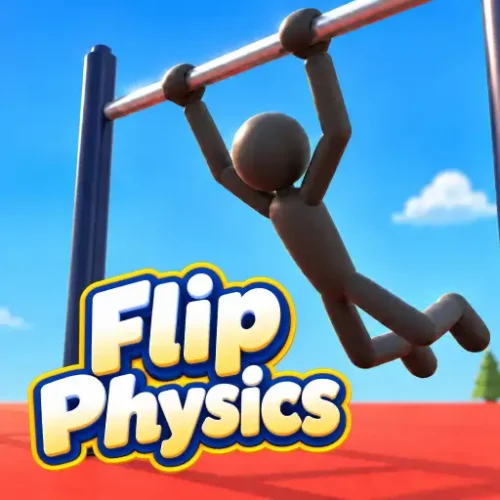




Noomi is hanging from a gymnastics bar, gathering speed with every swing. The next bar is just beyond reach. Release too early and the jump falls short; let go too late and the ragdoll tumbles toward the floor. But with enough momentum and one perfectly timed release, Noomi can fly through the air, complete a backflip, and grab the next bar without touching the ground.
Flip Physics is a 3D ragdoll gymnastics and flipping game where you control a character’s body movements rather than pressing a button for an automatic stunt. Swing across horizontal bars, perform frontflips and backflips, twist in midair, stick your landings, and experiment with realistic physics across 18 different maps.
The challenge comes from timing and body control. Arching changes your swing, tucking increases rotation, and stretching into a layout helps slow your spin. Every mistake teaches you something about momentum, making Flip Physics a game where improving your technique is more rewarding than simply reaching a finish line.
Meet Noomi – The Ragdoll Gymnast You Control
The athlete at the center of Flip Physics is called Noomi. Unlike characters in ordinary platform games, Noomi does not have a traditional left-and-right movement system. You primarily control body positions, releases, twists, and landings while the physics simulation determines what happens next.
That difference is important. You cannot make a poor jump successful just by pressing the right arrow key in midair. You need to create enough momentum before releasing, then change your body shape to influence rotation and prepare for the next landing or catch.
Noomi’s flexible ragdoll movement also makes the failures entertaining. A poorly timed backflip can end with the gymnast folded against a platform, bouncing off a trampoline, or missing a bar by inches. Press reset, make one small change, and try again.
How to Play Flip Physics
Start with the tutorial or select a map from one of the two main categories: Bars or Tumbling.
In Bars mode, you begin by hanging from a horizontal bar. Build a stronger swing by arching your body in rhythm with its movement. When Noomi is rising toward the front, release the bar and use different poses to control the flip. If the next bar is close enough to both hands, Noomi can automatically grab it and continue the sequence.
In Tumbling mode, the emphasis shifts toward launching from surfaces, performing aerial rotations, and controlling the landing. Boxes, ramps, platforms, and moving objects create different conditions for experimenting with momentum.
There is no enemy to defeat or weapon to collect. Your main goals are to improve your tricks, chain successful regrabs, experiment with map layouts, and achieve cleaner landings.
Flip Physics Controls – Full PC Keyboard Guide
Flip Physics has a more detailed control system than a typical one-click flipping game. These are the default keyboard bindings:
| Action | PC Controls |
|---|---|
| Let Go of Bar / Combined Action | Space |
| Arch Body | J or ↑ |
| Tuck Body | K or ↓ |
| Layout Position | L or → |
| Pike Position | I or ← |
| Flash Position | O |
| Squat Position | U |
| Twist Left / Right | Q / W |
| Stick Landing | S |
| Unstick Feet | X |
| Reset Attempt | R |
| Previous / Next Spawn | [ / ] |
| Watch Replay | P |
| Open Choreography | B |
| Toggle Touch Controls | M |
| Show / Hide Key Bar | H |
| Pause / Open Menu | Esc |
The game allows key rebinding in Settings, so you can change the layout to something more comfortable. Some browser pages also describe simplified mouse or touchscreen interactions; follow the controls shown inside your active game version if they differ from these defaults.
Build a Bigger Swing Before You Release
The secret to a good trick begins before Noomi leaves the bar. If you release without enough momentum, you may not gain sufficient height or distance to complete a flip or reach another bar.
The tutorial teaches a specific technique: hold Arch while Noomi swings backward, then release Arch during the forward swing. Repeat this rhythm to make the swing larger.
Think of pushing someone on a playground swing. The timing of each push matters more than holding one position constantly. If you hold Arch throughout the entire swing, you may lose the rhythm needed to build height effectively.
Watch Noomi’s movement and practice the backward-and-forward pattern several times before attempting a release. Once the swing becomes higher and more predictable, your aerial tricks will be easier to control.
How to Perform a Backflip in Flip Physics
A successful backflip requires the right release moment and body position. Try this sequence:
- Start from a horizontal bar, ideally in the Classic map.
- Use J or the Up Arrow to build a smooth swing, arching on the backward movement and relaxing on the forward movement.
- Wait until Noomi is moving upward and forward.
- Press Space to let go of the bar.
- Hold K or the Down Arrow to tuck and accelerate the rotation.
- Release Tuck and extend the body as you approach the position needed for landing or another catch.
- Use S to stick the feet to the floor when attempting a landing.
Do not try to fit the maximum number of rotations into every jump. Completing one controlled flip and landing cleanly is a better starting goal than spinning rapidly and crashing.
Regrabs: The Trick That Makes Bars Mode Addictive
A regrab happens when Noomi releases a bar and catches another bar after moving through the air. It is one of the central skills in Flip Physics and gives players a clear way to measure progress.
The most useful detail is that regrabbing can happen automatically. You do not need to keep holding Space while approaching the next bar. Instead, Noomi attempts to grab when both hands come sufficiently close.
This changes how you should practice. Focus on creating the correct trajectory and bringing the hands toward the next bar. If you are too low, too far away, or rotating in the wrong orientation, simply pressing more keys will not solve the problem.
Start with a short distance between bars. Build a modest swing, release during the forward ascent, and avoid unnecessary rotations until you can make the catch consistently. Once that becomes reliable, add a flip or twist before the regrab.
The game tracks successful regrabs and can display personal bests. For players chasing longer runs, chaining multiple catches without a fall becomes a natural challenge.
Understand the Body Positions: Tuck, Pike, Layout, and Arch
Each body position changes the way Noomi moves through the air. Learning what they do is more useful than randomly pressing several keys at once.
Arch – Build and Control Momentum
Arch changes Noomi’s body shape during swinging. The most important use is building height by applying it during the backward swing and relaxing on the forward movement. Master this before attempting complicated bar transitions.
Tuck – Rotate Faster
Tuck pulls the gymnast into a tighter shape. A smaller body shape generally allows faster rotation, making it useful when you need to finish a backflip or another aerial rotation before landing.
Layout – Extend and Stabilize
Layout stretches the body into a more extended position. Compared with a tight tuck, it is useful when you want to reduce rotation speed or prepare for a more controlled landing.
Pike – Experiment with a Different Shape
Pike bends the body at the hips, providing another way to influence a trick’s rotation. Experiment with switching between Pike and Layout to see how body shape changes the result.
Flash, Squat, and Twists
Advanced controls include Flash, Squat, and twisting left or right. These give experienced players more creative options when combining flips and aerial movements. Learn the basic positions first so you can recognize what each new move adds.
Explore 12 Bars Maps – From Classic to Workout Park
Bars mode contains 12 named environments designed around swinging, releasing, and catching horizontal bars. Some are simple training spaces, while others introduce unusual layouts or moving obstacles.
Classic, Indoors, and Old Classic
Classic is an excellent place to learn the fundamentals. Its straightforward bar arrangement makes it easier to concentrate on timing instead of navigating complicated structures.
Indoors places the activity inside a more enclosed space, while Old Classic offers another variation on the traditional bar setup. These maps are useful for refining repeatable swings and clean releases.
The W, Diamond, Ladders, and New Classic
These maps challenge your ability to judge the relationship between bars.
The W introduces an angular arrangement that changes how you approach a transition. Diamond places bars in a distinctive geometric formation, while Ladders uses a larger collection of bars at different positions.
New Classic expands the familiar format with double, triple, and high-bar arrangements. Practice using the available spawn positions to approach these layouts from different directions.
Trampoline and Spikes
Trampoline combines a multi-bar setup with a bouncing surface. It gives you another way to generate height and experiment with aerial rotations after leaving the bars.
Spikes features a more elaborate structure with numerous bars. It’s a good test of your ability to maintain an intended route instead of releasing without a plan.
Gears – Moving Machinery Changes Your Timing
Gears is one of the more distinctive maps. Its environment includes rotating gears and moving blocks, adding another layer of motion to consider when launching or landing.
Instead of concentrating only on Noomi’s rotation, you also need to observe how the environment changes over time. Practice a simpler trick first to understand where and when the moving pieces become relevant.
City and Workout Park
City places the gymnastics action among buildings, streets, scaffolding, and elevated structures. It creates a different visual setting for bar tricks while keeping the focus on physics-based movement.
Workout Park features outdoor exercise equipment, including parallel bars, monkey bars, and other arrangements. It is particularly important because the in-game tutorial uses this map to teach automatic regrabbing.
These two maps are good choices when you want to experiment with different bar shapes and more varied surroundings.
Six Tumbling Maps for Backflips, Jumps, and Landings
Tumbling mode changes the focus from horizontal-bar chains to floor-based gymnastics, jumps, and controlled landings. There are six named maps:
- Flat: A simple environment for learning how to rotate and stick a landing. The tutorial uses it for the Stick and Unstick lesson.
- Precisions: A tumbling environment where carefully controlling launch distance and landing position is especially useful.
- Boxes: Includes blocks and a trampoline, creating opportunities to experiment with bounces and landing on raised surfaces.
- Platforms: Uses separated surfaces and platforms, encouraging you to think about distance and body alignment.
- Ramps: Introduces sloped surfaces that change the way a jump begins and where a tumbling sequence can end.
- Moving Blocks: Features blocks that move vertically at different speeds, adding a timing challenge to landings.
If you struggle with regrabs in Bars mode, switch to Flat or Boxes and practice your basic rotations. Learning when to tuck and extend is easier when you are not also trying to catch another bar.
Change Gravity and Slow Motion to Practice Difficult Tricks
Flip Physics includes physics settings that let you experiment with how the gymnast behaves. The game provides gravity options such as Moon, Low, Regular, Extra, Zero, and Extremely Low.
Regular gravity is the best starting point for understanding the normal timing. Lower-gravity options let Noomi spend more time airborne, while higher gravity creates shorter, faster falls. Zero Gravity offers a very different environment for experimenting with floating movement.
Slow-motion settings include Slow and Super Slow, along with normal speed. These are especially useful when trying to understand why a release fails. Slowing the action makes it easier to observe the exact moment Noomi passes the highest point of a swing or begins rotating too quickly.
When learning a new trick, change only one setting at a time. If you adjust gravity, slow motion, body pose, and release timing simultaneously, it becomes difficult to identify what improved your attempt.
Watch Replays and Create Choreographed Stunts
Successful tricks often happen quickly, making it hard to understand what you did correctly. Flip Physics includes replay tools to inspect your movements afterward.
Press P to access replay functionality. Depending on the available settings, you can review recent action with different playback speeds and camera views. Playback options include 0.25x, 0.5x, 1x, 1.5x, and 2x.
The camera tools can also provide follow, wide, and free-view perspectives. Watching a failed regrab in slow motion may reveal that Noomi’s hands passed below the bar or that you began tucking too early.
Another advanced feature is Choreography, accessible with B. The game includes tools for recording or assembling sequences of held movements, then performing those routines again.
Replay saving, video export, and online sharing options can depend on the browser and game deployment, but the practice and review features add an extra reason to experiment with longer stunt sequences.
Common Flip Physics Mistakes and How to Fix Them
Releasing too early: If Noomi falls short of the next bar, build more height before pressing Space. A slightly later release during the forward ascent can change the flight path considerably.
Releasing too late: Waiting until the swing has already begun moving downward can waste the height you’ve built. Watch for the upward-and-forward motion described in the tutorial.
Holding Tuck for too long: A tight tuck can produce excessive rotation. Release it sooner or change to Layout when you need to prepare for landing.
Holding Space near the next bar: The game can regrab automatically. Holding the release input while approaching the next bar may interfere with the intended catch.
Trying complicated tricks immediately: Focus on one clean swing, one controlled release, and one successful regrab before adding extra twists.
Ignoring the spawn controls: Use the previous and next spawn keys to practice a difficult part of a map without always beginning from the same position.
Changing too many settings: Return to Regular gravity and normal speed when you want to compare techniques fairly.
Best Practice Routine for Beginners
If you’re just starting Flip Physics, this progression will help you develop the most useful skills:
- Classic: Practice arching backward and relaxing forward until you can create a larger swing consistently.
- Classic: Release during a forward ascent and try a single tuck rotation.
- Flat: Practice extending the body before landing, then use Stick and Unstick.
- Workout Park: Attempt short regrabs between nearby bars without adding extra flips.
- Trampoline: Experiment with bounce height and airborne control.
- Gears or Moving Blocks: Apply those fundamentals when the environment itself is moving.
By following this sequence, you build each skill on the one before it. The aim is not to memorize a perfect button combination but to understand why each movement works.
Other Similar Games
Flip Physics FAQ
What is Flip Physics?
Flip Physics is a 3D ragdoll gymnastics game where you control a gymnast named Noomi. Build momentum, release from horizontal bars, perform flips and twists, regrab bars, and practice landings across different maps.
How do you play Flip Physics on PC?
Press J or Up Arrow to Arch, Space to release, K or Down Arrow to Tuck, and R to reset. Additional keys control Layout, Pike, twists, and landings.
How do you do a backflip in Flip Physics?
Build a strong swing, release with Space during an upward-forward movement, then hold Tuck to rotate faster. Extend your body before landing or attempting another bar catch.
How do you grab the next bar?
Guide Noomi’s hands close to the next bar after releasing. The regrab happens automatically when the hands reach the correct position, so you do not need to hold Space to catch it.
How many maps are in Flip Physics?
The game has 18 playable maps: 12 in Bars mode and six in Tumbling mode. They include Classic, Trampoline, Gears, City, Workout Park, Flat, Ramps, and Moving Blocks.
What is the difference between Bars and Tumbling?
Bars mode focuses on swinging from horizontal bars and chaining regrabs. Tumbling mode emphasizes flips, jumps, platforms, ramps, and controlled landings.
How do you stick a landing in Flip Physics?
Press S to stick Noomi’s feet to the floor. Press X to unstick and continue moving.
Can you change gravity in Flip Physics?
Yes. The physics settings include Regular, Moon, Low, Extra, Zero, and Extremely Low gravity options, allowing you to experiment with different movement conditions.
Does Flip Physics have slow motion and replays?
Yes. The game includes slow-motion options and replay controls. These help you review release timing, rotations, and missed catches.
Can you play Flip Physics on mobile?
1Games lists desktop, tablet, and mobile browser support. The game also includes touchscreen input options, although keyboard controls offer more direct access to its full movement system.
Is Flip Physics free to play?
Yes. Flip Physics can be played online for free through supported browser gaming websites without installing a separate application.
Who developed Flip Physics?
AZGames is the developer and the release is dated October 9, 2026.
Physics GamesSimulation