





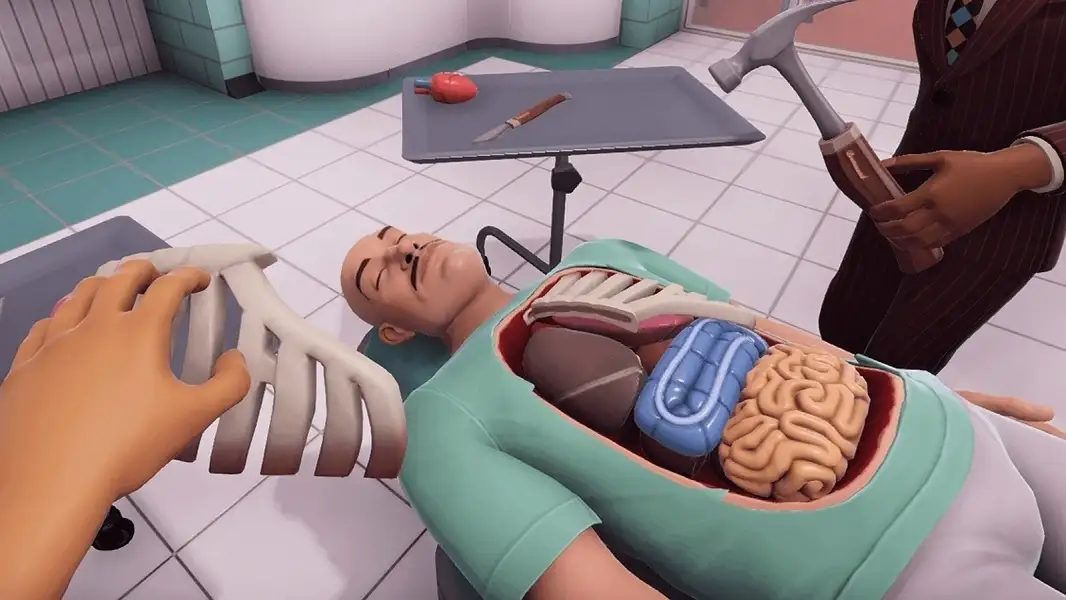






Surgeon Simulator hands you a single floating hand, a patient named Bob, and a set of organ transplants to perform — then gives you a control scheme that makes even picking up a scalpel genuinely difficult. It’s less a surgery simulator and more a digital, deliberately chaotic version of the board game Operation: every procedure is technically possible, but almost nothing goes the way you intend, and that gap between intention and outcome is the entire joke.
Developed by Bossa Studios and originally built in 48 hours for the 2013 Global Game Jam before being expanded into a full release, it became a cult hit largely through YouTube videos of people failing spectacularly at heart transplants.
| Feature | Details |
|---|---|
| Developer | Bossa Studios |
| Origin | 2013 Global Game Jam (48-hour prototype), expanded over ~48 days into the full release |
| Original release | April 19, 2013 (Windows, OS X, Linux via Steam) |
| Engine | Unity |
| Perspective | First-person — control a single floating hand |
| Platforms | PC (Steam, GOG), iOS, Android, PlayStation 4, Nintendo Switch — paid title |
| Core content | 3 main procedures, 3 variants, 2 extra missions |
| Current rights holder | Infogrames (acquired from tinyBuild, 2024) — originally Bossa Studios |
Contents
- Controls
- The Procedures
- Why the Controls Are Bad on Purpose
- Tips
- Where the Series Has Gone Since
- Similar Games
- FAQ
Controls
| Action | PC Input |
|---|---|
| Move hand | Mouse movement |
| Rotate hand / grip view | Hold Right Mouse Button + move mouse |
| Control individual fingers | Separate keyboard keys per finger |
| Grab / release tool | Curl the relevant finger(s) around the object |
This is the part that defines the entire game: each finger on your surgeon’s hand is bound to its own keyboard key, and picking something up means curling the right combination of fingers around it without knocking it across the room first. On Steam, this is listed under tags including “Intentionally Awkward Controls” — and that’s not a euphemism. The mouse-movement-plus-individual-finger-keys combination is the joke and the challenge simultaneously; there’s no “easy mode” control scheme on PC.
Mobile versions (iOS/Android) use a different scheme — confirmed via Pocket Gamer’s coverage of the iPad port — using two-finger camera movement and pinky-based item pickup with rotation via a second finger, an attempt to translate the keyboard finger-mapping into something touchscreen-compatible. According to the developer, this redesign took considerable iteration to “just about work.”
The Procedures
The original release contains 3 main transplant procedures, 3 corridor/variant challenges, and 2 extra missions — confirmed by Indie Game Reviewer’s breakdown. The three main transplants are heart, kidney, and lung. A reviewer’s assessment of the brain transplant (one of the bonus missions) is useful context for what to expect: “You just bash open the skull, clip the spinal cord, and drop in a new brain, done!” — described as visually entertaining but mechanically simple compared to the heart and kidney procedures.
One of the extra missions is not straightforward to access — reaching it reportedly requires performing a specific sequence of in-game actions that only became known after players solved an alternate-reality-game (ARG) puzzle the developers had set up separately. If you’re looking for the second bonus mission and can’t find it through normal play, that’s expected — it wasn’t meant to be stumbled into casually.
Why the Controls Are Bad on Purpose
According to Bossa Studios designer Luke Williams, speaking to Gamasutra, the control scheme “had a very organic development” — it started from the idea of a bumbling surgeon using a Trespasser-style physics hand (referencing the notoriously janky hand controls from the 1997 PC game Jurassic Park: Trespasser) and grew from there through iteration the team described as genuinely uncertain about: “We asked ourselves a few times if this was genuinely funny, or was it just because we were sleep-deprived and giggling.”
The broader design philosophy places Surgeon Simulator alongside games like QWOP and Octodad — titles built around deliberately difficult control schemes that are “just as fun to fail at and to watch.” Understanding this upfront changes how you should approach the game: fighting the controls to achieve textbook-perfect surgery isn’t really the goal — the goal is completing the objective by whatever chaotic method the controls allow, and the failures along the way are the actual content.
Tips
▸ Don’t fight the controls — work with the chaos
The control scheme was designed to produce comedic failure as a feature, not a bug. Trying to achieve smooth, precise tool handling is fighting the game’s actual design. Accepting that tools will fly across the room, that hammers will miss, and that the “correct” outcome often arrives via an absurd route is the mindset that makes the game enjoyable rather than frustrating.
▸ Learn the finger-key mapping before attempting a procedure under time pressure
Since each finger has its own key, and grabbing tools requires specific finger combinations, spend time in a low-pressure moment just experimenting with finger curls on simple objects before attempting a timed or sequence-dependent step in a procedure. Knowing which keys curl which fingers reduces (but doesn’t eliminate) the chaos when it matters.
▸ Use the right-click rotation to reposition your view, not just the hand
Holding right mouse button and moving the mouse rotates your perspective — this is separate from moving the hand itself with plain mouse movement. Repositioning your viewing angle before attempting a delicate grab can make a meaningful difference, since the hand’s position relative to the object you’re targeting is easier to judge from some angles than others.
▸ If a bonus mission seems missing, it probably requires the ARG sequence
If you’ve completed the 3 main procedures and their variants but can’t locate a second bonus mission, don’t assume you’re missing an obvious in-game prompt — community discussion around the game confirms one bonus mission requires a specific action sequence that was originally discovered through an alternate-reality-game puzzle set up by Bossa Studios, not through normal exploration.
▸ Treat each procedure as short — the value is in replaying, not extending
A full playthrough of all content takes a couple of hours. The replay value comes from attempting the same procedures again — faster, messier, with friends watching, or via the VR version’s different control scheme — rather than from new content appearing on repeat plays. Going in expecting a long single session will leave you disappointed; going in expecting a short, replayable, chaos-driven experience matches what the game actually offers.
Where the Series Has Gone Since
Surgeon Simulator’s ownership has changed hands twice since its original release: Bossa Studios sold the franchise to tinyBuild for $3 million in August 2022, and tinyBuild sold it to Atari SA (under the Infogrames label) in June 2024. A sequel, Surgeon Simulator 2, was released in August 2020 by Bossa Studios before the sale.
A VR version — Surgeon Simulator: Experience Reality — released in December 2016 across PlayStation VR, SteamVR (including HTC Vive), and Oculus Rift, adding new content including alien autopsies and zero-gravity space surgery, and replacing the keyboard finger-mapping with direct motion-controller hand tracking. This version is confirmed as a meaningfully different control experience from the original — if the keyboard finger-key system is the main barrier to enjoying the base game, the VR version removes that specific friction (while presumably introducing its own).