

















Play Mage Castle Idle Defense free. Upgrade spells, runes, and skills to defend your castle through 7 locations and epic boss fights. Mage Castle Idle Defense puts one lone wizard between an endless line of enemies and the tower he’s sworn to protect. He fires automatically – your job is entirely about the upgrades happening around him: which spells to unlock, which runes to socket, and which stats to push, all while waves keep climbing toward the boss fight waiting at the end of each stretch. No downloads, no account required to start. Works in Chrome, Firefox, Edge, and on mobile.
What Is Mage Castle Idle Defense?
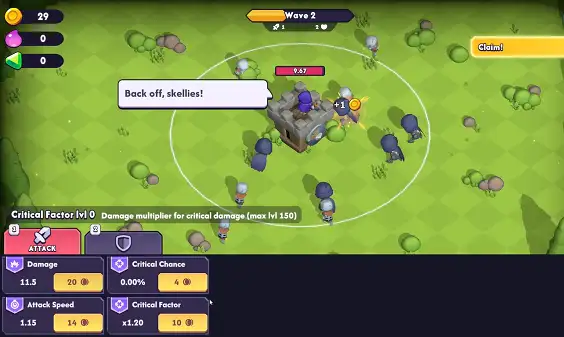
Mage Castle Idle Defense is a free, browser-based idle strategy game where you take control of a single powerful mage defending a fortified castle against wave after wave of enemies and the occasional towering boss.
The core loop leans heavily into the idle genre: your mage attacks automatically without needing direct input, and your actual gameplay decisions happen entirely in the upgrade menus – choosing which spells to unlock, which runes to combine, and which base stats to raise. Daily quests keep resources flowing in even when you’re away from the game, so progress doesn’t fully stop just because you’ve closed the tab.
How to Play Mage Castle Idle Defense
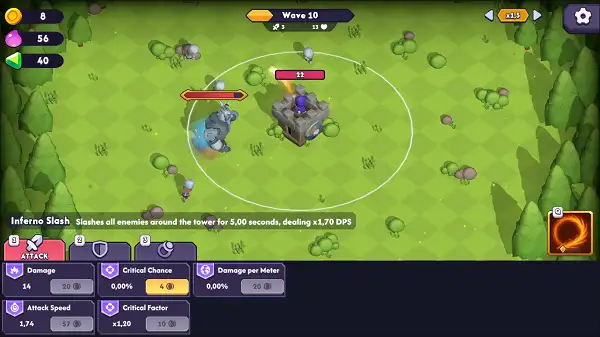
- Let your mage fight automatically. He attacks enemies on his own as waves approach – there’s no manual aiming or attacking required.
- Spend coins on battle upgrades during the fight. Coins drop from defeated enemies and can be spent immediately to strengthen your mage mid-battle – just be aware these upgrades are wiped if you lose the run.
- Collect souls from tougher enemies. Unlike coins, souls are used after a battle ends to buy permanent upgrades that carry over into your next run.
- Complete quests for gems. Gems unlock rune slots, giving you permanent bonus sockets that stay with you even after a defeat.
- Socket and combine runes strategically. Different rune combinations suit different enemy types, so adjusting your setup between runs matters.
- Save spell scrolls for bosses. Beating more waves than your previous run levels you up and earns spell scrolls – hold onto them and burn through your reserves specifically when a boss appears rather than spending them on regular waves.
- Progress through new locations. Clearing a location’s specific quest unlocks the next area, each with its own environment and fresh enemy challenges.
Controls
| Action | Input |
|---|---|
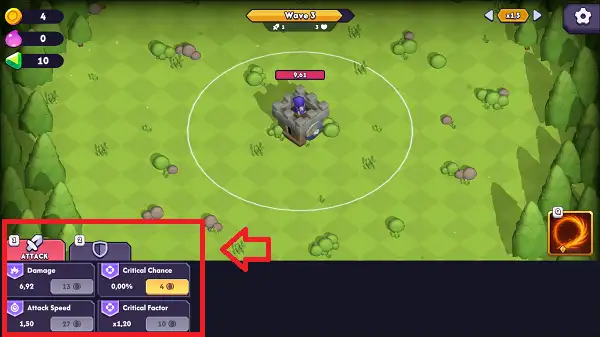
| Interact with menus / purchase upgrades | Left Mouse Button |
| Quick upgrades | Keyboard shortcuts (varies by menu) |
Since your mage attacks on his own, there’s no direct combat input to learn – the entire control scheme is built around navigating menus and confirming upgrade choices quickly, which keeps the pace moving even during hectic later waves. On mobile and tablets, everything is handled through touch taps on the same menus.
Core Progression Systems
Three systems work together to make your mage stronger, and understanding how they interact is the real skill in this game:
- Spells – Your primary source of offense. Each unlocked spell gives your mage a new way to damage enemies.
- Runes – Modify how your spells actually behave, adding effects or bonuses on top of a spell’s base function. Runes are unlocked through gem-earned slots and stay with you permanently.
- Skills – Raise your mage’s base numbers directly – stats like attack, defense, attack speed, range, and health.
Since these three systems stack together, figuring out which one is currently your bottleneck on a given wave is the central strategic decision – more raw spell damage doesn’t help much if your range or attack speed is what’s actually holding you back.
Currency: Coins, Souls, and Gems
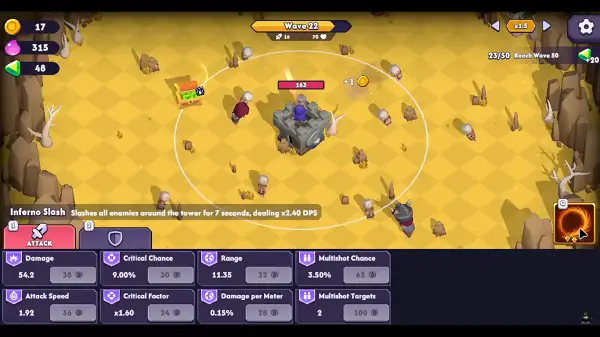
- Coins – Dropped by regular enemies and spent immediately during a run on temporary battle upgrades. If you lose the run, these upgrades are wiped clean.
- Souls – Dropped by stronger enemies and spent after a run ends on permanent upgrades that persist between attempts, regardless of whether you won or lost.
- Gems – Earned by completing quests, used specifically to unlock additional rune slots, which also remain permanently once unlocked.
This structure rewards playing consistently even through losing runs – coins reset, but souls and gems keep building toward permanent improvements no matter how a given attempt ends.
Locations and Bosses
The game features seven locations to progress through, each unlocked by completing the previous location’s quest. Every new location introduces a different environment along with its own set of enemy challenges, keeping the escalating waves from feeling identical as you advance. Bosses appear at intervals within this progression and carry significantly more health than regular enemies, specifically demanding strong single-target damage rather than the wide, wave-clearing damage that works fine against regular enemy groups – a build that handles normal waves comfortably can still stall out against a boss if it isn’t built to focus damage on one target.

Customization
Beyond the core combat and upgrade systems, you can collect and equip different mage skins to change your character’s appearance. This is purely cosmetic and doesn’t affect combat performance, giving you a way to personalize your mage’s look as you unlock more options through continued play.
Tips and Tricks
- Bank resources ahead of a boss fight. Since bosses demand focused single-target damage, it’s often worth holding back some upgrade spending during a wave stretch so you have resources ready to push single-target damage specifically once a boss appears.
- Match your runes to the spell you’re actually using. A rune bonus only counts if it’s paired with the right spell – double check your combinations rather than assuming a generally “good” rune helps regardless of setup.
- Don’t over-invest in coin-based upgrades on a run you’re likely to lose. Since coin upgrades reset on death, it can be smarter to play a little more cautiously once you sense a run is going poorly, rather than dumping resources into upgrades that won’t survive to your next attempt.
- Prioritize soul-based and gem-based upgrades for long-term growth. These persist regardless of how a run ends, so they represent your actual permanent progress between attempts.
- Claim daily quests every session. Since they feed the idle income loop and reward gems for rune slots, skipping them slows your permanent progression more than skipping in-battle coin spending would.
- Identify your current bottleneck before upgrading blindly. If enemies are dying easily but still reaching your tower, range or attack speed might be the real issue rather than raw spell damage – diagnose before you spend.
- Treat each location’s quest as your short-term goal. Since new areas only open once the previous location’s quest is complete, focusing your build around clearing that specific requirement is usually more efficient than trying to optimize for everything at once.

Other Similar Games
Frequently Asked Questions
What is Mage Castle Idle Defense?
Mage Castle Idle Defense is a free, browser-based idle strategy game where a single automatically-attacking mage defends a castle against endless waves of enemies and bosses, while you manage spells, runes, and skill upgrades between and during fights.
Do I control the mage’s attacks directly?
No. The mage attacks automatically. Your input goes entirely into choosing and purchasing upgrades – spells, runes, and skills – rather than aiming or timing attacks yourself.
What’s the difference between coins and souls?
Coins are earned from regular enemies and spent immediately during a run, but are wiped if you lose. Souls come from stronger enemies and are spent after a run ends on permanent upgrades that persist regardless of the outcome.
How do rune slots work?
Gems earned from completing quests unlock additional rune slots, which remain permanently unlocked once earned, letting you socket more runes into your spells over time.
How many locations are in the game?
There are seven locations to progress through, each unlocked by completing the previous location’s specific quest, with each new area introducing its own environment and enemy challenges.
What should I focus on for boss fights?
Bosses have significantly more health than regular enemies and require strong single-target damage. A build optimized purely for clearing large waves of regular enemies can struggle against a boss if it isn’t also capable of focusing damage onto one target.
Are there specific named spells, bosses, or characters?
Publicly available information about this game doesn’t include specific names for its spells, bosses, or locations – it’s built around one unnamed mage character rather than a roster of named heroes. If you’re able to check the specific names directly in the game, they can be added here for more detailed coverage.
Can I customize my mage’s appearance?
Yes. Mage skins can be collected and equipped to change your character’s look, though this is purely cosmetic and doesn’t affect gameplay.
Does the game reward playing while away?
Yes. Daily quests continue to provide resources even when you’re not actively playing, supporting the idle progression loop.
Which browser works best for Mage Castle Idle Defense?
The game runs well on Chrome, Firefox, and Edge.
Can I play Mage Castle Idle Defense on a phone or Chromebook?
Yes. It works in any modern browser, including on Chromebooks, and its menu-driven controls translate well to touch on mobile devices.
Why isn’t Mage Castle Idle Defense loading?
Check your internet connection, make sure this site isn’t blocked on your network, and try disabling any ad blockers – these are the most common causes of loading issues.
SimulationStrategy