




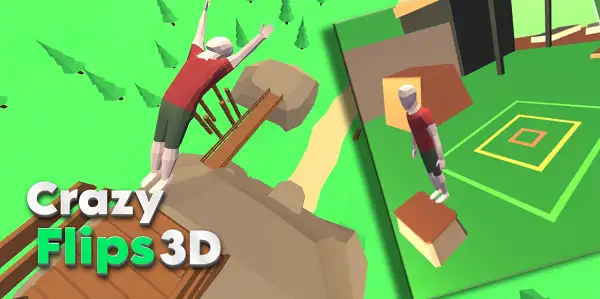
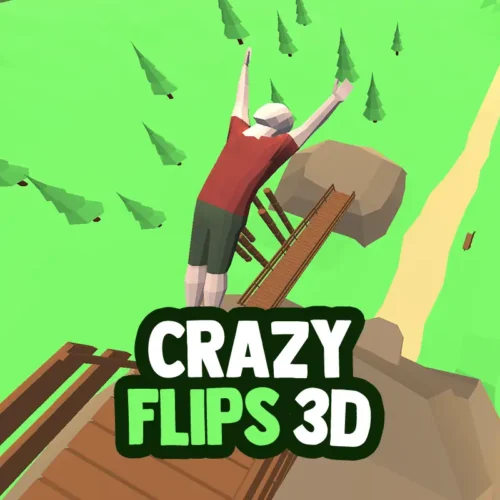



Play Crazy Flips 3D free. Launch, flip, and land perfectly on target zones with ragdoll physics. Crazy Flips 3D asks a simple question and dares you to answer it perfectly every single time: can you launch off a ledge, spin through the air, and land flat on your feet in a target barely big enough to fit you? Nail it, and you rack up points. Miss it, and ragdoll physics turns your character into a floppy, hilarious mess. No downloads, no account required to start. Works in Chrome, Firefox, Edge, and on mobile.
What Is Crazy Flips 3D?
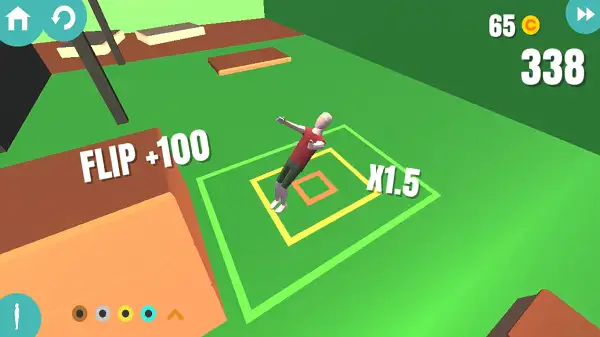
Crazy Flips 3D is a free, browser-based physics stunt game developed by BoomBit, a studio known for simple, addictive casual mobile titles, first released in the early 2020s. The premise is straightforward: launch your character off a high platform, string together flips and spins in mid-air, and land as precisely as possible on a marked target zone below.
What keeps it engaging is the balance between how simple it is to pick up and how genuinely hard it is to master. A single press-and-hold, release mechanic controls everything, but adjusting your jump power, spin timing, and landing angle takes real practice – and when you get it wrong, the game’s ragdoll physics turn every bad landing into its own kind of entertainment.
How to Play Crazy Flips 3D
- Press and hold to charge your jump. The longer you hold, the more power builds up before you launch.
- Release to leap into the air. Your character launches off the platform based on how much power you built up.
- Tap again mid-air to spin. Add flips and rotations while airborne, but keep track of how many spins you’ll need to land upright.
- Time your landing carefully. Coming down flat-footed and standing on the target zone is what earns you the best score.
- Aim for the target zone precisely. Landing outside the marked area, or landing awkwardly, either costs you points or ends the attempt outright.
- Collect coins from good flips and landings. Successful attempts, especially perfect ones, earn coins alongside your score.
- Spend coins to unlock new characters. Use what you’ve earned to unlock different playable characters as you keep progressing.
Controls
| Action | Input |
|---|---|
| Charge Jump | Press and hold Mouse button |
| Launch | Release Mouse button |
| Spin / Flip (mid-air) | Press and hold again while airborne |
That’s the entire control scheme – a single button does everything, from charging your launch to controlling your rotation in the air. On mobile and tablets, tapping and holding the screen works exactly the same way.
Scoring
Landing successfully – meaning your character comes down standing upright, on target – is worth points, generally around 100 for a clean, basic landing. More difficult jumps, tighter target zones, and more complex spin combinations reward higher scores, so pulling off a harder trick on a smaller landing area pays off more than a safe, simple flip on an easy target. Each level typically has a target score you need to reach across your attempts to clear it and move on.
Environments and Levels
Crazy Flips 3D sends you flipping across a genuinely varied set of locations – rooftops, cliff edges, gymnastic mats, construction beams, bridges, and floating platforms all make an appearance as you progress. Early levels keep things simple with generous landing zones and shorter falls, while later levels raise the platform height, shrink the target area, and sometimes add moving or unstable landing spots that demand much more precise timing.
Characters
Coins earned from successful flips and perfect landings can be spent to unlock new playable characters, each with their own look. Unlocking new characters doesn’t change the core physics or difficulty – it’s a cosmetic reward system that gives you something to work toward beyond just improving your score.
Tips and Tricks
- Start slow and master a single flip before chasing combos. Getting a feel for basic jump power and landing timing on simple levels pays off far more than attempting complicated spin combinations too early.
- Aim for a flat, feet-first landing. A clean, standing landing consistently scores better than an awkward or off-balance one, even if the trick itself looked more impressive in the air.
- Match your spin count to your jump height. Higher jumps give you more time in the air for additional flips, but adding too many spins for a short jump means you won’t have time to straighten out before landing.
- Watch your trajectory, not just your spin. Adjusting your launch angle changes how far or how high you travel – a good jump requires paying attention to both distance and rotation, not just one or the other.
- Don’t panic after a bad landing. Since the ragdoll crashes are just part of the game’s charm, treat a failed attempt as a chance to recalibrate your timing rather than something to get frustrated over.
- Save unlocking new characters for after you’re comfortable with the core controls. Since coins take some grinding to accumulate, prioritizing skill improvement early gets you further than rushing to unlock cosmetics.
Other Similar Games
Frequently Asked Questions
What is Crazy Flips 3D?
Crazy Flips 3D is a free, browser-based physics stunt game where you launch a character off high platforms, perform flips and spins in mid-air, and try to land precisely on target zones for points.
What are the controls?
Press and hold your mouse button (or tap and hold on mobile) to charge your jump, release to launch, and press again while airborne to spin. That’s the entire control scheme.
Who made Crazy Flips 3D?
Crazy Flips 3D was developed by BoomBit, a studio known for creating simple, addictive casual mobile games.
How does scoring work?
Landing standing upright on the target zone earns points, generally around 100 for a clean, basic landing. More difficult jumps and tighter target zones reward higher scores.
What happens if I land badly?
Ragdoll physics take over, resulting in a comedic crash. Depending on the level, this may cost you points or require you to try the jump again.
Can I unlock new characters?
Yes. Coins earned from successful flips and perfect landings can be spent to unlock different playable characters, though this is a cosmetic reward rather than something that changes the physics.
Does the game get harder as you progress?
Yes. Later levels introduce greater heights, smaller landing zones, and sometimes moving or unstable landing spots that demand more precise timing than earlier levels.
Which browser works best for Crazy Flips 3D?
Crazy Flips 3D runs well on Chrome, Firefox, and Edge.
Can I play Crazy Flips 3D on a phone or Chromebook?
Yes. It works in any modern browser, including on Chromebooks, and uses simple tap-and-hold touch controls on mobile devices.
Why isn’t Crazy Flips 3D loading?
Check your internet connection, make sure this site isn’t blocked on your network, and try disabling any ad blockers – these are the most common causes of loading issues.
ArcadeSkill Games