









Play Wheel Quest free. Balance your unicycle across endless hills, unlock 8 vehicles, and chase your best distance. Wheel Quest hands you a single wheel, a seat, and nothing else – no steering wheel, no brakes, just pure balance. Lean too far in either direction on the endless, procedurally generated hills ahead, and you’re on the ground before you know it. The only real question is how many meters you can rack up before that happens. No downloads, no account required to start. Works in Chrome, Firefox, Edge, and on mobile.
What Is Wheel Quest?
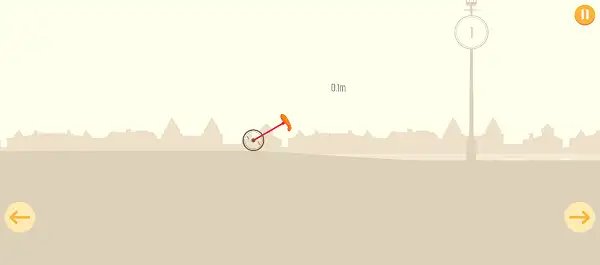
Wheel Quest is a free, browser-based 2D physics balance game published on 1games.io and Azgames.io. It’s a rebranded relaunch of One Wheel, an earlier mobile game by Orangenose Studio – the same developer behind Hardest Game Ever 2 – and the core concept carries over unchanged: ride a one-wheeled vehicle across an endlessly generated, hilly course, and see how far you can travel before losing your balance and crashing.
There’s no steering in the traditional sense. Instead, the entire game is built around real balance physics – leaning your vehicle forward or back to control both your speed and your stability as the terrain rolls, dips, and climbs beneath you. It’s simple to understand within seconds, but genuinely difficult to get consistently good at, which is exactly what keeps players coming back to beat their own best distance.
How to Play Wheel Quest
- Start on your unicycle. You begin every run on the default starting vehicle, referred to internally as “One Wheel.”
- Lean to move and balance. Holding left or right spins your wheel in that direction, controlling both your forward momentum and your balance at the same time.
- Read the terrain ahead. The course is built from generated chunks of downhill, uphill, and flat sections, each demanding a slightly different balance approach.
- Counter-lean to recover. If you start tipping too far in one direction, leaning the other way can pull you back into balance before you crash.
- Watch your distance climb. Your score is simply how many meters you’ve traveled – there’s no separate points system to think about.
- Crash and retry. Losing your balance ends the run immediately, but getting back in and trying again takes no time at all.
- Unlock new vehicles as your total distance grows. Cumulative mileage across all your runs unlocks new rides in the Character Shop, each with its own feel.
Controls
| Action | Input |
|---|---|
| Lean / Ride Left | ← or tap the left side of the screen |
| Lean / Ride Right | → or tap the right side of the screen |
| Retry After a Crash | Any key, or tap the screen |
Wheel Quest is built mobile-first, so touch controls – tapping and holding either side of the screen, or swiping – work just as smoothly as the keyboard on desktop. Both input methods control the exact same lean-and-balance mechanic.
Vehicles
Progress in Wheel Quest is measured entirely in distance, and that same distance is what unlocks new rides in the Character Shop. There are 8 vehicles in total:
- Unicycle (One Wheel) – Your free starting vehicle, available from the very first run.
- Bikes 1 through 5 – Five additional rides, each unlocked as your cumulative distance crosses specific thresholds – early unlocks appear around the 15-50 meter range, with further tiers around 35, 55, and 100 meters.
- Egg Car – A special vehicle unlocked not through distance, but by downloading a partner game from the same publisher.
- Motor Hero – Another special, download-gated vehicle separate from the mileage-based unlock system.
Every vehicle handles a little differently – each one has its own top speed, balance feel, and physics tuning, so a ride that feels comfortable on the starting unicycle might handle quite differently once you’ve unlocked one of the bikes.
Difficulty and Terrain
Wheel Quest doesn’t have discrete, hand-built levels – it’s a true endless run where the difficulty itself escalates the further you travel. The game pulls from a growing pool of tougher terrain chunks as your distance climbs, mixing steeper downhill sections, sharper uphill climbs, and trickier flat stretches with obstacles as you progress. This means the version of the course you’re riding on meter 5 will feel noticeably different from the course at meter 50.
Leaderboard and Player Profile
Wheel Quest includes a genuine online leaderboard, letting you compare your best distance against other players. Before competing, you can set up a player profile with a name and a country flag, giving the leaderboard a bit of personal identity beyond just anonymous high scores.
Tips and Tricks
- Make small, frequent balance adjustments rather than large corrections. Overcorrecting when you start to tip tends to send you falling the opposite way just as easily – short, controlled inputs keep you steadier over time.
- Ease off on downhill sections. Building too much speed heading into a slope makes the next uphill or flat section much harder to control – a little restraint on the way down pays off on what comes next.
- Learn each vehicle’s balance feel separately. Since every ride has its own physics tuning, assuming your unicycle instincts will transfer directly to a newly unlocked bike can catch you off guard – spend a few runs getting a feel for anything new before pushing for distance.
- Don’t fixate on speed over balance. Since your score is purely about distance traveled, staying upright consistently beats risky bursts of speed that are more likely to end your run early.
- Retry immediately after a crash. Since restarting costs no time at all, treating every attempt as quick practice rather than a big setback keeps you improving faster.
- Watch for the shift between terrain types. Downhill, uphill, and flat sections each demand a slightly different balance approach – anticipating which is coming next, rather than reacting only once you’re on it, helps you stay upright longer.
Other Similar Games
Frequently Asked Questions
What is Wheel Quest?
Wheel Quest is a free, browser-based 2D physics balance game where you ride a one-wheeled vehicle across an endless, procedurally generated course, trying to travel as far as possible without losing your balance and crashing.
Who made Wheel Quest?
Wheel Quest is a rebranded relaunch of One Wheel, originally developed by Orangenose Studio, the team also known for Hardest Game Ever 2. It’s currently published through Azgames.io and 1games.io.
What are the controls?
Use the Left and Right Arrow Keys, or tap and hold either side of the screen on mobile, to lean your vehicle and control both your speed and balance.
How is my score measured?
Your score is simply the distance you travel, measured in meters, with your best distance tracked separately so you can try to beat it on future runs.
How do I unlock new vehicles?
Most vehicles unlock automatically once your cumulative distance across all your runs crosses specific thresholds. Two special vehicles, Egg Car and Motor Hero, are unlocked differently – by downloading a partner game rather than through mileage.
How many vehicles are there in total?
Eight: the starting Unicycle, five numbered Bikes unlocked through distance, and two special download-gated vehicles, Egg Car and Motor Hero.
Are there discrete levels in Wheel Quest?
No. It’s a true endless runner – there’s no level-select screen or set of hand-built stages. Instead, terrain difficulty escalates gradually the further you travel in a single continuous run.
Is there a leaderboard?
Yes. Wheel Quest includes an online leaderboard where you can compare your best distance against other players, with a player profile featuring your chosen name and country flag.
Which browser works best for Wheel Quest?
Wheel Quest runs well on Chrome, Firefox, and Edge.
Can I play Wheel Quest on a phone or Chromebook?
Yes. It’s built with mobile play in mind, working smoothly in any modern browser including on Chromebooks, with touch and swipe controls on phones and tablets.
Why isn’t Wheel Quest loading?
Check your internet connection, make sure this site isn’t blocked on your network, and try disabling any ad blockers – these are the most common causes of loading issues.
ArcadeSkill Games