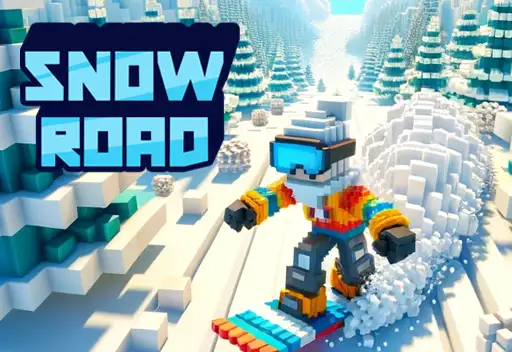
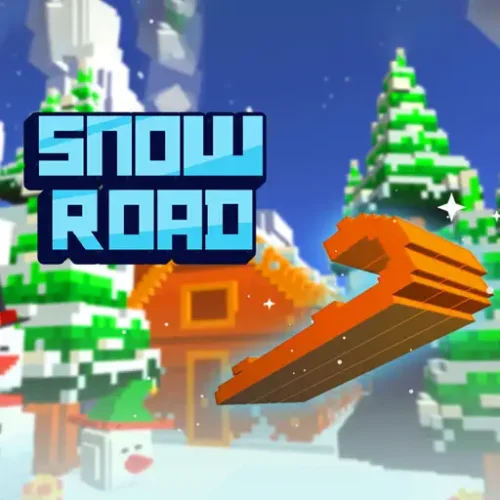
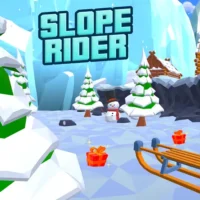
Snow Road is a free endless sled game where you race a pixelated sled down an icy mountain filled with trees, rocks, snowballs, and gaps that want your run to end. The mountain never stops. The speed keeps climbing. And one collision — with anything — ends the run immediately.
The game runs on a lane system. Your sled moves between lanes and your job is to switch into the clear one before the next obstacle arrives. Gift boxes scattered along the path earn you the currency to unlock new sled designs from the in-game shop. The further you get per run, the more you collect, and the faster the next obstacle comes.
Pixel 3D graphics, a constant escalation in pace, and instant restarts after crashes make every session a quick loop of try-die-improve. No download, no account. Plays in any modern browser on desktop and mobile.
Left / Right LanesMovement Style
Gift BoxesCurrency
One HitGame Over
FreeBrowser Play
How the Game Works
Your sled moves forward automatically at a constant and gradually increasing speed. You control which lane it occupies — left, center, or right — and nothing else. Press left or right to shift the sled one lane in that direction. The challenge is reading what is in each lane ahead and moving into the clear one before the obstacle arrives.
One hit from any obstacle ends the run. Trees, rocks, rolling snowballs, and gaps in the path all count as fatal. There is no health bar, no near-miss forgiveness, and no second chance per run. The sled breaks and you start again from zero distance.
The speed is not fixed. Every portion of mountain you cover increases the pace slightly, which progressively compresses the window between seeing an obstacle and needing to have already moved. What feels like generous reaction time at the start of a run becomes a tight decision in less than a minute. The game is explicitly designed so that nobody survives indefinitely — the question is only how far you get before the escalation exceeds your reading speed.
The pace change is the difficulty
Snow Road does not introduce new obstacle types as you progress — it speeds up the ones already there. This means the strategy for a long run does not change; what changes is whether your eyes are processing the track at the pace the game is currently moving. Runs that end at high speed almost always end because the reaction window closed before the lane was changed, not because the player did not know what to do.
Controls
Input
Action
← Left Arrow or A
Shift sled one lane to the left
→ Right Arrow or D
Shift sled one lane to the right
↑ Up Arrow or Space
Jump — clears gaps and holes in the path
Swipe left / right (mobile)
Lane shift
Swipe up (mobile)
Jump
The jump mechanic is separate from lane movement and exists specifically for gaps and holes in the mountain path. A gap that cannot be bypassed by a lane change requires a jump — recognizing which obstacle type is ahead determines which input to use. Early runs tend to fail on gaps because players reach for a lane shift when a jump was needed.
The Obstacles
Snow Road uses a focused set of obstacles that each require slightly different responses. Understanding each one removes the guesswork from longer runs.
Trees
Static obstacles in fixed positions. The most common hazard and the easiest to read because they do not move. Trees are where you learn lane discipline — a row of trees fills two lanes simultaneously and only one clear lane exists. The dangerous habit they create is over-shifting, where a player moves past the clear lane trying to get further away from the obstacle.
Rocks
Also static but smaller and harder to see at high speed. Rocks sit lower in the visual field than trees, which means players who scan the horizon miss them until they are dangerously close. At advanced speeds, rocks become the leading cause of unexpected run endings because they do not announce themselves as visually as larger obstacles.
Snowballs
Moving obstacles that roll across or down the path. The variable is their trajectory — a snowball rolling across your lane from the side requires you to time your movement around its current position, not just react to its initial appearance. Snowballs that roll toward the camera are particularly difficult because their speed relative to yours makes the closing distance hard to judge.
Gaps and Holes
Sections where the path disappears and a jump is required to continue. Gaps span the full width or appear in specific lanes. A full-width gap requires a jump regardless of which lane you are in. A single-lane gap can be either jumped over or avoided by shifting to an adjacent lane — choose based on which requires fewer inputs given your current position.
Icy Ramps and Slopes
Sections of the path that redirect your sled’s trajectory. These are less about dodging and more about the positioning they leave you in after passing through. Exiting a ramp section in the center lane rather than near an edge leaves you the most options for whatever follows immediately.
Gift Boxes and the Sled Collection
Gift boxes appear randomly along the path during runs. They are the only source of sled currency in the game — there is no time-based reward, no daily bonus, no other collection mechanism. Every sled you want to unlock comes from collecting gift boxes during actual runs, which means survival time and collection are the same pursuit.
The shop contains a range of named sled designs that change the visual character of your runs without affecting the gameplay mechanics. Confirmed sleds in the collection include:
Santa Sled — the classic seasonal design
Round Sled — compact circular shape
Chroma Sled — color-shifting visual design
Ancient Sled — older style aesthetic
Modern Sled — sleek contemporary design
Additional designs available in-game
None of the sleds affect speed, turning radius, or jump height. The choice is entirely aesthetic, but having a collection target makes runs feel purposeful even when a distance record is not the goal for that session.
When to skip a gift box
Gift boxes that sit in a lane adjacent to an obstacle are regularly responsible for runs ending early. The collection pull is strong, but a box that requires a shift toward a tree or rock is a trap. Skip it. The box is worth less than the distance you would have covered by staying in the clear lane.
How to Run Further
1
Look further ahead than feels necessary
The single most effective technique for longer runs is reading the track further ahead than your current obstacle. Reacting to what is directly in front of the sled means your lane changes are always last-second. Reading two or three obstacle positions ahead means your inputs arrive before there is urgency, which is dramatically easier to sustain at high speed.
2
Smooth lane shifts beat sharp corrections
Jerky, rapid-repeated inputs — pressing left twice quickly to over-correct — produce unpredictable positioning that makes the following obstacle harder to read. One deliberate shift to the clear lane, held there, creates a stable platform for the next decision. Players who tap left-right-left trying to micro-adjust position crash more frequently than players who commit to one clean lane at a time.
3
Default to center lane when no obstacle is visible
The center lane gives you access to both a left and a right shift as options. A sled in the far left lane can only shift right — it has lost one option. In clean sections between obstacle clusters, drifting back toward center costs nothing and preserves maximum flexibility for whatever appears next.
4
Identify gap vs obstacle before deciding input
The jump and lane shift inputs do different things, and using the wrong one costs the run. A gap requires a jump; an obstacle in your lane requires a shift. At high speeds the visual distinction compresses. Train yourself to categorize what is ahead — hole or solid object — before the input fires rather than reacting to movement with whichever key is faster to reach.
Yes, completely free. No download, no account, no purchases. Plays in your browser on desktop and mobile with nothing to install.
What are the controls?
Left Arrow or A to shift one lane left. Right Arrow or D to shift one lane right. Up Arrow or Spacebar to jump over gaps. On mobile, swipe left, right, or up to match the same inputs.
What happens when you hit an obstacle?
The sled breaks and the run ends immediately. There is no health system and no margin for error — one contact with any obstacle, tree, rock, snowball, or gap ends your attempt. The game restarts instantly from zero distance.
Does the speed increase during a run?
Yes. The sled’s speed increases continuously the further you travel. The obstacle types do not change — the same trees, rocks, and gaps appear throughout — but the speed compresses the decision window until most players reach a point where reaction time is no longer fast enough. Longer runs require reading ahead rather than reacting.
What do gift boxes do?
Gift boxes are the in-game currency. Collecting them during runs builds up credit to unlock new sled designs from the shop. They are the only way to earn sleds — there are no other reward mechanisms.
What sleds can I unlock?
Confirmed sleds in the collection include the Santa Sled, Round Sled, Chroma Sled, Ancient Sled, and Modern Sled, with additional designs available in the shop. All unlocked sleds are purely cosmetic — none affect the game’s speed, turning, or jump height.
When should I jump instead of shifting lanes?
Jump when the obstacle ahead is a gap or hole in the path — something the sled would fall through. Shift lanes when the obstacle is a solid object like a tree, rock, or snowball in your current lane. Using the wrong input for the wrong obstacle type is one of the most common causes of unexpected run endings.
What is the best position to stay in when the path is clear?
The center lane. Being centered gives you the option to shift either left or right for the next obstacle. Staying in a side lane eliminates one of those options and forces you to react in only one direction, which costs runs when the next obstacle appears on the side you cannot shift toward.
Is Snow Road the same as Snow Rider 3D?
No. Both are free browser sled games with similar themes, but they are separate games. Snow Road uses a lane-shift system with pixel 3D graphics. Snow Rider 3D is a different game on the same platform. They share the same genre and general obstacle-avoidance format but are not the same game or the same version of a game.
Can I play Snow Road on my phone?
Yes. The game works on mobile browsers with swipe controls that replace the keyboard inputs. Swipe left, right, or up to lane shift and jump. No app download is required.
✦ Final Verdict
Snow Road does what the best endless runners do — it presents a simple system and lets escalating speed do all the difficulty work. The lane mechanic is clean, the obstacle set is focused, and the gift box loop gives each run a tangible secondary purpose beyond just distance. The game does not overstay its welcome in a single session and does not feel like it needs more than it has. It is a well-made winter endless runner that plays exactly as advertised, and that honesty about what it is makes it consistently worth coming back to.