











Farting Flight
What Is Farting Flight?
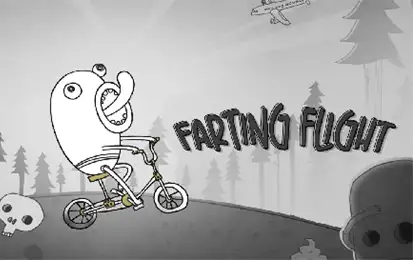
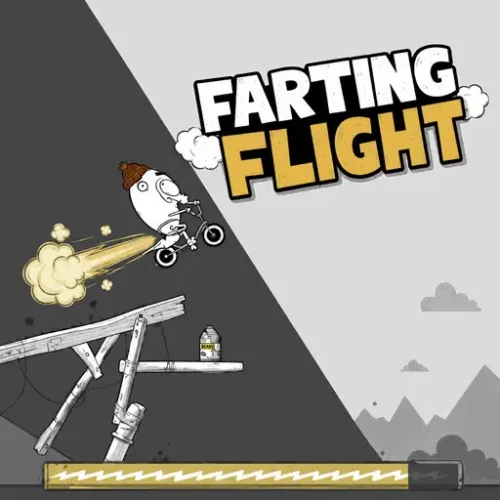
Farting Flight is a free 2D physics-based downhill game developed by AZGames and released on 13 May 2026. You control Doofus — a clumsy cartoon rider — launching him down steep, obstacle-filled slopes and keeping him moving as far as possible through a combination of terrain physics, fart-powered boosts, and whatever collision luck the ragdoll engine decides to deliver this run.
The game belongs to the same tradition as Happy Wheels and similar physics launchers: the comedy comes from the unpredictable way the character reacts to the environment, and the strategy comes from learning to work with the physics rather than against it. Every run is different. One moment Doofus is bouncing through oversized forks and garbage pits; the next he has somehow landed on a monster truck and is flying across the map.
No download, no account. Plays in any modern browser on desktop, tablet, and mobile.
How the Game Works
Farting Flight is divided into two phases that feel very different from each other: the launch and the descent.
The launch is where you set the run in motion. Hold the input to build launch power — the longer you hold, the more force behind the initial push. Release to send Doofus rolling down the hill. How much power you build here directly affects starting momentum, which matters because the early slope is where you either build the speed that carries you through the harder sections ahead or lose it immediately to the first rock you clip.
The descent is where the physics takes over. Doofus tumbles, bounces, and ragdolls down the terrain. Your job is to time your fart boosts to add propulsion at useful moments and collect beans and stars as they appear along the path. The run ends when Doofus completely stops moving — either from hitting something he cannot bounce off, or from losing enough momentum that the slope is no longer carrying him forward.
Controls
| Input | Action |
|---|---|
| Click | Launch or start the run |
| Hold | Build launch power before releasing |
| Release | Trigger the downhill movement |
| Tap (mobile) | Same as click — all inputs work on touchscreen |
The control scheme is intentionally minimal. Most of what happens after launch is the physics engine deciding Doofus’s fate, and your influence comes through boost timing rather than constant input. This is not a game where pressing more buttons helps. It is a game where pressing the right one at the right moment extends a run, and pressing it at the wrong moment does not.
What You Are Collecting and Why It Matters
Two collectibles appear throughout runs, and understanding both changes how you approach each attempt.
Beans are the fart fuel. Pick them up while rolling and they charge your boost capacity. Without beans, fart boosts either do not fire or produce less propulsion. The more beans you carry into a tricky section, the more control you have over maintaining momentum through it. Experienced players learn to prioritize bean pickups at the start of a run over going for distant stars that require risky detours.
Stars are the run currency. They carry over between runs and are spent on upgrades in the shop between attempts. Stars do not directly affect the current run — they are the long-term progression layer that makes each run feel like it contributes to something even when Doofus stops twenty meters from the start.
Most players instinctively spend their first stars on cosmetic unlocks or vehicle skins. The more useful investment, consistently, is momentum-related upgrades — anything that improves starting launch power, bounce efficiency, or boost propulsion. Better cosmetics are satisfying but they do not change how far Doofus travels. Better momentum does.
The Vehicles
Doofus starts every run on a bicycle. As you progress and unlock vehicles through upgrades and star spending, you gain access to rides that behave completely differently on the terrain.
The Obstacles
The terrain in Farting Flight does not follow a predictable layout. Runs pull from a pool of obstacle types and arrange them differently each time, which is part of why two runs never feel identical. The types you will encounter most often:
- Rocks and cliff edges — the baseline hazard. Small ones deflect Doofus and can actually be useful for generating bounce. Large ones or sharp edges at the wrong angle end runs quickly.
- Trash pits — areas where Doofus sinks into garbage and loses all momentum. These are the most common cause of unexpectedly short runs. When Doofus lands in a trash pit rather than bouncing off a surface, the physics stops working in your favor.
- Giant forks — oversized utensils jutting from the terrain. They look like hazards but they also function as ramps at the right angle, which occasionally produces the most impressive airtime of an entire run entirely by accident.
- Spikes and moving hazards — appear in later sections as runs extend further. These require boost timing to either clear over them or navigate around, and they are where runs that are going well most commonly end.
Why Not Panicking Is the Actual Skill
The most common way new players make runs shorter than they need to be is by overreacting to what the physics is doing. Doofus starts spinning on a slope. They boost immediately. The boost fires at the wrong angle and launches him directly into the nearest rock.
Farting Flight’s physics engine is built to create extended bouncing chains when Doofus is left to react naturally to terrain. Interrupting that chain with a poorly timed boost breaks the momentum it was building. The moments where a run looks like it is about to end are often the moments where the ragdoll is one bounce away from recovering on its own — if you let it.
Tips That Actually Work
Similar Games You Will Like
Frequently Asked Questions
Farting Flight does the thing that the best physics launchers always do: it makes failure entertaining enough that the gap between runs is barely noticeable. The ragdoll behavior is unpredictable in exactly the right way — chaotic enough to keep every run surprising, consistent enough that good technique actually makes a visible difference.