












Geometry Jump
What Is Geometry Jump?
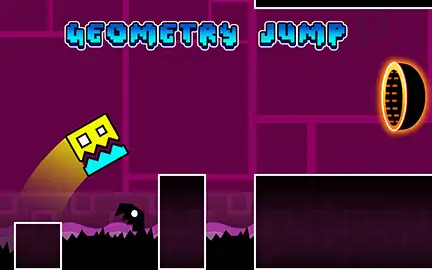
Geometry Jump is a free auto-scrolling geometric platformer inspired by Geometry Dash. You guide a cube — and several other geometric shapes it transforms into — through neon levels packed with spiked blocks, walls, liquid pools, and flying sections. Your cube advances automatically. You handle everything else with a single input: click or press Spacebar to jump, hold to fly in flying sections, and time your moves to the rhythm of the level.
The game positions itself as the more accessible version of Geometry Dash’s formula — familiar mechanics, more forgiving pacing, and a checkpoint portal system that lets runs continue from progress points rather than restarting entirely from level one every time. If Geometry Dash’s speed has ever felt like it was working against you rather than with you, Geometry Jump is worth trying. An option in the settings menu also lets you reduce the game speed directly.
No download, no account. Plays free in any browser on desktop, tablet, and mobile.
The One-Button Format — and Why It Works
One button. That is the complete input vocabulary of Geometry Jump. Click or press Spacebar and the cube jumps. In flying sections, holding the button keeps the shape airborne; releasing lets gravity bring it down. The entire game is the decision of when to press, when to hold, and when to release.
What makes one-button platformers compelling rather than shallow is the consequence attached to each input. In Geometry Jump, a mistimed click means the cube hits a spike and explodes. A well-timed one threads the gap cleanly. The reading of what is ahead and the precision of the response is where the game lives — not in a complex control scheme but in the mastery of a single action applied with exact timing across increasingly demanding obstacle sequences.
Controls
| Input | Action |
|---|---|
| Left Click or Spacebar | Jump (cube) / Fly up (flying sections) |
| Release / No input | Fall under gravity (in flying sections) |
| Tap (mobile) | Same as click — tap anywhere on screen to jump or fly |
The Obstacle Set — What You Are Navigating
Character Transformations — The Game Within the Game
Geometry Jump’s most distinctive feature is that the cube is not always a cube. Passing through specific portal tiles transforms the character into a different geometric shape, and each shape has its own movement physics and control response.
The 1games.io version specifically notes that “the main entity can transform into several other states with their own unique movement patterns.” This is the mechanic that separates Geometry Jump from a basic one-button jumper.
The most common death in Geometry Jump is not the spike directly in front of you — it is the spike two steps after a transformation portal that your previous movement pattern would have cleared but your new movement physics cannot. Every portal is a signal to reset your timing instincts. What worked a second ago no longer applies. The first time you hit a transformation in any level is orientation. The second run, you know what physics to expect on the other side.
The Checkpoint System
Geometry Jump uses two types of progress preservation that distinguish it from Geometry Dash’s unforgiving restart-from-the-beginning approach.
Portal checkpoints are placed throughout each level. Passing through a portal marks your current position as the respawn point. If the cube explodes on a spike ahead, the run restarts from the last portal reached rather than from the beginning of the level. The progress bar at the top of the screen shows how far through the level you are and how far to the next portal.
Flag placement (available in some versions) lets you manually plant a checkpoint flag as you progress. A cube that dies respawns at the last flag placed. This gives you direct control over where a difficult section’s retry point is rather than depending on portal placement alone.
Together, these systems mean a long level does not require a full replay from scratch every time a spike catches you in the final third. This is the design decision that most directly separates Geometry Jump from Geometry Dash — it allows players to make genuine forward progress through difficult sections without the full-level restart that Geometry Dash demands.
The Speed Option — An Accessibility Feature Worth Knowing
In the game options menu, Geometry Jump includes a speed adjustment setting. Reducing the game speed gives more reaction time for obstacle sequences that at default speed feel too fast to read before arriving. This is not a cheat mode — it is a genuine learning tool that allows players to build the pattern recognition for a difficult section at a manageable pace before attempting it at the level’s designed speed.
Players who use the speed option to learn a section and then raise the speed back to normal consistently develop better timing than players who attempt the same section at full speed repeatedly and rely on reflex memorisation alone. Understanding the pattern at a slower speed produces cleaner, more transferable technique than pure reflex drilling.
Stars and Level Sections
Stars are collectibles scattered throughout levels. Collecting them contributes to your score and unlocks progression rewards. The portal that ends each section of a level also acts as a checkpoint — reaching the end of a section with stars collected locks in both the progress and the collectible score before the next section begins.
Levels are structured in sections rather than as single continuous runs. Each section has its own start-to-portal journey, which means progress can be made in manageable chunks rather than requiring a complete first-to-last run to achieve anything meaningful.
Geometry Jump vs Geometry Dash — The Key Differences
Geometry Dash, created by Robert Topala and released in August 2013, is the original rhythm-based platformer that Geometry Jump draws inspiration from. In Geometry Dash, dying at 98% of a level sends you back to the very beginning. There are no mid-level checkpoints in the official game. The difficulty is extreme and intentional — the community has built an entire culture around level completion rates and skill categories.
Geometry Jump takes the same visual aesthetic, the same transformation mechanic, and the same one-button control scheme, and rebuilds the difficulty structure around checkpoints and a more forgiving pacing. It is not a lesser game for that choice — it is a different game for a different player: someone who wants the geometric obstacle course experience without the hours of failed attempts that Geometry Dash demands as the price of admission to its hardest levels.
Tips for Getting Through Levels
- Read obstacles in pairs, not individually. A spike on the floor with a spike on the ceiling creates a window. That window is what you are actually jumping through, not just over. Reading the ceiling obstacle as part of the same jump decision as the floor obstacle produces more accurate height calibration than treating them separately.
- Watch for rings and plan the button press before reaching them. Rings require a button input while inside them — which is a very short window at the game’s speed. Preparing the input as you see the ring rather than reacting when you arrive gives you the full window to use it rather than catching only the tail end.
- After every transformation portal, reset your timing expectations. The physics change on transformation. A jump timing that worked perfectly in cube form will not carry over unchanged to a flying form. Treat every portal as the beginning of a new timing calibration rather than a continuation of the previous one.
- For liquid pools, start the jump before the pool arrives in frame. Pools are wider than they appear when first visible. A jump that starts at the pool’s edge clips the far side. Starting the jump while still on solid ground approaching the pool builds the full arc needed to clear the width.
- Use the speed option to learn difficult sections. Reducing speed in the options menu turns an impossible-seeming obstacle sequence into a learnable pattern. The technique you build at lower speed transfers directly to full speed. It is faster to learn a section slowly and run it fast than to run it fast blindly until something sticks.
Similar Games You Will Like
Frequently Asked Questions
Geometry Jump earns its place as a Geometry Dash alternative by making two honest design decisions: checkpoints that respect the player’s time, and a speed option that lets difficult sections be learned rather than only endured. The transformation mechanics, the rings-and-pads system, and the flying sections all carry genuine depth from the Geometry Dash lineage.