













Hot Games

Arcade Glide – Play Game Online
Arcade Glide

Arcade Glide

4.6 (51,387)
One Button · Arcade · Endless Racing

Arcade Glide

🎮 Controls: Hold and Release Mouse — One Button
⚡ Style: Anchor-Drift Endless Racer
🧠 Skill: Drift Timing and Corner Reading
🌐 Platform: Free Browser + Mobile

What Is Arcade Glide?

Arcade Glide Game – Endless Drift

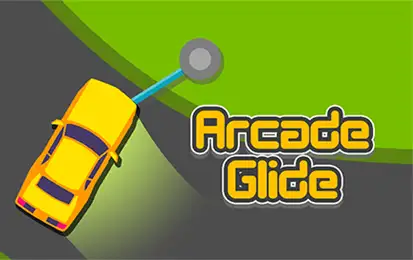
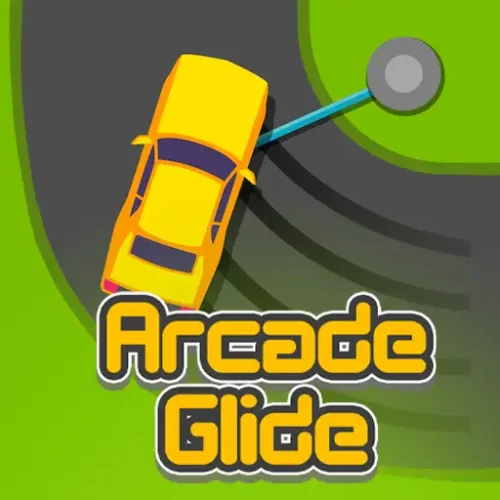
Arcade Glide is a free one-button endless arcade racer developed by AZGames and released on 6 May 2026. Your car moves forward automatically. You never steer it. What you do instead is control how it swings around corners using an anchor system — hook onto an anchor point at each turn, ride the arc, and release at the exact right moment to continue forward without hitting the walls.

One button. Hold to hook. Release to continue. The elegance of the control scheme is deceptive — the game is rated 9.1 on 1games.io because that one button contains an enormous amount of depth in timing. Every corner asks you to judge whether this is a wide arc or a tight one, and how long to hold accordingly. Hold too long and the car swings into the inner wall. Release too early and it drifts wide into the outer barrier. Both end the run instantly.

No download, no account. HTML5, plays in any browser on desktop, tablet, and mobile.

AZGamesDeveloper
6 May 2026Released
One ButtonHold / Release
FreeBrowser Play

How the Mechanic Actually Works

Most descriptions of Arcade Glide say “drift around corners” and leave it there. That misses the point. The game does not use traditional drifting — it uses an anchor-and-swing system that behaves more like a grappling hook than a steering wheel.

Here is the complete sequence for every corner:

1
Approach the corner
Your car moves toward the turn automatically. The anchor point at the corner becomes visible ahead. At this point your only decision is when to hold the button — which determines how wide or tight your arc will be.
2
Hold the mouse button — hook onto the anchor
Pressing and holding connects your car to the anchor point. The car immediately begins swinging around it in an arc, like a ball on a string. The longer you hold, the further through the arc your car travels. The car is now physically rotating around the anchor rather than steering through the corner.
3
Release at the exit point
Releasing the button detaches from the anchor and launches the car forward in the direction it is pointing at that exact moment. Release when the car is aimed down the next straight section and it continues cleanly. Release too early and it flies wide into the outer wall. Hold too long and it swings into the inner wall.
4
Carry the momentum into the next corner
A well-timed release puts the car in the center of the next straight, which gives the maximum preparation distance for reading and timing the following corner. A slightly off release puts you closer to one side, compressing your reaction window for whatever comes next.
Both failure directions feel different

Holding too long and releasing too early each produce distinct crashes you learn to recognize. Holding too long sends the car into the inner wall — the tight inside of the corner. Releasing too early sends it wide into the outer barrier. Learning to identify which error just ended your run helps correct it in the next attempt. Players who treat both outcomes as the same mistake take longer to improve than those who name them separately.

Controls

InputAction
Hold Left Mouse ButtonAttach to anchor point — begin swing around corner
Release Left Mouse ButtonDetach from anchor — launch car toward next section
Hold tap (mobile)Same as holding mouse — anchors to corner point
Release tap (mobile)Exits the drift and continues forward

The game uses exactly one input. The car moves forward and speeds up on its own. Every outcome — good corner, inner wall crash, outer wall crash — comes from one decision: how long to hold the button on each anchor.

What Changes as the Game Progresses

Arcade Glide does not introduce new mechanics as runs extend. It escalates what already exists in three specific ways:

Increasing speed
The car moves faster the further you travel. The corners do not change — your time to read and prepare for each one shrinks. A corner that gave you three seconds of preparation time early in a run gives you one second at advanced speed. The same technique applies; the window to execute it compresses.
Narrower track sections
Later track sections reduce the margin on each side of the car. A release that was acceptably slightly early on a wide section becomes a wall crash on a narrow one. Centering position after each corner matters more as the margins close.
Sharper corner sequences
The game sequences corners with less straight track between them at higher progression. Instead of reading one corner at a time, you begin reading two corners in sequence — anticipating where the car will be after the current release and setting up for what follows immediately.

The Shaking Signal

One detail that almost no competitor mentions: as your car approaches the walls during a swing, it visually shakes. This shaking is a tension indicator — it tells you the car is entering dangerous proximity to the barrier before a crash actually occurs. Players who learn to use the shake as a warning signal rather than a crash notification gain a meaningful reaction window that is not available to players who only notice when the run ends.

When the car starts shaking during a hold: release earlier than you normally would on the next attempt, or modify your hook timing so the arc does not get that close to the wall. The shaking is information, not just visual noise.

Corner Types and Their Timing Differences

Not every corner in Arcade Glide is the same shape. The timing of your release needs to match the geometry of each corner specifically.

Wide corners — long holds
Corners with a gentle curve allow a longer hold before the car reaches the exit angle. Wide corners are the easiest to learn on because the timing window is generous. The danger is developing a habit of holding long and carrying that into tighter corners where the same hold sends the car into the inner wall.
Short or sharp corners — fast releases
Tight corners with a small radius have a narrow exit window. The car passes through the correct exit angle quickly and misses it just as quickly. Sharp corners require an earlier release than feels natural, especially after a run of wide corners that has conditioned a longer hold. These are where most long-run deaths occur.
Consecutive corners with no straight
The hardest section type. Back-to-back corners require that a release from the first corner immediately sets up the hook timing for the second. There is no preparation distance between them. The car’s position after each release determines whether the next hook is reachable. Ending a corner near the center of the track is the only reliable setup for surviving back-to-back turns.

Gems and Car Unlocks

Gems are collected during runs and accumulate across attempts. They are the currency for unlocking additional cars in the shop. Like other AZGames endless titles, none of the unlocked cars affect the physics or the timing window — the choice is aesthetic. The gem loop gives each run a secondary motivation beyond distance, which makes short runs feel productive even when they do not set records.

Tips That Translate Directly to Longer Runs

  • Stay center after each release. A centered exit from one corner gives you a full preparation distance for the next. A slightly wide or tight exit puts you closer to one wall, which means your hook timing on the following corner has less room for error. Center is the default position to target on every straight.
  • Read the corner geometry before you hook, not after. The shape of the upcoming corner is visible before you reach the anchor. Use the straight leading into it to identify whether it is wide or sharp and pre-set your hold duration mentally. Deciding hold length after you have already hooked is too late at high speed.
  • Shorter holds are almost always safer than longer ones. An early release sends you wide but often recoverable depending on track width. A late release into the inner wall is almost always a crash. In the learning phase, err toward releasing slightly early and adjust from there.
  • Use the shake as an advance warning. When the car shakes near a wall, log that timing point. In the next run, release earlier on that corner specifically. The shake appears a beat before the crash — it is the game signaling you have just enough time to correct if you read it immediately.
  • Do not adjust speed — focus on duration. The car handles its own acceleration. Players who try to “go slower” by adjusting their play style are fighting a mechanic that does not exist. The only variable you control is how long to hold each corner. Speed management is not part of your toolkit.

Similar Games You Will Like

Frequently Asked Questions

Who made Arcade Glide?
Arcade Glide was developed by AZGames and released on 6 May 2026.
Is Arcade Glide free to play?
Yes, completely free. No download, no account, no purchases. Plays in any browser on desktop, tablet, and mobile.
What are the controls?
Hold the mouse button to hook onto the anchor at a corner and begin the drift arc. Release to exit the drift and launch the car toward the next section. On mobile, tap and hold replaces the mouse. That is the complete control scheme.
How does the drifting mechanic work?
Each corner has an anchor point. Holding the button hooks your car onto it and the car swings around it in an arc, like a ball on a string. Releasing detaches the car and it launches forward in whichever direction it is pointing at that moment. The timing of the release determines whether the car exits cleanly or hits a wall.
Why does the car shake sometimes?
The shaking is a visual warning that the car is approaching dangerously close to a wall. It appears just before a crash, giving a brief signal that the current hold is too long or the angle is too tight. Use it as a release cue in the next run rather than just watching the run end.
What happens if I hold the button too long?
The car swings past the exit angle and into the inner wall of the corner — an instant crash. Holding too long is the most common cause of runs ending on tight corners.
What happens if I release too early?
The car exits the arc before it has reached the correct angle and drifts wide into the outer barrier — also an instant crash. On wide corners with forgiving track width, an early release sometimes recovers. On narrow sections it almost always crashes.
Does the speed increase during a run?
Yes. The car accelerates the further you travel, compressing the preparation time before each corner. The mechanic itself does not change — only the window you have to execute it. Longer runs require reading corners further ahead rather than reacting to them as they arrive.
What do gems do in Arcade Glide?
Gems are collected during runs and used to unlock additional cars in the shop. They accumulate across attempts. Unlocked cars are cosmetic — none affect the physics, timing windows, or speed of the game.
Can I play Arcade Glide on my phone?
Yes. The tap-and-hold mobile input replaces the mouse button directly. Hold a finger on the screen to hook onto anchors, release to exit drifts. The one-button design works naturally on touchscreens.
✦ Final Verdict

Arcade Glide earns its 9.1 rating by doing something genuinely rare — building a mechanic that takes about ten seconds to understand and considerably longer to master, with a feedback loop tight enough that improvement feels constant. The anchor-drift system is unlike anything else in the one-button driving genre. Holding is wrong if you hold too long. Releasing is wrong if you release too soon. Finding the exact window between those two outcomes, across increasingly fast and tight corners, is the entire game. It is a simple premise that delivers far more than it promises.


Arcade

Discuss Arcade Glide

Leave a Comment

Link copied!