






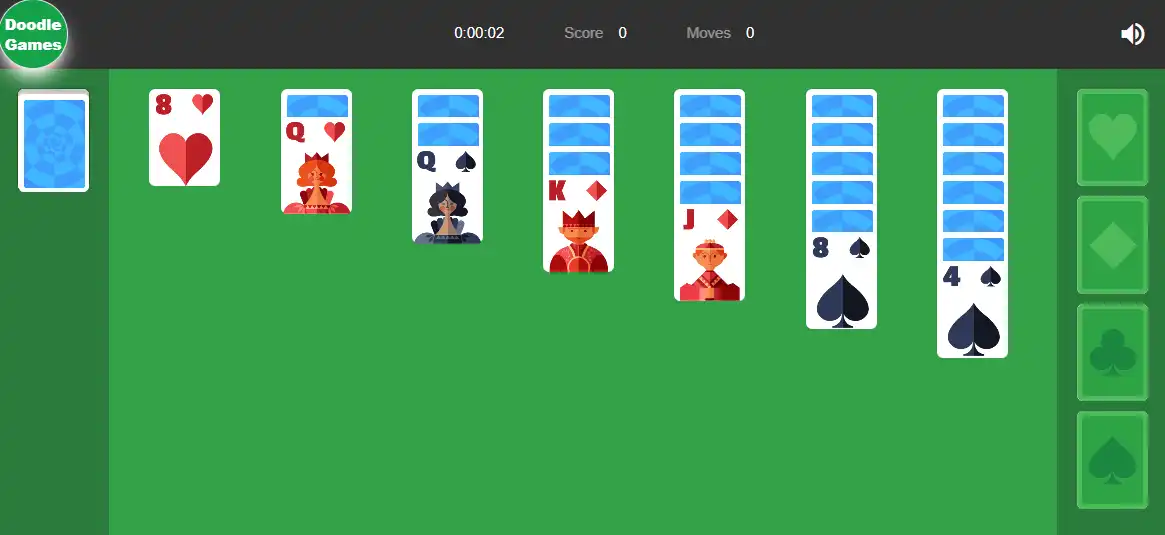








Sort a full deck of cards into four foundation piles, building each one in order from Ace to King. Classic Klondike rules, drag-and-drop cards, and a choice between an Easy mode for relaxed play or a Hard mode for a real challenge.
| Feature | Details |
|---|---|
| Card game type | Klondike Solitaire |
| Goal | Build 4 foundation piles, Ace to King, one per suit |
| Difficulty modes | Easy and Hard |
| Assist features | Undo and Hints |
| Controls | Drag-and-drop (desktop), tap-to-select and tap-to-place (mobile) |
| Platform | Browser — desktop and mobile |
Contents
Controls
| Action | Desktop | Mobile |
|---|---|---|
| Move a card | Click and drag to the destination pile | Tap the card, then tap the destination |
| Draw from the deck | Click the deck pile | Tap the deck pile |
| Auto-move to foundation | Double-click a card (where applicable) | Tap the card if it has a valid foundation move |
On desktop, drag-and-drop is the primary way to move cards — pick up a card and release it over a valid column or foundation pile. On mobile, the tap-then-tap method replaces dragging: tap the card you want to move, then tap where you want it to go. Tapping the deck pile turns over new cards when no other moves are available.
The Rules
Doodle Solitaire follows standard Klondike rules — the most widely recognized solitaire format. The board is set up with seven tableau columns and a deck pile, and the goal is to move every card into one of four foundation piles, sorted by suit, built up in order from Ace to King.
The two core rules that govern every move:
- Tableau columns are built in descending order with alternating colors — a red 7 can go on a black 8, a black 6 can go on a red 7, and so on.
- Foundation piles are built in ascending order within a single suit — the 2 of hearts can only go on the Ace of hearts, the 3 of hearts only on the 2, and so on through the King.
Moving cards between tableau columns reveals the face-down cards underneath, which is how new moves become available as the game progresses. The game is won when all four foundation piles are complete, from Ace to King, in every suit.
Easy vs Hard Mode
| Mode | What it changes |
|---|---|
| Easy | More relaxed dealing — generally results in more available moves on the board, making it a good way to learn the rules and build confidence |
| Hard | Cards are dealt in a way that limits available moves significantly — requires planning several moves ahead and careful sequencing |
Easy mode is the better starting point if you’re still learning how tableau sequencing and foundation building interact — with more moves available at any given time, mistakes are easier to recover from. Hard mode removes much of that flexibility: the same Klondike rules apply, but the deal makes it far more likely that the “obvious” move blocks a card you’ll need later. Players who do well in Hard mode tend to think about what a move reveals, not just what it accomplishes immediately.
Undo and Hints
Two assist features are built in: Undo, which reverses your last move, and Hints, which suggests a valid move when you’re stuck. Both are useful in different ways — Undo is for correcting a move that turned out to block your progress, while Hints is for situations where no move is obviously available and you want to confirm whether one exists before drawing more cards from the deck.
Relying on Hints too early in a game can mean missing the chance to develop your own read of the board — but late in a difficult Hard mode game, when the visible options have narrowed significantly, Hints can confirm whether a position is still winnable or whether the remaining cards are locked in an unsolvable arrangement.
Tips
▸ Prioritize moves that reveal face-down cards
Every face-down card in a tableau column is a card you can’t use yet. A move that uncovers a new card is usually more valuable than a move that just rearranges visible cards — even if the immediate move looks less productive, the information and options gained from revealing a hidden card often matter more.
▸ Don’t rush cards to the foundation piles
It’s tempting to send every eligible card to a foundation pile as soon as possible. But a low card sent to a foundation early can sometimes be needed in the tableau to continue a sequence — for example, a red 2 might be needed to receive a black 3, even though it’s also eligible to go to its foundation. Holding a card in the tableau a little longer sometimes opens more moves than banking it immediately.
▸ Empty columns are valuable — protect them
A fully empty tableau column can hold any card, including a King, which is otherwise one of the hardest cards to relocate once exposed. Working toward clearing at least one column completely gives you flexibility for moving Kings and reorganizing long sequences that would otherwise have nowhere to go.
▸ In Hard mode, think two moves ahead before committing
Because Hard mode limits available moves, a move that looks fine in isolation can close off the only path to a card you need two or three moves later. Before making a move, check what it reveals and whether anything currently visible depends on the card being moved staying where it is. This habit matters far less in Easy mode, where extra moves are usually available to recover from a misstep.