


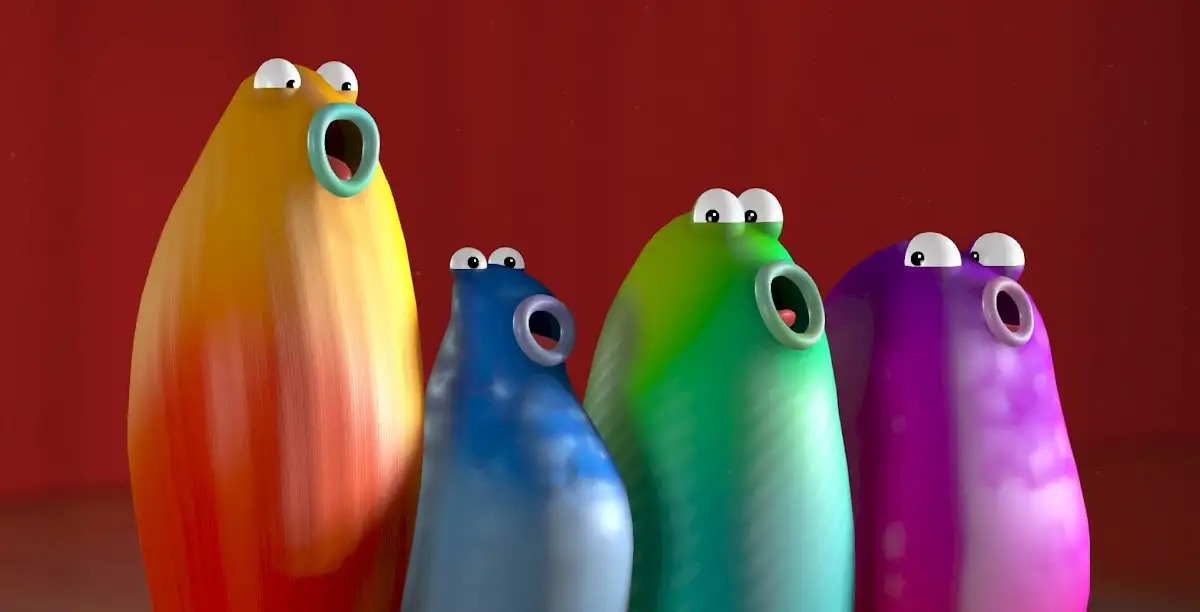
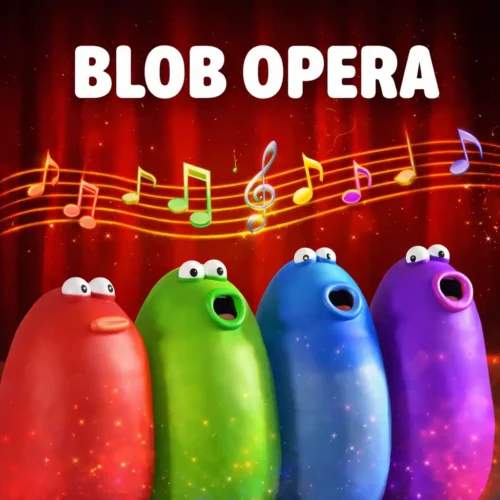




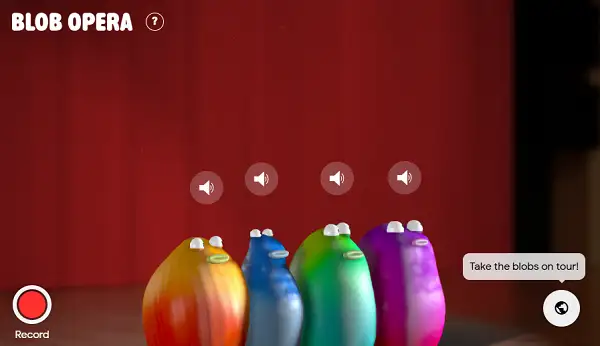
lay Blob Opera free. Conduct four singing blob characters using real machine learning trained on professional opera singers. Blob Opera hands you four wobbly, big-headed blob characters and lets you conduct them like your own opera quartet. Drag one up and it hits a higher note, pull it left or right and its vowel sound shifts, and the rest of the group follows along to build a full harmony – no musical training needed. No downloads, no account required to start. Works in Chrome, Firefox, Edge, and on mobile.
What Is Blob Opera?
Blob Opera is a free music and skill game developed by artist David Li in collaboration with Google Arts & Culture, released in December 2020. It uses a genuine machine learning model, trained on the real voices of four professional opera singers, to generate realistic operatic sound at any pitch or vowel you choose – which is why anyone can create something that actually sounds like opera, no musical background required.
To build it, four singers – tenor Christian Joel, bass Frederick Tong, mezzo-soprano Joanna Gamble, and soprano Olivia Doutney – each recorded hours of singing. That training data taught the model what operatic singing sounds like, so when you drag a blob around, you’re hearing the model’s own generated voice rather than a playback of the singers’ actual recordings. A second machine learning model lets the other blobs harmonize with your input automatically, so every session ends up sounding a little different.
How to Play Blob Opera
- Click and hold a blob. Each of the four blobs represents a different vocal range – bass, tenor, mezzo-soprano, and soprano.
- Drag up or down to change pitch. Moving a blob higher makes it sing a higher note, and lower drops the pitch.
- Drag left or right to change the vowel sound. This shifts the shape of the sound, similar to switching between different sung vowels.
- Watch the other blobs follow along. Blobs positioned to the right of whichever one you’re controlling will automatically join in and harmonize with your movement.
- Toggle festive mode for a holiday twist. A switch in the corner puts Santa hats on the blobs and shifts them into a Christmas theme.
- Send your blobs on a world tour. A globe icon lets you change the setting and hear your blobs perform in a different environment.
- Hit record to save your performance. Once you’re happy with what you’ve created, use the record button, then share it with a link when you’re done.
Controls
| Action | Input |
|---|---|
| Change Pitch | Click and drag a blob up or down |
| Change Vowel Sound | Drag a blob left or right |
| Record Performance | Click the red Record button |
| Stop Recording | Click the Stop button |
| Share a Recording | Click Share to copy a link |
On mobile and tablets, tapping and dragging with your finger controls the blobs the same way a mouse does on desktop.
Meet the Four Blobs
- Bass Blob – The deepest voice of the group, adding rich, powerful low tones to the performance.
- Tenor Blob – A bright, clear voice that carries the higher, more energetic melodies.
- Mezzo-Soprano Blob – A smooth middle-range voice that bridges the gap between the low and high vocal layers. If you want a real-world reference point, Adele’s voice is a well-known example of a mezzo-soprano range – notes that sit slightly deeper and moodier than a soprano’s.
- Soprano Blob – The highest-pitched voice in the group, delivering the sweeping top notes that sit over the whole performance.
Recreating Real Music
One of the most popular things people do in Blob Opera is recreate songs they already know – video game themes, movie soundtracks, and pop songs have all been rebuilt note-by-note by players and shared online. A number of YouTubers have put together surprisingly polished Blob Opera covers of familiar music, and browsing a few of these is a good way to see just how far the tool can be pushed beyond simple noodling around.
Tips and Tricks
- Start with one blob before layering in the others. Getting a feel for how dragging affects pitch and vowel sound on a single blob makes it much easier to build a fuller performance once you start working with multiple blobs.
- Use smooth, deliberate drags rather than quick, jerky ones. Slower movement tends to produce something that actually sounds like a sung phrase, while fast, erratic dragging creates more chaotic results.
- Let the automatic harmony do some of the work. Since blobs to the right of whichever one you’re controlling will follow along, you don’t need to manually direct every voice – focus your attention on one or two blobs and let the rest fill in.
- Try recreating a simple, familiar melody first. Picking a tune you already know well makes it much easier to judge whether your pitch dragging is landing where you want it to.
- Record before you keep experimenting. Since nothing saves automatically, hit record on a performance you like before moving on to try something different.
- Explore festive mode and the world tour globe for variety. Both change the feel of a session meaningfully, and are worth trying separately from the default setup.
Other Similar Games
Frequently Asked Questions
What is Blob Opera?
Blob Opera is a free music and skill game by David Li in collaboration with Google Arts & Culture, where you drag four blob characters to control pitch and vowel sounds, creating your own operatic performance using a machine learning model trained on real opera singers.
Who made Blob Opera?
Blob Opera was developed by artist David Li in collaboration with Google Arts & Culture, released in December 2020.
Am I hearing real opera singers?
Not directly. Four professional singers – Christian Joel (tenor), Frederick Tong (bass), Joanna Gamble (mezzo-soprano), and Olivia Doutney (soprano) – recorded hours of singing to train the underlying machine learning model. What you actually hear is the model’s own generated voice, not playback of their recordings.
What are the controls?
Click and drag a blob up or down to change its pitch, and left or right to change its vowel sound. Blobs to the right will automatically join in and harmonize.
Do I need musical training to play?
No. Blob Opera is built to be accessible to anyone, regardless of musical background – the appeal is in its simplicity and low barrier to entry.
Can I save or share what I make?
Yes. Use the red Record button to capture your performance, then the Share button to copy a link and send it to friends.
Is there a Christmas mode?
Yes. A festive toggle puts Santa hats on the blobs and shifts them into a holiday theme.
What is the globe button for?
It sends your blobs on a “world tour,” letting you change the setting and hear your performance in a different environment.
Can I recreate real songs in Blob Opera?
Yes. Many players have recreated video game themes, movie music, and popular songs using the pitch and vowel controls, and a number of these covers have been shared online.
Which browser works best for Blob Opera?
It runs well on Chrome, Firefox, and Edge.
Can I play Blob Opera on a phone or Chromebook?
Yes. It works in any modern browser, including on Chromebooks, and supports touch controls on mobile devices.
Why isn’t Blob Opera loading?
Check your internet connection, make sure this site isn’t blocked on your network, and try disabling any ad blockers – these are the most common causes of loading issues.
Music