



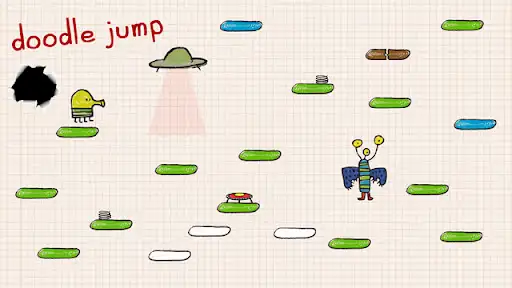
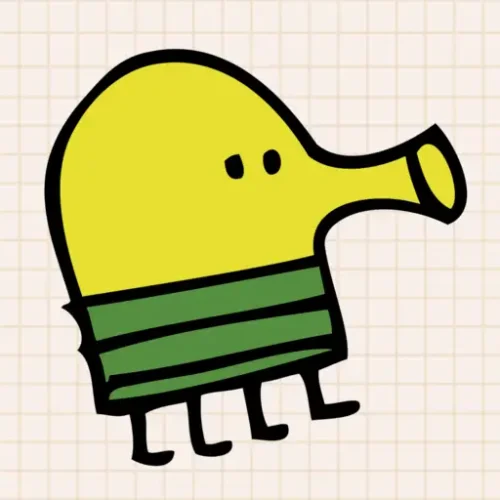





You control the Doodler, a small four-legged creature that never stops jumping. Tilt or steer left and right to land on platforms below it, climbing as high as possible while avoiding monsters, black holes, and the long fall back down.
Doodle Jump was developed and published by Lima Sky — an independent studio founded by brothers Igor and Marko Pušenjak — and originally released in March 2009 for iOS, with versions following on Android, BlackBerry, Java, Windows Phone, Xbox 360 Kinect, and Nintendo DS/3DS. It became one of the best-selling mobile games of all time. The browser version is free to play with no download, on desktop and mobile.
| Feature | Details |
|---|---|
| Developer | Lima Sky (Igor and Marko Pušenjak) |
| Original release | March 2009 (iOS) |
| Genre | Vertical endless platformer |
| Character | The Doodler |
| Platform types | Normal, moving, fragile/breakable |
| Power-ups | Springs, trampolines, jetpacks, propeller hats, shooting power-ups |
| Hazards | Monsters, black holes, UFOs, broken platforms |
| Platform (browser) | Desktop and mobile, free, no download |
Contents
Controls
| Action | Mobile | Desktop |
|---|---|---|
| Move left / right | Tilt device | Arrow Keys |
| Jump | Automatic — character always jumps | Automatic, or Spacebar in some browser versions |
| Shoot (with shooting power-up equipped) | Tap screen | S or click |
The Doodler jumps continuously and automatically — your only consistent job is horizontal positioning. On mobile this was originally accelerometer-based (tilt), which is why precise micro-adjustments feel different on a touchscreen versus arrow keys. On desktop, arrow keys give more discrete, repeatable control — useful for landing on narrow or moving platforms where tilt sensitivity can overshoot.
Platform Types
Three platform types are confirmed across multiple sources:
- Normal platforms — static, safe to land on repeatedly
- Moving platforms — shift left and right (or sometimes vertically); timing your jump to where the platform will be, not where it currently is, is required
- Fragile / breakable platforms — collapse after one landing; usable exactly once before they’re gone
As you climb higher, the mix shifts toward more moving and fragile platforms and fewer static ones. The core difficulty curve of Doodle Jump is platform composition, not enemy density — a screen full of normal platforms is manageable at almost any height, while a screen of moving and fragile platforms is dangerous even early on.
Power-Ups
| Power-up | Effect |
|---|---|
| Spring | Sits on a platform — landing on it gives extra jump height beyond a normal platform bounce |
| Trampoline | Similar to spring — provides a height boost on landing |
| Jetpack | Carries the Doodler upward for an extended period, ignoring platforms entirely during its duration |
| Propeller hat | Provides sustained lift, similar function to the jetpack with different visual/duration profile |
| Shooting power-up | Lets the Doodler fire projectiles at enemies in its path — equip and use to clear monsters before they cause a fall |
Power-ups appear floating in the level and are collected by passing through them — no separate pickup action required. Not every power-up is worth detouring for. A jetpack or propeller hat that’s slightly off your current horizontal path may not be worth drifting toward if it puts you at risk of missing the next platform — the lift power-ups carry you past several platforms regardless, so the platforms you’d be aiming for become irrelevant anyway, but the drift itself can be the risk.
Enemies and Hazards
Confirmed enemy types include stationary monsters, monsters that move up-and-down or side-to-side, and a winged enemy that follows the player diagonally upward. Contact with most enemies ends the run unless the Doodler is shielded or shoots the enemy first.
Black holes are a distinct hazard — touching one ends the run immediately, separate from the fall mechanic. UFOs behave differently from standard enemies: rather than just blocking your path, a UFO can suck the Doodler upward if you’re not careful, similar to a hazard mechanic from Lima Sky’s earlier game Parachute Panic. Both black holes and UFOs require active avoidance rather than the reactive shooting that works against ground-based monsters.
Tips
▸ Stay centered on screen, not centered on the platform
Keeping the Doodler near the horizontal center of the screen — rather than dead-center on whatever platform you just landed on — gives you the most visual information about what’s coming from both sides. Screen position matters more than platform position because it determines how much reaction time you have for the next jump.
▸ Shoot before you land, not after
If an enemy is positioned where your next jump would land, shooting it while still airborne clears the platform before you arrive. Shooting after landing on the same platform as an enemy is often too late — the contact damage happens on landing, before a follow-up shot can fire. Identify the threat during the jump arc, not after touchdown.
▸ Don’t chase every power-up
Springs and trampolines are usually safe to grab since they’re typically positioned on platforms you’d land on anyway. Jetpacks and propeller hats that require drifting significantly off your current line are a different calculation — the lift carries you upward regardless of which platforms are below, so the risk is purely in the drift toward the power-up, not in what you’re skipping. Only detour for them when the drift itself is low-risk.
▸ On fragile platforms, land and immediately commit to the next jump
A fragile platform breaks after one landing — there’s no benefit to hesitating on it. Treat the landing as the trigger for your next directional input, not a moment to reassess. By the time you’ve decided where to go next while standing still, the platform may already be gone from under you.
▸ Read moving platforms by their direction at the moment you jump, not when you land
A moving platform’s position when you initiate a jump is not where it’ll be when you arrive. Aim for where the platform is heading, accounting for its current direction and your jump’s airtime — jumping at where it currently sits, especially on fast-moving platforms, consistently lands you short or past it.