



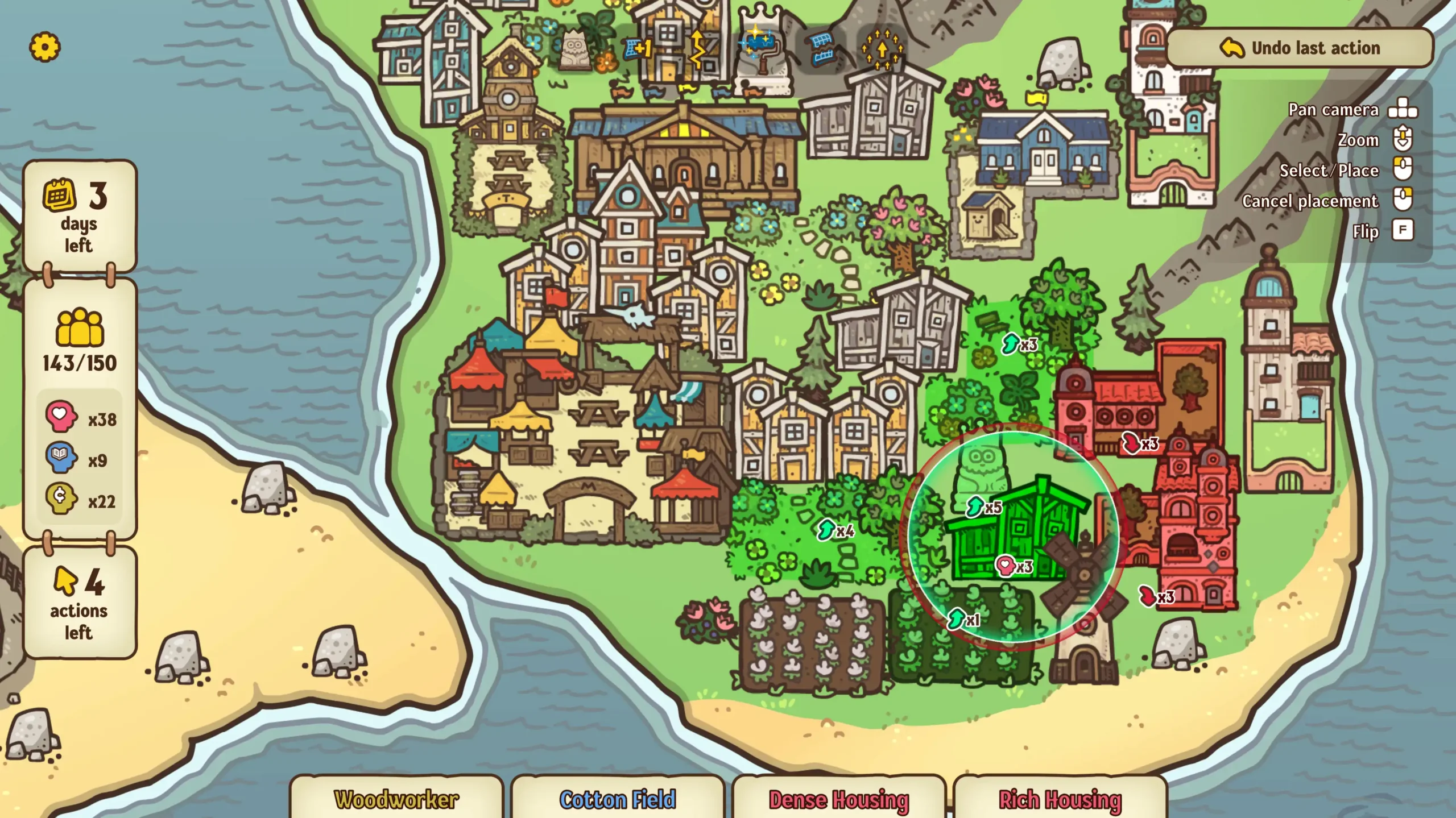



Proximity City is a relaxing rogue-like city-builder from JuicyBeast, built as a short experimental demo to test a twist on the formula popularized by Islanders. The king’s realm has gotten too crowded, and the job of expanding onto a series of empty islands falls to you — each day, you place buildings to hit a population target, and different buildings generate different population types that double as currencies for a randomized shop full of new building options and perks.
JuicyBeast stripped away the tax rates, water pipes, and zoning menus that usually come with city-builders, leaving a tight spatial puzzle: where you place each building, and which currency you’re optimizing for, is essentially the whole game.
| Feature | Details |
|---|---|
| Developer | JuicyBeast |
| Inspiration | Islanders (credited to Grizzly Games) for the simplification approach |
| Genre | Relaxing rogue-like city-builder |
| Core loop | Place buildings to hit daily population targets on each island |
| Currencies | 3 population types, generated by different building types |
| Rogue-like elements | Randomized shop for new buildings, plus perks |
| Scope | Originally built in “a few weeks” as an experimental demo |
| Platform | Browser — free, no download |
Contents
Controls
| Action | Input |
|---|---|
| Pan camera | W, A, S, D, Arrow Keys, or Left-click and drag |
| Place a building | Click on an empty tile |
Confirmed directly via KBHGames, camera panning has three equivalent methods — keyboard (WASD or arrows) or click-and-drag — so you can use whichever feels more natural for navigating around an island as it fills up. Building placement itself is straightforward clicking, but as covered below, where you click matters far more than how you click — placement is the entire strategic layer of the game.
The Core Loop
Each island starts mostly empty, and the game gives you a daily population target to hit through building placement. Buildings generate population over time, and reaching the target keeps expansion moving — onto the next island, with new building options unlocked through the shop. The premise is intentionally minimal: “The king’s realm is too crowded, so the job of settling new frontiers falls completely on your shoulders.” There’s no resource management beyond the population currencies themselves, no tax sliders, no infrastructure to maintain — just placement decisions, repeated across a growing island.
JuicyBeast’s own framing of the design goal is useful context: they specifically wanted to keep the “simplification” that Grizzly Games brought to the city-builder genre with Islanders, while layering in currency variety and rogue-like elements on top. If you’ve played Islanders, the core placement-puzzle feel will be familiar — the additions here are the multiple currencies and the random shop.
The Three Population Currencies
Different buildings generate different population types, and these types function as separate currencies — each one spendable in the shop independently. This is the headline mechanical addition over a standard Islanders-style builder.
Worth knowing upfront: this exact design choice has drawn direct criticism from players in the game’s own comment section. One commenter asked plainly: “Not sure why to split to 3 resource when it don’t have any impact on gameplay.” Whether the three currencies meaningfully change strategy or function more like a single pooled currency split into three visual categories isn’t something the developer has publicly clarified. If you’re finding that having a surplus of one currency type and a shortage of another doesn’t seem to constrain your choices much, that’s a documented player observation, not something you’re missing.
A separate, smaller usability note from the same feedback thread: the currency icons (heart, book, and money symbols) are displayed inside character head icons, which one commenter noted makes them harder to read than they’d be as plain icons — worth knowing if you’re having trouble quickly distinguishing currency types on screen.
The Randomized Shop and Perks
New building options are unlocked through a randomized shop — confirmed by both the developer’s own description and Armor Games’ listing. This is the primary rogue-like element: you don’t get to choose exactly which buildings become available; the shop’s offerings are randomized, so the buildings you can place next are partly outside your control, similar to a roguelike’s randomized item pool between runs.
The developer also mentions “perks” as part of the rogue-like additions, though specific perk mechanics aren’t detailed in available descriptions. Based on player feedback, the relationship between buying cards in the shop and what’s actually needed to keep building isn’t always obvious — one commenter asked directly: “What is the point of buying card? When I don’t buy anything I still have cards to build.” This suggests the shop may provide acceleration or variety rather than being strictly required to continue placing buildings — but if you’re confused about whether a purchase is necessary, you’re not alone, and experimenting without spending may not block your progress as much as it might seem.
Tips
▸ Don’t assume currency type dictates strategy — but track your population targets closely
Given the open player question about whether the three currencies meaningfully affect gameplay, don’t over-invest mental energy into optimizing currency balance at the expense of the actual stated goal: hitting the daily population target. If currency type turns out not to matter much, the target itself is the more reliable thing to optimize around.
▸ Experiment with building placement — the game doesn’t explain requirements clearly
Confirmed directly by player feedback: “It’s not obvious how each building should be placed, add more info what it needs or what to avoid.” Since the game doesn’t spell out placement requirements, the practical approach is trial placement — place a building, observe whether it generates population as expected, and adjust future placements based on what you observe rather than expecting upfront documentation.
▸ Try building without spending shop currency first
Since one player found they “still have cards to build” without buying anything, don’t assume shop purchases are mandatory before you can continue placing buildings. If you’re holding currency and unsure what to spend it on, it may be safe to continue building with what’s already available and treat shop purchases as optional acceleration rather than a gate.
▸ Turn down or mute the music if it feels mismatched to the pace
A player comment specifically noted: “Music is too aggressive for me, for this type of game.” Proximity City is framed as relaxing, and if the soundtrack’s energy doesn’t match that for you, there’s no gameplay reason to leave it on — muting it doesn’t cost you any information, since all the gameplay feedback is visual (population numbers, building states).
▸ Use whichever camera pan method feels most natural — there’s no functional difference
WASD, arrow keys, and click-drag all do the same thing. Pick the one that’s most comfortable for repeatedly scanning a growing island — click-drag may feel more natural if you’re also clicking to place buildings, since your hand is already on the mouse.