
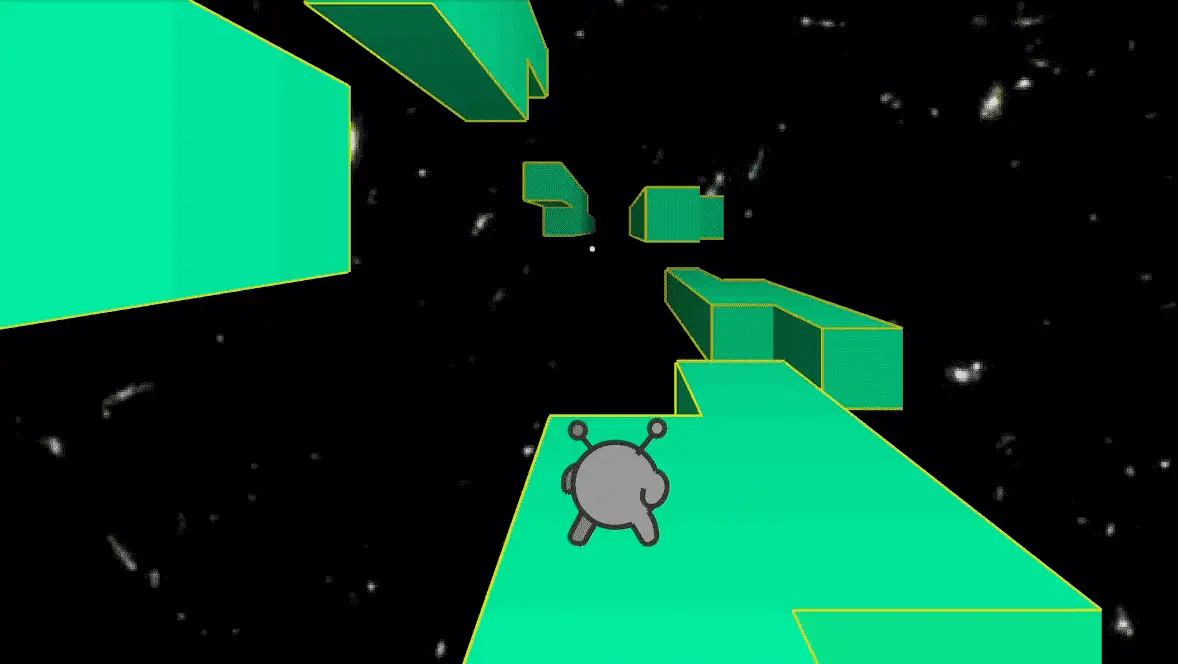
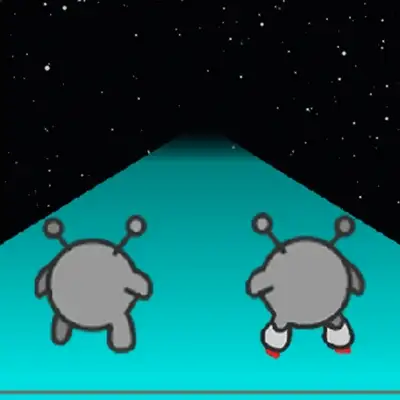




You guide a small alien through floating space tunnels, jumping over gaps and running onto walls to shift gravity and create new paths forward. One wrong step sends you into the void and restarts the level.
Run 2 was developed by Joseph Cloutier (player_03), first released in March 2011 as a Flash game and converted to HTML5 in May 2021. It is the sequel to the original Run and was followed by Run 3. In the developer’s own words: “A game about running, jumping, ignoring certain laws of physics, and trying on roller skates.” Free to play in browser on desktop, tablet, and mobile — no download required. Also available on Android and iOS.
| Feature | Details |
|---|---|
| Developer | Joseph Cloutier (player_03) |
| Original release | March 2011 (Flash) — HTML5 conversion May 2021 |
| Core mechanic | Gravity shifts when you jump onto a wall — that wall becomes the new floor |
| Characters | Runner (balanced, beginner) and Skater (faster, trickier) |
| Modes | Explore Mode (level-based) and Infinite Mode (endless) |
| Bonus orbs | Hidden in levels — unlock special bonus stages |
| Platform | Browser (desktop, tablet, mobile), Android, iOS — free |
Run 2-game
Contents
Controls
| Action | Input |
|---|---|
| Move left / right | Left / Right Arrow Keys |
| Jump | Spacebar |
| Pause | P |
| Rotate gravity (shift to wall) | Jump onto a wall — no separate key |
| Remap controls | Click “Controls” in the main menu |
These are taken from the developer’s own game description on KupoGames. Gravity rotation has no dedicated key — it triggers automatically when you jump and land on a wall. The tunnel rotates around you, and the wall you landed on becomes your new floor. Most players assume they need a special input to change gravity; understanding that it’s just a jump-and-land onto a wall is the first mechanical breakthrough for new players.
The Gravity Mechanic
The Run series was distinctive for being one of the few 3D games on a platform where nearly everything else was 2D Flash. The defining feature is gravity rotation: the tunnel is a tube with four surfaces — floor, two walls, and ceiling. Jump and land on any wall and that surface becomes your floor. The tunnel visually rotates around your character to match.
This turns every gap in the floor from a dead end into a navigation decision. Instead of treating a gap as an obstacle to jump over, an experienced player evaluates whether jumping sideways onto a wall and running from there provides a better path. Gaps on the floor might be passable via the side walls even when the direct jump seems impossible. Every level in Run 2 has at least one section where wall-running is the intended solution, not the advanced option.
Runner vs Skater
| Character | Speed | Jump | Best for |
|---|---|---|---|
| Runner | Standard | Precise, controlled height | Beginners — easier to control, responds predictably to inputs |
| Skater | Faster | Longer distance, covers more ground mid-air | Experienced players — harder to control but covers gaps the Runner can’t reach directly |
The Skater’s longer jump arc is an advantage on wide gaps but a liability on tight platforms where landing precision matters more than distance. Start with the Runner to learn the gravity mechanic and level layouts, then switch to the Skater once you have muscle memory for when to jump. The Skater’s momentum also makes stopping on small platforms after a long jump considerably harder than the Runner’s tighter response.
Game Modes
Explore Mode (also called Run Mode) presents a series of structured tunnel levels, each with a defined exit. Completing a level moves you to the next. Difficulty increases progressively — early levels introduce gravity rotation on simple flat surfaces, while later levels combine crumbling tiles, narrower platforms, and more complex multi-wall routing. There is a finish line in each level.
Infinite Mode removes the finish line. The tunnel generates continuously and the goal is to survive as long as possible without falling into the void. Infinite Mode is purely a test of reflexes and gravity-switching instinct — there are no bonus orbs and no objectives beyond surviving further than your last run.
Bonus Orbs
Bonus orbs are hidden collectibles scattered through Explore Mode levels. Collecting them unlocks special bonus stages with different challenges from the standard tunnel format. Bonus stages are not required to complete the main level sequence but provide additional content for players who have already cleared the normal path. Finding them requires awareness of the full tunnel surface — orbs are sometimes placed on walls or ceilings that aren’t the default running floor, making gravity switching necessary to reach them.
Tips
▸ Look ahead, not at your character
The character’s current position doesn’t change quickly enough to be useful visual information. Keep your eyes two or three tile-lengths ahead to identify where the next gap is and which wall you’d need to rotate to in order to bypass it. Reacting to what’s already underfoot is always too late at Run 2’s pace.
▸ Treat walls as floors, not as escape routes
New players jump to walls only when the floor runs out. Experienced players rotate to walls proactively — using the wall before the floor disappears rather than after. A lateral move to a side wall while the current floor still exists is cleaner and gives more time to read the next section.
▸ Use short hops on tight platforms, long jumps for wide gaps
Spacebar jump height is consistent regardless of Spacebar duration in Run 2, so the key variable is timing. On narrow platforms where landing precision matters, jump later rather than earlier to reduce mid-air drift. On wide gaps, jump as early as possible to give the arc time to clear the distance.
▸ In Infinite Mode, prioritize stability over speed
Infinite Mode rewards survival length, not efficiency. A slower path across a wider wall surface is always safer than a faster path across a narrow floor tile. When two routes present themselves, take the wider one — the extra tile width gives margin for the next input to be slightly imprecise without losing the run.
▸ Use the Skater only after you know the level layout
The Skater’s extra speed means gaps arrive faster and the window to react is shorter. Attempting a new level blind with the Skater removes the margin for error that learning the layout requires. Complete a level once with the Runner, then replay with the Skater once you know where each gap is and when to jump.